Setup, Compatibility & Care
Setup
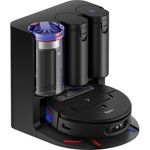
- Charging: Place the charging base station against a wall, ensuring a clear area around it. Dock the RoboVac and allow it to charge fully before the first use.
- App Installation: Download and install the Eufy app on your smartphone or tablet. Follow the in-app instructions to connect the RoboVac to your Wi-Fi network.
- Mapping: Allow the RoboVac to map your home using iPath Laser Navigation. It's recommended to run a full cleaning cycle to create an accurate map.
- Customization: Use the app to create cleaning schedules, set no-go zones, and customize cleaning modes.
Compatibility
The Eufy RoboVac L60 Hybrid is compatible with:
- Wi-Fi Networks: Supports 2.4/5 GHz Wi-Fi.
- Smart Home Systems: Works with Amazon Alexa and Google Assistant for voice control.
Care
- Dustbin and Filter: Empty the dustbin and clean the filter regularly (ideally after each use). Rinse the filter with water and let it air dry completely before re-inserting.
- Brushes: Clean the main brush and side brushes to remove hair and debris that may affect performance.
- Mopping Pad: Wash the mopping pad after each use. Replace it when worn.
- Sensors: Wipe the sensors with a clean, dry cloth to ensure they function correctly.
- Self-Empty Station: Empty the dust bag regularly.



 eBay£149.99Visit shop
  Eufylife UK£152.99Visit shop
  EE Tech & Gaming£179.00Visit shop