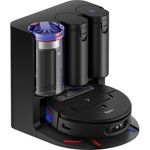
The TP-Link Tapo RV30 Max Plus is a robotic vacuum cleaner designed for efficient cleaning across ...The TP-Link Tapo RV30 Max Plus is a robotic vacuum cleaner designed for efficient cleaning across all floor types. With a bagless dust collection system and a capacity of 0.3 liters, it ensures hassle-free maintenance and easy disposal of dust and debris. This vacuum has a suction pressure of 5.3 kPa and features HEPA H11 filters, making it suitable for capturing pet hair and allergens, creating a healthier living environment. Equipped with intelligent features such as a LiDAR+IMU dual navigation system and 3D mapping, the Tapo RV30 Max Plus navigates through your home. It adapts its cleaning mode based on the floor type, utilizing auto carpet boost technology for deeper cleaning on thicker surfaces. With a runtime of up to 150 minutes, this vacuum provides an efficient cleaning experience while being compatible with Google Assistant and Alexa for voice control. It boasts Ultra-Powerful 5300Pa Suction to efficiently pick up dust, pet hair, and debris from all flooring surfaces. The Auto-Empty feature with a 3L large dust bag allows for up to 2 months of hands-free cleaning. Its LiDAR+IMU Dual Navigation System accurately maps your house, avoiding missed spots. Control is made easy with Voice & Remote Control compatibility with Amazon Alexa or Google Assistant. The Tapo IQ+ Smart Cleaning acts as the robot's brain, powered by multiple sensors and advanced algorithms. Customizable Cleaning allows you to merge and separate areas, set schedules, and customize clean modes for each room. It supports 4 Multi-Floor Maps, accurately detecting different floors and creating local-stored maps. The Auto-Charging function ensures the robot returns to the dock when the battery is low and resumes cleaning from where it left off.
Tapo RV30 Max Plus 5300Pa Robot Vacuum Cleaner with Mop,Auto Empty/ChargingFree delivery in 1–3 days£179.99Visit shop →
Tapo Black Tp-Link Lidar Smart Navigation Robot Vacuum And Mop With Self-Emptying Dock, 5300Pa,97%+ Dust Pickup Rate, Customizable Cleaning, Self-Charging, Compatible With Alexa & Google Home, Rv30 Max PlusFree delivery in 1–3 days£317.43Visit shop →
Tapo by TP-LinkTapo By Tp-Link Robot Vacuum & Mop, Ultra-Powerful Suction With Lidar+Imu Dual Navigation, Smart Auto-Empty Dock, Tapo Rv30 Max Plus
The TP-Link Tapo RV30 Max Plus is designed for busy homeowners who want a hassle-free cleaning experience. Its powerful 5300Pa suction and smart features ensure a thorough clean across various floor types, while the auto-empty dock minimizes maintenance. Keep in mind that initial setup and mapping may require some time.
All features
Colour
Black
Series
RV30 Max Plus
Model Part Number
TAPO RV30 MAX PLUS
Brand
Tapo
Extended Product Information
FAQs
How often should I empty the dustbin?
If you are not using the auto-empty dock, empty the dustbin after each cleaning or as needed. With the auto-empty dock, the bag typically needs replacing every 2 months.
How do I set up a cleaning schedule?
Use the Tapo app to set cleaning schedules. You can specify days, times, and even specific rooms.
How do I clean the brushes?
Remove the brushes and use the cleaning tool (included) to cut away any tangled hair or debris.
What kind of water should I use for mopping?
Use clean tap water for mopping. Do not use cleaning solutions in the water tank, as this can damage the robot.
How do I connect to Alexa or Google Assistant?
In the Tapo app, go to the integration settings and link your account with Alexa or Google Assistant. Then, use voice commands to control the robot.
What if my robot gets stuck?
The robot will typically try to free itself. If it repeatedly gets stuck in the same place, identify the obstruction (cords, rugs, etc.) and remove it. You can also set a 'no-go' zone in the app to prevent it from entering that area.
Troubleshooting
Robot vacuum is not connecting to Wi-Fi.
Ensure your Wi-Fi network is 2.4 GHz and that the password is correct. Move the robot closer to the router.
Robot vacuum is not returning to the dock.
Check for obstacles blocking the path to the dock. Clean the charging contacts on the robot and the dock.
Poor suction performance.
Empty the dustbin, clean the filters, and check the brushroll for tangles.
Robot vacuum is getting stuck.
Remove any obstacles, such as cords or small objects. Check for low clearance areas that the robot cannot pass.
Pros and Cons
Pros
High suction power for effective cleaning.
Auto-empty dock for reduced maintenance.
Smart navigation for efficient cleaning paths.
Voice control integration for convenient operation.
Multi-floor mapping for use in various homes.
Cons
Initial setup and mapping can take some time.
The dust bag in the auto-empty dock needs to be replaced.
May struggle with very thick carpets or rugs.
Water tank capacity is moderate, requiring refills for larger areas.
Setup, Compatibility & Care
Initial Setup:
Download the Tapo app and create an account.
Connect the robot to your Wi-Fi network.
Allow the robot to map your home.
Compatibility:
Compatible with Amazon Alexa and Google Assistant.
Supports 2.4 GHz Wi-Fi networks.
Care:
Empty the dustbin regularly (or replace the auto-empty dock bag).
Clean the main brush and side brushes regularly to remove hair and debris.
Replace the HEPA filter every few months or as needed.



 Amazon£179.99Visit shop