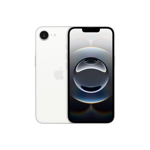
iPhone 16e is built for Apple Intelligence, offering seamless assistance for writing, self-express...iPhone 16e is built for Apple Intelligence, offering seamless assistance for writing, self-expression, and task completion. Its 48 MP Fusion camera captures high-resolution images, while the A18 chip ensures powerful performance and exceptional power efficiency. Enjoy extended battery life for up to 26 hours of video playback, the best for a 6.1-inch iPhone. The device features a dual-camera system with a 48MP Fusion camera and a 12MP front camera for stunning selfies. Its durable design includes a brilliant 6.1-inch OLED display with Ceramic Shield front. The Action Button provides quick, customizable access to apps and features, and can be used with visual intelligence to understand your surroundings. Personalize your Home and Lock Screens, send messages with text effects, and use Tapback with any emoji through iOS 18. In emergencies, iPhone can contact services even without mobile service or Wi-Fi. Privacy is enhanced with Face ID for secure unlocking and app access. Apple Intelligence is currently in beta and requires Siri and device language set to English (US, UK, Canada, Australia, New Zealand, South Africa, Ireland) as part of an iOS 18 update. Additional features and languages will be rolled out, including Chinese, English (India, Singapore), French, German, Italian, Japanese, Korean, Portuguese, Spanish, and Vietnamese in 2025. Note for EU residents: Apple Intelligence will not function within the EU if your Apple ID country/region is also set to the EU. It will work when traveling outside the EU with a supported device language and Siri language.
Best current price£549.00from Laptops Direct (BID)
The Apple iPhone 16e 256 GB in Black is meticulously crafted for users who demand exceptional performance, a secure operating environment, and a seamlessly integrated digital experience. Powered by the advanced A18 chip and intuitive iOS 18, it delivers remarkable speed and access to a vast ecosystem of apps and services, providing a premium smartphone experience. However, users should be aware of the inherent integration within the Apple ecosystem, which may influence accessory choices and data management.
All features
Colour
Black
Processor Family
Apple A18
WiFi Standard
Wi-Fi 6
Internal Storage Capacity
256 GB
Network Generation
5G
Operating System
iOS
Release Year
2024
OS
iOS
Processor
Apple A
Display Size
6.1
Series
16e
Model Part Number
MD1T4QN/A
Brand
Apple
Extended Product Information
FAQs
How do I transfer data from my old iPhone to the new iPhone 16e?
You can use the 'Quick Start' feature during initial setup by placing your old iPhone near the new one, or restore from an iCloud backup or a backup from your computer (Mac or PC) via Finder or iTunes.
Is the iPhone 16e water resistant?
Yes, the iPhone 16e is designed with water resistance, but it is not waterproof. Avoid intentionally submerging your device in water and dry it thoroughly if it gets wet. Damage from liquids is not typically covered under warranty.
How can I maximize my battery life?
Enable 'Optimized Battery Charging' in Battery Settings, reduce screen brightness, turn off unnecessary notifications, use Wi-Fi instead of cellular data when available, and limit background app refresh for apps you don't frequently use.
What kind of charger should I use for my iPhone 16e?
For optimal and safe charging, it is recommended to use Apple-certified power adapters and cables. While some third-party chargers may work, MFi (Made For iPhone) certified accessories ensure compatibility and safety standards.
How do I update the iOS software?
You can update your iPhone's software wirelessly by going to `Settings` > `General` > `Software Update`. Ensure your device is connected to Wi-Fi and has sufficient battery charge or is connected to power.
Can I expand the storage of my iPhone 16e?
No, the internal storage of the iPhone 16e (256 GB in this model) cannot be expanded with a microSD card or any other physical storage expansion.
How does the A18 chip benefit me?
The A18 chip provides significant benefits through its multi-core CPU, GPU, and Neural Engine. This means faster app launches, smoother multitasking, high-performance gaming, enhanced photography processing, and more intelligent AI-driven features like Siri and on-device machine learning tasks.
Troubleshooting
iPhone will not turn on or is unresponsive.
Try a force restart: Quickly press and release the Volume Up button, then quickly press and release the Volume Down button, then press and hold the Side button until you see the Apple logo.
Battery drains quickly.
Check battery usage in `Settings` > `Battery` to identify power-hungry apps. Reduce screen brightness, disable 'Background App Refresh' for non-essential apps, and turn off location services when not needed.
Cannot connect to Wi-Fi or cellular network.
For Wi-Fi: Toggle Wi-Fi off and on, 'Forget This Network' in `Settings` > `Wi-Fi` and reconnect. Restart your router. For cellular: Ensure 'Cellular Data' is enabled in `Settings` > `Cellular`, toggle 'Airplane Mode' on and off, and check with your carrier for service outages.
Apps are crashing or freezing.
Close the app by swiping up from the bottom of the screen (or double-pressing the Home button on older models) and swiping the app away. Reopen the app. If the issue persists, restart your iPhone. Ensure all apps and iOS are updated to their latest versions.
Touch screen is not responding accurately.
Ensure your screen is clean and free of moisture or debris. If you have a screen protector, ensure it's properly installed and not interfering. Try a force restart. If the problem continues, contact Apple Support.
Pros and Cons
Pros
Exceptional processing power for all tasks thanks to the A18 chip.
User-friendly and secure iOS 18 operating system.
Ample 256 GB internal storage for extensive media and apps.
Blazing-fast 5G and Wi-Fi 6 connectivity for reliable internet access.
Robust privacy and security features built into the iOS ecosystem.
Cons
Storage is not expandable via external memory cards.
Tightly integrated Apple ecosystem may limit third-party accessory choices.
Proprietary charging and accessory standards (e.g., Lightning port or USB-C depending on model, which might require specific cables/adapters).
Limited customization options compared to some other operating systems.
Setup, Compatibility & Care
Initial Setup
Power On: Press and hold the side button until the Apple logo appears. Follow the on-screen instructions.
Activate: Insert your SIM card (if applicable) and follow the prompts to activate your device. You may need to connect to Wi-Fi.
Data Transfer: If you're upgrading, use Apple's Quick Start feature by bringing your old iPhone close to your new one, or restore from an iCloud or computer backup.
Apple ID: Sign in with your existing Apple ID or create a new one to access the App Store, iCloud, and other Apple services.
Compatibility
Ecosystem: The iPhone 16e seamlessly integrates with other Apple products, including AirPods, Apple Watch, Mac computers, and HomePod devices, using iCloud for data synchronization and Continuity features.
Accessories: For optimal performance and safety, use Apple-certified accessories, including charging cables and power adapters. Compatibility with Bluetooth accessories is broad.
Product Care
Cleaning: Gently wipe your iPhone with a soft, slightly damp, lint-free cloth. Avoid abrasive materials, solvents, or aerosol sprays. Unplug all cables before cleaning.
Protection: Consider a screen protector and a case to guard against scratches and accidental drops.
Battery Health: To prolong battery lifespan, avoid extreme temperatures and consider enabling 'Optimized Battery Charging' in `Settings` > `Battery` > `Battery Health & Charging`.
Software Updates: Regularly update iOS to the latest version to benefit from security patches, bug fixes, and new features. You can find updates in `Settings` > `General` > `Software Update`.


 Laptops Direct (BID)£549.00Visit shop