Setup, Compatibility & Care
Getting started with your new APPLE iPhone 16 is a straightforward process, designed to integrate seamlessly into your digital life.
Initial Setup
- Power On: Press and hold the power button on the right side until the Apple logo appears.
- "Hello" Screen: Swipe up to begin the setup.
- Language and Region: Select your preferred language and region.
- Quick Start (Optional): If you have another iPhone or iPad, bring it near your new iPhone 16 to automatically transfer many of your settings and content. Follow the on-screen prompts.
- Set Up Manually: If not using Quick Start, follow the steps to connect to Wi-Fi, set up Face ID or Touch ID, create a passcode, and restore data from an iCloud or computer backup, or set up as a new iPhone.
- Apple ID: Sign in with your Apple ID or create a new one. This is crucial for accessing the App Store, iCloud, and other Apple services.
- Data Transfer: If restoring from a backup, allow time for your apps, photos, and settings to download.
Compatibility
- Apple Ecosystem: The iPhone 16 is fully compatible with Apple services such as iCloud, Apple Music, Apple Pay, and Find My. It integrates perfectly with other Apple devices like AirPods, Apple Watch, and Macs.
- Accessories: It supports standard Lightning port accessories (if still present on iPhone 16 - *Info needed: confirm port type*) and a wide range of Bluetooth devices. Ensure accessories are MFi (Made for iPhone) certified for best compatibility.
- Software: Running on iOS, the device is compatible with millions of apps available on the App Store, continuously updated for performance and security.
Product Care & Maintenance
- Cleaning: Use a soft, lint-free cloth, slightly dampened with water if necessary, to clean the screen and exterior. Avoid abrasive materials, solvents, or aerosol sprays. Always power off the device before cleaning.
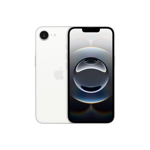
- Protection: Consider using a screen protector and a protective case to guard against scratches, drops, and impacts, especially given the sleek White finish.
- Software Updates: Regularly update iOS to the latest version. These updates often include security patches, performance improvements, and new features.
- Storage Management: With 128 GB storage, periodically review your stored data. Delete unnecessary apps, photos, or videos, or offload them to cloud storage or a computer to maintain optimal performance.
- Temperature: Avoid exposing your iPhone to extreme temperatures (hot or cold) as this can affect battery life and internal components. Optimal operating temperatures are typically between 0° to 35° C (32° to 95° F).


 OnBuy.com£599.00Visit shop
  Currys£699.00Visit shop
  Amazon£699.00Visit shop