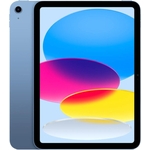
Apple iPad - 11" - 512 GB - Wi-Fi - Beige

El Apple iPad ofrece una experiencia de rendimiento excepcional gracias a su procesador Apple M4. ...

Currently unavailable

Display Size
Colour
Processor Family
Internal Storage Capacity

Currently out of stock

This product is not available at the moment. Check back later or explore other options below.

Similar alternatives

Product Information

Full details

The 11-inch iPad Air is a premium, high-performance tablet designed for creative professionals, students, and power users who need desktop-class speed in a portable form factor. Featuring the ultra-fast M4 chip and 512GB of storage, it excels at multitasking, gaming, and creative workflows like photo and video editing. While it offers a sleek and powerful experience, users should note that the device does not include an AC adapter in the box, requiring separate charging hardware for optimal use.

All features

ColourBeige
Processor FamilyApple M4
WiFi StandardWi-Fi 7
Internal Storage Capacity512 GB
OSiPadOS
ProcessorApple M
Device Network ConnectivityWi-Fi
Display Size11
SeriesiPad
Model Part NumberMH3D4TY/A
BrandLenovo

Extended Product Information

FAQs

Does this model support the Apple Pencil?

Yes, it is designed to support the Apple Pencil Pro for pixel-perfect precision and advanced creativity tools.

Is an AC adapter included in the box?

No, the package includes a USB-C cable, but you will need to provide your own USB-C power adapter.

What is the battery life like?

The iPad Air is designed for all-day use, with up to 10 hours of web browsing or video playback on Wi-Fi.

Can I connect this to an external monitor?

Yes, you can connect to external displays using the USB-C port, which supports high-resolution output.

Does it have a fingerprint reader?

Yes, it features Touch ID for secure authentication and convenient unlocking.

What kind of storage does this model have?

This specific configuration comes with 512 GB of high-speed internal storage.

Troubleshooting

Device is not charging

Ensure you are using a certified USB-C cable and a power adapter that provides at least 15W to 60W of power.

Wi-Fi connection seems slow

Verify that your router supports Wi-Fi 7; otherwise, move closer to your access point to ensure signal stability.

iPadOS feels sluggish

Close background apps or perform a restart. Check for iPadOS updates in Settings > General > Software Update.

Pros and Cons

Pros

  • Incredible M4 chip performance
  • Fast Wi-Fi 7 connectivity
  • Highly portable 11-inch design
  • Advanced Apple Intelligence features
  • Excellent, color-accurate Liquid Retina display

Cons

  • AC adapter is not included
  • Premium pricing for high storage capacity
  • Limited repairability (class C)

Setup, Compatibility & Care

To set up your iPad Air, power it on and follow the on-screen instructions to connect to your Wi-Fi 7 network and sign in with your Apple ID. For optimal care, keep the device in environments between 0 and 35 °C. Because it features a premium aluminum housing with a laminated display, it is recommended to use a screen protector and a protective case to prevent scratches and impacts. The device supports USB-C charging; ensure you use a quality power adapter (up to 60W supported) to maintain battery health. Regularly clean the display with a dry, lint-free cloth to maintain the effectiveness of the oleophobic coating.