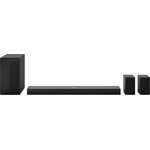
LG USC9S Soundbar - Black

Experience truly immersive home cinema sound with the LG USC9S Soundbar. This 3.1.3 channel soundb...

Best current price£49.00from B&Q

Colour

All Offers

66 offers from £49.00 - £1,699.00

View price history by clicking the chart icon.

B&QB&Q - Sqm1 2.0-Channel SoundbarBluetooth 4.0Optical InputDolby DigitalCompact Design.
Free delivery in 1–3 days
£49.00
Visit shop
CurrysLg Sqm1 2.0 Compact Sound Bar, Black
Free delivery in 1–3 days
£49.99
Visit shop
eBayLG SQM1 2.0-channel Soundbar
Free delivery in 1–3 days
£79.00
Visit shop
Marks ElectricalLG - SQM1 - Sound Bar - 40W - Bluetooth - Black SQM1.AGBRLLK
£6.00 delivery
£79.00
Visit shop
TVA TechnologyLg Black Sqm1.agbrllk 2.0 Channel 40W Soundbar Speaker
Free delivery in 1–3 days
£79.00
Visit shop

Refurbished Offers

7 offers from £62.99 - £729.99

View price history by clicking the chart icon.

OnBuy.comLg Us20a Smart Soundbar With 2.0 Channel, Bluetooth, Dolby Digital, Hdmi, Usb - Free Gift Rrp 10!
Free delivery in 1–3 days
£62.99
Visit shop
eBayLG US80TR Soundbar 5.1.3 Channel with Dolby Atmos and Rear Speakers #A
Free delivery in 1–3 days
£729.99
Visit shop

Used Offers

10 offers from £26.99 - £261.79

View price history by clicking the chart icon.

eBayLG SQM1 40W 2.0 Compact Sound Bar No Remote
Free delivery in 1–3 days
£26.99
Visit shop

Product Information

Full details

The LG USC9S Soundbar is designed for home cinema enthusiasts seeking truly immersive audio, particularly those with an LG OLED C Series TV. It delivers a wide and rich soundstage with 3.1.3 channels, a wireless subwoofer, and advanced Dolby Atmos technology, including unique triple up-firing channels. While offering exceptional sound tailored for specific LG TVs, its optimal performance is best realized with this dedicated pairing.

All features

ColourBlack
SeriesUSC9S
Model Part NumberUSC9S.DGBRLLK
BrandLG

Extended Product Information

FAQs

What does '3.1.3 channel' mean for this soundbar?

The '3.1.3 channel' configuration means the soundbar has three main front channels (left, center, right), one dedicated wireless subwoofer for bass, and three distinct up-firing channels that project sound upwards for height effects, creating a truly immersive audio experience.

How do the triple up-firing channels enhance the sound?

The triple up-firing channels bounce sound off your ceiling, creating a more expansive and realistic overhead soundstage. This significantly enhances the perception of height and depth in audio, making multi-dimensional formats like Dolby Atmos more impactful.

Can I use the LG USC9S Soundbar with a non-LG OLED C Series TV?

Yes, you can connect the LG USC9S Soundbar to other TVs via standard HDMI ARC/eARC or optical connections. However, it is specifically made and optimized for LG OLED C Series TVs, so the full benefits of integration and acoustic synergy might be best experienced with those models.

How do I connect the wireless subwoofer?

Typically, the wireless subwoofer will automatically pair with the soundbar when both devices are powered on. If not, you'll usually find a 'Pairing' button on both the subwoofer and the main soundbar unit. Refer to your product manual for specific instructions on manual pairing.

What are the dimensions of the soundbar?

The LG USC9S Soundbar has dimensions of 63 mm (height) x 975 mm (width).

How do I ensure I'm getting Dolby Atmos audio?

To experience Dolby Atmos, ensure your audio source (streaming service, Blu-ray player, gaming console) provides Dolby Atmos content. Your TV's audio output settings should be configured to 'Bitstream' or 'Passthrough' for the HDMI eARC/ARC port connected to the soundbar. Also, ensure your soundbar's firmware is up to date.

How should I clean my soundbar?

Gently wipe the soundbar and subwoofer with a soft, dry cloth. For stubborn spots, a slightly damp cloth can be used. Avoid using abrasive cleaners, solvents, or harsh chemicals that could damage the finish or components. Regularly dust the speaker grilles to maintain sound quality.

Troubleshooting

No sound from the soundbar.
  1. Check all cable connections (HDMI, optical) between the soundbar and TV. 2. Ensure the soundbar is powered on and the correct input source is selected. 3. Verify the TV's audio output is set to the soundbar (e.g., HDMI ARC/eARC or Optical).
Wireless subwoofer is not producing sound or connecting.
  1. Ensure the subwoofer is powered on and within range of the soundbar. 2. If it doesn't connect automatically, refer to your user manual for manual pairing instructions (often involves holding a 'Pairing' button on both devices).
Dolby Atmos effects are not noticeable.
  1. Ensure your source content (movie, game) supports Dolby Atmos. 2. Verify your TV's audio output settings are configured to pass-through Dolby Atmos (e.g., 'Bitstream' or 'Passthrough' for HDMI eARC). 3. Ensure the soundbar firmware is up to date. 4. Check soundbar placement, ensuring up-firing channels have clear path to ceiling.
Sound is distorted or crackling.
  1. Check for loose cable connections. 2. Reduce the volume level. 3. Ensure no objects are obstructing the speaker grilles. 4. Try adjusting the sound modes on the soundbar. 5. Check if there's interference with other wireless devices if using a wireless connection.
Remote control is not working.
  1. Replace the batteries in the remote control. 2. Ensure there are no obstructions between the remote and the soundbar's sensor. 3. If using a universal TV remote, ensure it's correctly programmed for the soundbar.

Pros and Cons

Pros

  • Truly immersive home cinema sound with 3.1.3 channels.
  • Enhanced soundstage and overhead effects due to triple up-firing channels and Dolby Atmos.
  • Deep, clear bass from the included wireless subwoofer.
  • Seamless aesthetic and acoustic integration with LG OLED C Series TVs.
  • Advanced audio technologies for a premium listening experience.

Cons

  • Optimal performance is specifically tied to LG OLED C Series TVs.
  • Dimensions might be large for smaller TV stands or setups.

Setup, Compatibility & Care

Setup

  1. Placement: Position the soundbar centrally below your TV, ensuring the front-firing and up-firing speakers are unobstructed. The soundbar dimensions are 63 x 975 mm (HxW).
  2. Power Connection: Connect the soundbar and the wireless subwoofer to separate power outlets using their respective power cables.
  3. TV Connection: Connect the soundbar to your LG OLED C Series TV (or other compatible TV) using an HDMI cable to the `HDMI eARC/ARC` port on both devices for optimal audio performance and control. An optical cable can also be used if HDMI ARC is not available, though it may limit certain features like Dolby Atmos.
  4. Subwoofer Pairing: The wireless subwoofer should automatically pair with the soundbar upon power-up. If not, refer to the user manual for manual pairing instructions (usually involving a 'Pairing' button on the subwoofer and soundbar).
  5. Initial Setup: Follow the on-screen prompts on your TV or use the soundbar's remote control to complete the initial setup, including sound calibration if available.

Compatibility

This soundbar is specifically made for LG OLED C Series TVs for optimized performance and integration. While it can connect to other TVs via standard HDMI ARC/eARC or optical connections, the full benefit of its design and features, especially regarding seamless aesthetic and acoustic synergy, is achieved with the specified LG OLED C Series TVs.

Care

  • Cleaning: Gently wipe the soundbar and subwoofer surfaces with a soft, dry, or slightly damp cloth. Avoid using harsh chemicals, solvents, or abrasive materials.
  • Dust Accumulation: Regularly dust the speaker grilles and surfaces to prevent build-up, which can affect sound quality and aesthetics.
  • Ventilation: Ensure adequate airflow around the soundbar and subwoofer. Do not block vents or place them in enclosed spaces that can cause overheating.
  • Environmental Conditions: Keep the soundbar away from extreme temperatures, direct sunlight, and high humidity.

Similar items

Price History

DatePrice
Visit shop