Setup, Compatibility & Care
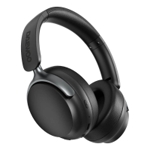
To set up your UX1000, ensure the headphones are in pairing mode by holding the power button until the indicator light flashes. Once connected via Bluetooth 5.4, use your device's settings menu to confirm the Multipoint connection if you wish to pair a second device. The foldable design makes storage simple, but it is recommended to keep the headphones in a dust-free environment when not in use. Clean the memory foam ear pads periodically using a slightly damp, lint-free cloth to maintain hygiene and comfort. Avoid exposing the electronics to excessive moisture or extreme temperatures to ensure the longevity of the battery and internal components.


 OnBuy.com£32.99Visit shop