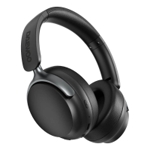
Soundcore Q30 Noise Cancelling Headphones - Black

Advanced Noise Cancellation Technology: Maintain your focus with Q30’s hybrid active noise cancell...

Best current price£44.98from Soundcore UK

All Offers

10 offers from £44.98 - £111.05

View price history by clicking the chart icon.

Soundcore UKSoundcore Blue Q30 | Noise Cancelling Headphones / Skip Option 2
Free delivery in 1–3 days
£44.98
Visit shop
OnBuy.comSoundcore By Anker Life Q30 Hybrid Active Noise Cancelling Headphones With Multiple Modes, Hi-Res Sound, Custom Eq Via App, 40H Playtime, Comfortable
Free delivery in 1–3 days
£56.23
Visit shop
eBayHybrid Active Noise Cancelling Bluetooth Headphones – Ultimate Sound & Comfort
Free delivery in 1–3 days
£64.99
Visit shop

Refurbished Offer

1 offer from £58.98

View price history by clicking the chart icon.

eBaysoundcore by Anker Life Q30 Hybrid Active Noise Cancelling Headphones Hi-Res 40H
Free delivery in 1–3 days
£58.98
Visit shop

Product Information

Full details

The Soundcore Q30 headphones are ideal for anyone seeking immersive audio and effective noise cancellation. The key benefit is exceptional noise isolation with customizable modes, ensuring a focused listening experience. However, note that while the headphones offer impressive battery life, the charging time may be longer than some competitors. These headphones feature hybrid active noise cancellation, 40mm drivers, and Bluetooth 5.3, providing a superior listening experience.

All features

ColourBlack
SeriesLife
Model Part NumberQ30
BrandSoundcore

Extended Product Information

FAQs

How do I turn on the noise cancellation?

Press the ANC button on the left earcup to cycle through the noise cancellation modes (Transport, Outdoor, Indoor) or turn it off.

How long does it take to charge the headphones?

A full charge takes approximately 2 hours. A 5-minute charge provides up to 4 hours of playtime.

Can I use the headphones with a cable?

No, the Soundcore Q30 only supports wireless connectivity via Bluetooth.

What is the Bluetooth range?

The Bluetooth range is up to 10 meters (33 feet) in an open space.

Are the headphones water-resistant?

No, the headphones are not water-resistant, so avoid exposure to liquids.

Can I adjust the EQ settings?

Yes, you can customize the EQ settings using the Soundcore app.

What is the warranty period?

The warranty period is typically 12 months from the date of purchase.

Troubleshooting

Headphones won't turn on.

Ensure the headphones are charged. If they still won't turn on, try resetting them by pressing and holding the power button for 10 seconds.

Poor Bluetooth connection.

Move closer to the audio source. Turn off other Bluetooth devices nearby. Reset the headphones and re-pair them.

Noise cancellation is not working effectively.

Ensure the ANC mode is enabled. Try different ANC modes to suit your environment. Make sure the earcups fit snugly.

Sound quality is poor.

Check the Bluetooth connection. Adjust the EQ settings in the Soundcore app. Clean the earcups and drivers.

Microphone not working.

Ensure the microphone is not muted. Check your device's microphone settings. Try resetting the headphones.

Pros and Cons

Pros

  • Excellent noise cancellation performance.
  • Long battery life, providing extended listening sessions.
  • Customizable ANC modes for various environments.
  • Comfortable design suitable for prolonged use.
  • High-resolution audio with detailed sound reproduction.
  • Fast charging capabilities for quick top-ups.

Cons

  • Charging time may be longer than some competing models.
  • ANC performance can slightly alter the music's original sound profile.
  • Some users may find the earcups warm after extended use.
  • Bluetooth connectivity can sometimes be susceptible to interference in crowded areas.
  • The included carrying case provides minimal protection.
  • Limited water resistance.

Setup, Compatibility & Care

Setup

  1. Charging: Charge the headphones fully before first use using the included USB-C cable.
  2. Pairing: Turn on the headphones and enter pairing mode by pressing the power button. Activate Bluetooth on your device and select "Soundcore Q30" from the list of available devices.
  3. App Integration: Download the Soundcore app to customize EQ settings, switch between noise cancellation modes, and update firmware.

Compatibility

The Soundcore Q30 headphones are compatible with:

  • Bluetooth-enabled devices (smartphones, tablets, laptops).
  • The Soundcore app (available on iOS and Android).

Care

  • Cleaning: Wipe the earcups and headband with a soft, slightly damp cloth.
  • Storage: Store the headphones in a cool, dry place when not in use.
  • Protection: Avoid exposing the headphones to extreme temperatures or direct sunlight.
  • Charging: Use only the provided or a compatible USB-C cable for charging.

Similar items

Price History

DatePrice
Visit shop