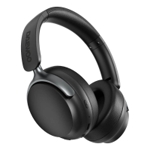
Want Bluetooth headphones with long battery life or smart headphones? Get QuietComfort Wireless He...Want Bluetooth headphones with long battery life or smart headphones? Get QuietComfort Wireless Headphones, also available in dark green. Listening feels anything but fleeting when you tune in with QuietComfort Headphones in Twilight Blue, a new Amazon Exclusive limited-edition color. Effortlessly combines noise cancelling headphone technology with passive features so you can shut off the outside world, quiet distractions and take music beyond the beat. Plush earcup cushions softly hug your ears, while a secure and comfortable padded band gently keeps your over-ear headphones in place for those extra-long listening sessions. These wireless Bluetooth headphones feature Quiet and Aware Modes that let you toggle between full noise cancelling or full awareness of your surroundings for seamless sound control. Supercharge your favourite tracks with high-fidelity audio and Adjustable EQ that puts you in control of the bass, mid-range and treble for unmatched bold sound. Bose QuietComfort noise cancelling wireless headphones provide up to 24 hours of battery on a single charge, plus a 15-minute charge gives you up to 2.5 hours of additional play time. Plug the included audio cable with in-line microphone into your Bose QuietComfort noise cancelling headphones to use them without a Bluetooth connection, or even when the battery is depleted. Seamlessly stay connected to all your favourite devices using the multi-point toggle feature, which allows you to switch devices without disconnecting and reconnecting each time. Microphones focus on the sound of your voice and the high fidelity bluetooth headphones with microphone filter out background noise for the clearest phone calls of any Bose headphones. Download the Bose app to receive the latest software updates. Ensure optimal functionality and get access to all the latest features and cutting-edge tech.
Bose QuietComfort Wireless Noise Cancelling Earbuds 5.3, Lifestyle Bluetooth Earbuds with Active Noise Cancellation, Up to 8.5 Hours of Battery Life, Twilight Blue - Limited Edition
AmazonBose QuietComfort Wireless Noise Cancelling Earbuds 5.3, Lifestyle Bluetooth Earbuds with Active Noise Cancellation, Up to 8.5 Hours of Battery Life, Twilight Blue - Limited Edition
Bose QuietComfort Wireless Noise Cancelling Headphones, Bluetooth Over Ear Headphones with Up To 24 Hours of Battery Life, Twilight Blue - Limited EditionFree delivery in 1–3 days£190.76Visit shop →
Bose QuietComfort Wireless Noise Cancelling Headphones, Bluetooth Over Ear Headphones with Up To 24 Hours of Battery Life, Ice Blue - Limited EditionFree delivery in 1–3 days£199.00Visit shop →
CurrysBose Quietcomfort Ultra Wireless Bluetooth Noise-Cancelling Headphones - Ice Blue, Blue
- Bose Quietcomfort Wireless Noise Cancelling Earbuds 5.3Lifestyle Bluetooth With Active CancellationUp To 8.5 Hours Of BatteryFree delivery in 1–3 days£324.99Visit shop →
- Bose Quietcomfort Wireless Noise Cancelling HeadphonesBluetooth Over Ear With Up To 24 Hours Of Battery LifeIce BlueFree delivery in 1–3 days£369.99Visit shop →
Refurbished Offers
2 offers from £175.00
iView price history by clicking the chart icon.
OnBuy.comBose Quietcomfort Headphones (Moonstone ) Blue 017817850506
Bose QuietComfort Headphones Wireless Bluetooth Blue Dusk Good 884367-1300 BoxedFree delivery in 1–3 days£145.00Visit shop →
Bose Headphones QuietComfort Noise Cancelling Over-Ear Bluetooth Blue ExcellentFree delivery in 1–3 days£149.99Visit shop →
Product Information
Full details
For those seeking an immersive listening experience without distractions, the Bose QuietComfort Headphones in Twilight Blue offer advanced noise cancellation and premium comfort, though they require app usage for full feature customization. These over-ear headphones seamlessly combine acoustic noise canceling technology with plush design, providing up to 24 hours of high-fidelity audio with customizable EQ and crystal-clear call quality.
All features
Colour
Blue
Series
QuietComfort
Model Part Number
884367-1600
Brand
Bose
Extended Product Information
FAQs
What is the battery life of the Bose QuietComfort Headphones?
The headphones provide up to 24 hours of audio playback on a single charge. A quick 15-minute charge can give you up to 2.5 hours of additional listening time.
Can I use these headphones with a wired connection?
Yes, an audio cable with an in-line microphone is included. You can plug it into your headphones to use them without Bluetooth, or even when the battery is depleted.
What is 'Aware Mode'?
Aware Mode allows you to hear your surroundings and your music simultaneously. It's useful when you need to be aware of traffic, announcements, or conversations while still enjoying your audio.
How do I customize the sound settings?
You can customize the sound, including bass, mid-range, and treble (Adjustable EQ), by downloading and using the Bose app on your smartphone or tablet.
Are the Bose QuietComfort Headphones waterproof?
No, these headphones do not have a specified IP rating for water or sweat resistance. They are not designed to be used in wet conditions or submerged in water.
How do I switch between multiple connected devices?
The headphones feature multi-point connectivity. Once paired with multiple devices, you can switch between them seamlessly using the toggle feature, typically managed through the Bose app or by pausing audio on one and playing on another.
How do I ensure I have the latest features?
Regularly check for and install software updates through the Bose app. This will ensure optimal functionality and access to any new features or improvements.
Troubleshooting
Headphones won't turn on or respond.
Ensure the headphones are sufficiently charged. Connect them to a power source using the provided USB cable. If charged, try a different power outlet or USB port.
Cannot connect via Bluetooth.
Make sure the headphones are in pairing mode (LED indicator should be blinking blue). Turn off and on your device's Bluetooth, then try reconnecting. If issues persist, remove the headphones from your device's Bluetooth list and re-pair them.
Noise cancellation seems ineffective.
Ensure the earcups create a good seal around your ears; adjust the headband for a snug fit. Check if Quiet Mode is activated, and ensure earcup cushions are not damaged or worn.
Poor sound quality or distorted audio.
Adjust the volume on both your headphones and the connected device. Check the Adjustable EQ settings in the Bose app if enabled. Try another audio source or file to rule out source issues. Ensure the audio cable is fully plugged in if using wired connection.
Callers cannot hear me clearly.
Ensure the microphone is not covered. Try disabling and re-enabling Bluetooth on your device. Check for any background noise near you. Make sure the Bose app is updated for optimal microphone performance.
Pros and Cons
Pros
Outstanding active noise cancellation for immersive listening.
Superior comfort designed for extended wear.
Customizable audio experience with Adjustable EQ through the Bose app.
Excellent battery life with convenient quick charge capability.
Versatile connectivity options, including Bluetooth and wired mode.
Clear voice pickup for phone calls, even in noisy environments.
Cons
Requires Bose app for full sound customization (Adjustable EQ).
While comfortable, they are over-ear headphones, which are less portable than earbuds.
No specified IP rating for water or sweat resistance, limiting use in certain conditions.
Setup, Compatibility & Care
Initial Setup
Charge Your Headphones: Before first use, fully charge your QuietComfort Headphones using the provided USB cable.
Power On: Slide the power button to the 'On' position.
Bluetooth Pairing: Your headphones will automatically enter pairing mode. On your device (smartphone, tablet, laptop), go to Bluetooth settings and select "Bose QuietComfort Headphones".
Download Bose App: For full customization, including Adjustable EQ and software updates, download the Bose app from your device's app store. Connect your headphones within the app.
Compatibility
Bluetooth Devices: Compatible with any device supporting Bluetooth audio, including smartphones, tablets, laptops, and smart TVs.
Wired Devices: Use the included audio cable to connect to devices with a 3.5mm audio jack, even when the battery is depleted.
Care & Maintenance
Cleaning: Gently wipe the earcups and headband with a soft, damp cloth. Avoid harsh chemicals or abrasive materials. Do not immerse the headphones in water.
Storage: When not in use, store your headphones in their case to protect them from dust and damage.
Battery Life: For optimal battery longevity, avoid extreme temperatures and fully charge the headphones periodically if not used for extended periods.
Software Updates: Regularly check the Bose app for software updates to ensure optimal performance and access to new features.



 Amazon£119.00Visit shop