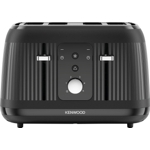
Setup, Compatibility & Care
Setup
Setting up your Kenwood Dusk 4 Slot Toaster is straightforward:
- Unpack: Remove all packaging materials and stickers from the toaster.
- Placement: Place the toaster on a clean, dry, flat, and heat-resistant surface, ensuring adequate ventilation around the appliance.
- First Use: Before toasting bread, run the toaster through a full toasting cycle (without bread) on a medium setting (`3` or `4`). This helps to burn off any manufacturing residues and eliminates any initial odors. A slight smoke or odor during this first use is normal.
- Connect Power: Plug the toaster into a standard 220-240V AC electrical outlet.
Compatibility
This toaster is compatible with standard bread slices. While it has ample slot width for most bread types, thicker items like bagels or specialty breads might require careful placement or a slightly lower browning setting to prevent burning.
Care and Maintenance
Regular cleaning ensures longevity and consistent performance:
- Always Unplug: Before cleaning, always unplug the toaster from the power outlet and allow it to cool completely.
- Empty Crumb Tray: Periodically pull out the crumb tray located at the bottom of the toaster. Shake out crumbs into a bin. Wipe the tray clean with a damp cloth if necessary, then dry thoroughly before reinserting.
- Exterior Cleaning: Wipe the exterior of the toaster with a soft, damp cloth. Do not use abrasive cleaners, scouring pads, or harsh chemicals, as these can damage the finish.
- Interior Cleaning: Never insert utensils or your fingers into the toaster slots. Do not attempt to clean the heating elements. For stubborn crumbs inside the slots, turn the toaster upside down over a sink and gently shake it.
- Storage: When not in use, ensure the toaster is clean and dry. You can store the cord by wrapping it around the cord storage cleats (if available) on the underside of the unit.



 AO.com£38.00Visit shop
  George at ASDA£39.00Visit shop
  B&Q£39.99Visit shop