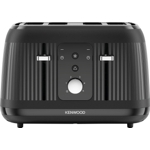
Reflecting the calming and reassuring natural tones of early morning, this palette of three colour...Reflecting the calming and reassuring natural tones of early morning, this palette of three colours, cream, black and light blue will complement any kitchen. Subtle gloss touches sit alongside a traditional matt finish and a textured striped design, combine with the 1.7L kettle for a striking set. The Kenwood Dawn 4 slice toaster comes in a palette of three colours, suitable for any kitchen. The 1800W toaster has 5 adjustable browning controls and a hi-rise feature as well as reheat, defrost, one-sided toasting and cancel functions. Features: 4 Slice Toaster 1800W Electronic Controls Removable crumb tray Cord Storage Specifications: Dimensions: H:20.0 x W:29.2 x D:30.0 cm Weight: 3.0 kg Colour: Cream Guarantee:2 Years Material: Plastic Model Number: KW9005
This guide is for anyone who wants to quickly and easily toast bread to their desired level, especially those with busy mornings. The Kenwood 4 Slice Toaster offers the convenience of toasting up to four slices at once with a defrost function, saving you time. Keep in mind that while the toaster is designed for ease of use, it's essential to clean the crumb tray regularly to maintain its performance.
All features
Colour
Cream
Model Part Number
TFP09.000CR
Brand
Kenwood
Extended Product Information
FAQs
How do I clean the toaster?
Unplug the toaster and remove the crumb tray to empty it. Wipe the exterior with a damp cloth. Do not immerse the toaster in water.
Can I use this toaster for bagels?
Yes, the Kenwood 4 Slice Toaster is suitable for bagels. However, you may need to adjust the browning setting for optimal results.
What kind of bread can I use?
You can use various types of bread, including white bread, whole wheat, multigrain, and sourdough. Adjust the browning control based on the type of bread.
What if the bread gets stuck?
Unplug the toaster and carefully remove the bread. Do not use metal objects to remove the bread to avoid damaging the heating elements.
How long is the warranty?
The Kenwood 4 Slice Toaster comes with a standard manufacturer's warranty. Please refer to your product documentation for warranty details.
Can I toast frozen waffles?
Yes, you can toast frozen waffles using the defrost function. Adjust the browning level according to your preference.
What is the reheat function used for?
The reheat function is used to warm up toast that has already been toasted without browning it further.
Where can I find replacement parts?
Replacement parts can often be found at major appliance retailers or directly from the manufacturer's website. Check the Kenwood website or contact customer support.
Troubleshooting
Toaster doesn't turn on.
Check if the toaster is plugged in and the outlet is working. Also, ensure the lever is fully pushed down.
Toast is burning.
Reduce the browning level setting. Ensure the bread is not too thick or stuck.
Toast is not popping up.
Check for any obstructions in the slots. Ensure the crumb tray is properly inserted. If the problem persists, the toaster may need repair.
Toaster is not toasting evenly.
Try toasting two slices at a time and rotating the bread. Clean the crumb tray regularly.
Defrost function isn't working.
Make sure the defrost button is pressed. Ensure the bread is placed correctly inside the slots.
Pros and Cons
Pros
Toasts bread quickly and efficiently.
Offers a defrost function for added convenience.
Provides variable browning control for customized toasting.
Includes a reheat function to warm up toast.
Easy to clean with a removable crumb tray.
Features a stylish design that complements any kitchen.
Cons
May take up more counter space compared to 2-slice toasters.
The plastic housing material may be less durable than some other materials.
Browning levels may vary slightly based on bread type.
The toaster's exterior can get hot during operation.
The initial setup requires reading the user manual for optimal use.
Setup, Compatibility & Care
Initial Setup:
Place the toaster on a stable, level surface.
Ensure the crumb tray is properly inserted.
Plug the power cord into a standard electrical outlet.
Using the Toaster:
Insert bread slices into the slots.
Select the desired browning level using the control knob.
If toasting frozen bread, press the defrost button.
If reheating, press the reheat button.
Press the lever down to start toasting.
The toast will automatically pop up when done.
Cleaning and Care:
Always unplug the toaster before cleaning.
Remove the crumb tray and empty it regularly.
Wipe the exterior with a damp cloth.
Do not use abrasive cleaners or immerse the toaster in water.



 Amazon£31.19Visit shop
  AO.com£49.00Visit shop