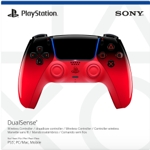
Sony DualSense Wireless Controller - Fortnite Edition - Multicolor
Defy the Storm as you build, battle, create and Unleash the Fun with the DualSense® Wireless Contr...Defy the Storm as you build, battle, create and Unleash the Fun with the DualSense® Wireless Controller - FORTNITE® Limited Edition. Starring Fishstick and Peely, and emblazoned with illustrations of fan-favourite characters, this colourfully vibrant eye-catching design encapsulates the wildly energetic FORTNITE spirit enjoyed by players worldwide.
So, where we droppin’ today?
This guide is for gamers looking to enhance their Fortnite experience with the Sony DualSense Wireless Controller - Fortnite Edition. This limited-edition controller offers a unique, eye-catching design featuring popular Fortnite characters. A key benefit is the immersive gaming experience thanks to the DualSense's advanced features. Keep in mind that this controller's unique design might not appeal to everyone.
All features
Colour
Multicolor
Series
DualSense
Brand
Sony
Extended Product Information
FAQs
How do I charge the DualSense controller?
You can charge the controller by connecting it to your PS5 or PC using a USB-C cable. You can also charge it using a DualSense charging station (sold separately).
How long does the battery last?
Battery life varies depending on usage, but typically lasts between 7-12 hours on a full charge.
Can I use this controller with older PlayStation consoles?
No, the DualSense controller is designed for use with the PlayStation 5 and compatible PCs only.
How do I update the controller's firmware?
The controller's firmware updates automatically when connected to a PS5 that is connected to the internet. For PC, check the game's settings.
What is the small button on the back of the controller for?
This is the reset button. Pressing this button resets the controller's settings and can help resolve connection issues.
Does the controller come with a charging cable?
Yes, the controller comes with a USB-C charging cable.
Can I use the controller wirelessly with my PC?
Yes, you can connect the controller to your PC wirelessly via Bluetooth, if your PC has this capability.
Troubleshooting
Controller not connecting to PS5 or PC.
Ensure the controller is charged. Try a different USB-C cable. Reset the controller by pressing the small reset button on the back.
Haptic feedback or adaptive triggers not working.
Make sure the game supports these features. Check the controller settings in the game menu.
Microphone not working.
Ensure the microphone is enabled in the PS5 settings or PC game settings. Check the volume levels.
Controller not charging.
Try a different USB-C cable and charging source. Check the charging port for any debris.
Pros and Cons
Pros
Unique and vibrant Fortnite-themed design.
Immersive haptic feedback and adaptive triggers enhance gameplay.
Integrated features like a microphone and speaker improve communication and audio.
Ergonomic design promotes comfort during long play sessions.
Cons
Limited edition availability may make it harder to find.
The unique design might not appeal to all users.
Battery life may vary depending on usage of features like haptic feedback.
Some advanced features are only fully supported on PS5.
Setup, Compatibility & Care
Setup
PS5: Simply connect the controller to your PS5 with the provided USB-C cable and follow the on-screen instructions to pair it. You can then disconnect the cable and use the controller wirelessly.
PC: Connect the controller to your PC via USB-C or Bluetooth. Ensure your PC has the necessary drivers installed. You may need to configure the controller settings within your game.
Compatibility
PlayStation 5: Fully compatible with all PS5 consoles.
PC: Compatible with PCs via USB-C or Bluetooth; however, feature support may vary depending on the game.
Care
Clean the controller with a soft, dry cloth. Avoid using harsh chemicals or abrasive materials.
Do not expose the controller to extreme temperatures or humidity.
Store the controller in a clean, dry place when not in use.
To preserve battery life, charge the controller regularly and avoid leaving it fully charged for extended periods.


 eBay£85.65Visit shop