
DualSense Wireless Controller - Galactic Purple
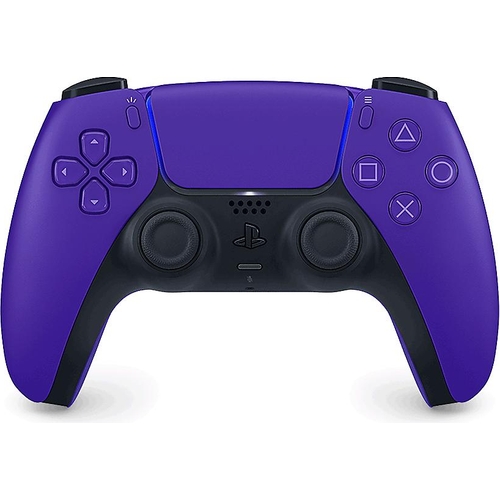
Plot a course for astronomical adventures on your PlayStation®5 console with the DualSense® Galact...

Best current price£58.99from eBay

Colour

All Offers

11 offers from £58.99 - £94.34

View price history by clicking the chart icon.

eBaySony PlayStation 5 DualsSnse Wireless Controller - Galactic Purple
Free delivery in 1–3 days
£58.99
Visit shop
CurrysPlaystation Ps5 Dualsense Wireless Controller - Galactic Purple
Free delivery in 1–3 days
£59.99
Visit shop
very.co.ukPlaystation Playstation 5 Dualsense Wireless Controller
£3.99 delivery
£59.99
Visit shop
OnBuy.comPlaystation Sony Ps5 Dualsense Wireless Controller Galactic Purple
Free delivery in 1–3 days
£60.30
Visit shop
PlayStation DirectPurple Dualsense® Wireless Controller - Galactic - For PS5, Pc, Mac & Mobile
Free delivery in 1–3 days
£64.99
Visit shop

Product Information

Full details

This guide is for PlayStation 5 gamers seeking a more immersive and responsive gameplay experience. The DualSense Wireless Controller in Galactic Purple offers advanced haptic feedback and adaptive triggers that bring games to life. A potential caveat is the reliance on specific game implementations to fully utilize these advanced features.

All features

ColourPurple
SeriesDualSense
Model Part Number1000050253-GB
BrandSony

Extended Product Information

FAQs

Can I use the DualSense controller with my PS4?

No, the DualSense controller is designed exclusively for the PlayStation 5. It cannot be used with a PS4 console.

How do I update the controller firmware?

Controller firmware updates are typically downloaded and installed automatically when the controller is connected to your PS5 console via USB and the console's system software is updated. You may be prompted to perform an update.

What is the battery life of the DualSense controller?

Battery life varies significantly based on usage, particularly the intensity of haptic feedback and adaptive triggers. Generally, you can expect between 6-12 hours of gameplay on a single charge.

Can I use the built-in microphone and headphones simultaneously?

Yes, the DualSense controller features a combo headphone/mic port, allowing you to use a headset for both audio output and microphone input simultaneously.

Is the Galactic Purple color available for other DualSense models?

The Galactic Purple color is specific to this DualSense model. Other color variants and models like DualSense V2 or V3 may be available with different color options.

How do I adjust the intensity of the haptic feedback and triggers?

You can adjust the intensity of haptic feedback and adaptive triggers in the PS5's Settings menu, under 'Accessories' > 'Controller'.

Does the controller support PC gaming?

Yes, the DualSense controller can be used with PCs, especially via Steam, which offers some support for its advanced features. A wired USB connection often provides the most reliable experience.

Troubleshooting

Controller not connecting to PS5

Ensure the controller is charged. Try resetting the controller by pressing the small reset button on the back with a paperclip for 5 seconds. Re-pair by connecting it to the PS5 with a USB cable.

Haptic feedback or adaptive triggers not working

Verify that the game you are playing supports these features. Check the game's settings and the PS5 console's accessory settings to ensure they are enabled.

Controller not charging

Use the official USB Type-C cable and ensure it is securely connected to both the controller and the PS5 or a compatible power source. Try a different USB port or a different compatible cable.

Wireless connection is unstable or lagging

Ensure there are no significant obstructions between the controller and the PS5. Minimize interference from other wireless devices. Try connecting the controller via USB cable for a more stable connection.

Buttons are unresponsive

Check for debris around the buttons. If the issue persists, try performing a controller reset as described above. If problems continue, contact Sony support.

Pros and Cons

Pros

  • Highly immersive haptic feedback and adaptive triggers enhance gameplay realism.
  • Built-in microphone offers convenient voice chat options.
  • Ergonomic design provides comfort for long gaming sessions.
  • Wired and wireless connectivity offer flexibility.
  • Distinctive Galactic Purple color adds a unique aesthetic.

Cons

  • Advanced features like haptic feedback and adaptive triggers depend on game support.
  • Battery life can be impacted by heavy use of advanced features.
  • The controller's size may be large for players with smaller hands.
  • Potential for higher cost compared to standard controllers.
  • Requires a PlayStation 5 console for full functionality.

Setup, Compatibility & Care

Setup

  1. Initial Charge: Fully charge the controller using the included USB Type-C cable and a PS5 console or compatible USB power adapter before first use.
  2. Pairing: Connect the controller to your PS5 console using a USB Type-C cable for initial pairing. Once paired, you can disconnect the cable and use it wirelessly via Bluetooth.
  3. System Updates: Ensure your PS5 console's system software is up to date, as controller firmware updates are often delivered through system updates.

Compatibility

  • Primary Platform: Designed for and fully compatible with the PlayStation 5 console.
  • PC Compatibility: Can be used with PCs for some games, particularly those on Steam that support DualSense features. Wired connection via USB Type-C is recommended for best compatibility and to enable advanced features where supported by PC titles.
  • Mobile Devices: Basic functionality may be available via Bluetooth on some mobile devices, but advanced features are not supported.

Care

  • Cleaning: Wipe the controller gently with a soft, dry cloth. For tougher smudges, use a slightly damp cloth and allow the controller to air dry completely before use. Avoid using abrasive cleaners or harsh chemicals.
  • Storage: Store the controller in a cool, dry place away from direct sunlight when not in use.
  • Battery Care: Avoid exposing the controller to extreme temperatures. For long-term storage, charge the battery to approximately 50% before powering down the console.

Similar items

Price History

DatePrice
Visit shop