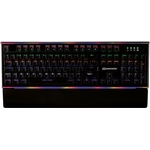
Razer BlackWidow V4 75% - Black - 2023

The Razer BlackWidow V4 is the first mechanical gaming keyboard designed to pave the way for a who...

Best current price£89.99from Amazon

Colour
Release Year

All Offers

37 offers from £89.99 - £299.99

View price history by clicking the chart icon.

AmazonRazer BlackWidow V4 X (Green Switch) - Mechanical Gaming Keyboard Chroma RGB (Clicky Mechanical Switches, 6 Dedicated Macro Keys, Doubleshot ABS Keycaps) QWERTY UK Layout | Black
Free delivery in 1–3 days
£89.99
Visit shop
Scan ComputersRazer Blackwidow V4 X Switch Mechanical Gaming Keyboard Green Rz03-04700300-R3w1
£5.48 delivery
£109.99
Visit shop
very.co.ukRazer Blackwidow V4 X (Green Switch)
£3.99 delivery
£109.99
Visit shop
Box.co.ukRazer Size 3 Black Widow V4 X Rgb Green Switch Mechanical Gaming Keyboard
£4.95 delivery
£116.94
Visit shop
Laptop OutletRazer Black Widow V4 X Rgb Green Switch Mechanical Gaming Keyboard
£4.95 delivery
£116.94
Visit shop

Used Offers

4 offers from £40.49 - £118.99

View price history by clicking the chart icon.

eBayRazer BlackWidow V4 X green switch mechanical keyboard USB wired Chroma RGB READ
Free delivery in 1–3 days
£40.49
Visit shop

Product Information

Full details

The Razer BlackWidow V4 75% is a compact, hot-swappable mechanical keyboard designed for gamers who want customization and performance. It offers a 75% layout, hot-swappable switches, and Razer Chroma RGB, providing a personalized typing and gaming experience. However, users should be aware that the included switches may not suit every preference, requiring potential switch replacements for optimal feel.

All features

ColourBlack
Release Year2023
Model Part NumberRZ03-05000400-R3E1
BrandRazer

Extended Product Information

FAQs

What type of switches does the keyboard use?

The Razer BlackWidow V4 75% uses mechanical switches. It comes with Razer Orange Tactile Mechanical Switches Gen-3 pre-installed.

Are the switches hot-swappable?

Yes, the keyboard has a hot-swappable design, allowing you to easily change the switches.

What is the polling rate?

The polling rate is 8000 Hz, which ensures a fast and responsive performance.

Does it have RGB lighting?

Yes, it features Razer Chroma RGB for customizable lighting effects.

Does it include a wrist rest?

Yes, it includes a magnetic plush leatherette wrist rest for added comfort.

What is the keyboard layout?

The keyboard features a 75% layout, which is a compact design that retains essential keys.

What is the warranty?

Please refer to the product packaging or Razer's website for warranty information.

Troubleshooting

Keyboard not recognized by the computer.

Ensure the USB cable is securely connected. Try a different USB port or a different computer. Check if Razer Synapse is properly installed.

Backlighting not working.

Make sure the backlighting is enabled in Razer Synapse. Check for any software conflicts that might be interfering with the lighting effects. Update the keyboard's firmware.

Key presses not registering.

Test the keyboard on a different computer to rule out software issues. Ensure the switches are properly seated. If using custom switches, make sure they are compatible.

Razer Synapse not detecting the keyboard.

Restart Razer Synapse and your computer. Reinstall Razer Synapse. Ensure your internet connection is stable for software detection.

Pros and Cons

Pros

  • Compact and space-saving 75% layout.
  • Hot-swappable switches for easy customization.
  • Excellent typing experience with gasket-mounted design.
  • Vibrant and customizable Razer Chroma RGB lighting.
  • Durable build quality with an aluminum top case.
  • Includes a comfortable magnetic wrist rest.

Cons

  • May require additional investment in switches for preferred feel.
  • Limited to 3 or 5-pin switch compatibility.
  • The pre-installed Razer Orange Tactile switches may not be preferred by all users.
  • The compact layout may take time to adjust to for some users.
  • Requires Razer Synapse software for full customization.
  • Wired connectivity only, no wireless options available.

Setup, Compatibility & Care

Setup

  1. Connect the keyboard to your computer via the USB Type-C cable.
  2. Download and install Razer Synapse software from the Razer website.
  3. Follow the on-screen prompts to set up your keyboard and customize your settings.
  4. Update the keyboard's firmware to the latest version via Razer Synapse.

Compatibility

The Razer BlackWidow V4 75% is compatible with Windows operating systems. Ensure that your computer has a USB port for connection. The keyboard supports 3 or 5-pin switches, allowing for a wide range of customization options.

Care

  • Clean the keyboard regularly with a soft, damp cloth.
  • Avoid using harsh chemicals or abrasive cleaners.
  • To clean keycaps, remove them and wash them with mild soap and water.
  • Protect the keyboard from spills and excessive moisture.
  • Store the keyboard in a clean, dry place when not in use.

Similar items

Price History

DatePrice
Visit shop