
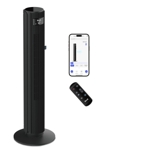
Dreo Tower Fan - Cruiser Pro T2 - Black


Best current price£109.99from Currys
Best offers
Shopping.co.uk recommended and popular offers
 Currys£109.99Visit shop
 Dreo Cruiser Pro T2 Smart Tower Fan - Black, Black
Visit shopBest current price£109.99from Currys
Shopping.co.uk recommended and popular offers
Currys£109.99Visit shop Dreo Cruiser Pro T2 Smart Tower Fan - Black, Black
Visit shop1 offer from £109.99
View price history by clicking the chart icon.
The Dreo Cruiser Pro T2 is a 42-inch black tower fan ideal for those seeking efficient, quiet, and customizable cooling in medium to large rooms. Its primary benefit is powerful, widespread airflow that can reach up to 26 feet per second while maintaining noise levels as low as 25 decibels, ensuring comfort without disturbance. A potential caveat for some users might be the reliance on app or voice control for certain advanced features, though a remote is included. Key features include rapid cooling, ultra-quiet operation, smart oscillation, customizable settings, and versatile control options.
| Colour | Black |
|---|---|
| Model Part Number | DR-HTF011S |
| Brand | Dreo |
The Dreo Cruiser Pro T2 can deliver airflow speeds of up to 26 feet per second.
The fan operates as quietly as 25 decibels, making it suitable for noise-sensitive environments.
Yes, the fan features a 90-degree wide oscillation to distribute air evenly across the room.
The fan includes a timer that can be set for up to 12 hours.
Yes, the Dreo Cruiser Pro T2 is compatible with Amazon Alexa and Google Assistant for voice control.
A 2.4GHz Wi-Fi network is required for connecting the fan to the Dreo App and for voice control.
Always unplug the fan first. Wipe the exterior with a soft, damp cloth. Avoid abrasive cleaners. Use a vacuum attachment to clean the air intake grill.
Ensure the power cord is securely plugged into the fan and a working electrical outlet. Check if the circuit breaker has tripped. If using the remote, ensure the batteries are correctly inserted and functional.
Unplug the fan and check the base and fan blades (if accessible) for any obstructions or loose parts. Ensure the fan is placed on a stable, level surface. If noise persists, contact customer support.
Verify that your Wi-Fi network is 2.4GHz. Restart your router and the fan. Ensure the fan is within range of your Wi-Fi signal. Re-enter Wi-Fi credentials in the Dreo App if necessary.
Check and replace the battery in the remote control. Ensure there are no obstructions between the remote and the fan's sensor. Try operating the fan using the controls on the unit or the app.
Ensure your smartphone is connected to the internet. Close and reopen the Dreo App. Check if the fan is still connected to your Wi-Fi network. Try re-pairing the fan with the app.
Setup:
Compatibility:
Care:
 Levoit Tower Fan - WhiteFrom £102
 Dreo Tower Fan - BlackFrom £131
 Dreo Smart Tower Fan - BlackFrom £330
 Xiaomi TV Stick - HD - 2nd GenFrom £40
 Lint Brush - CharcoalFrom £15
 Morphy Richards HeatFlux Ultra Thin Tower Fan Heater - 2kw Ceramic - With RemoteFrom £88
 Crank Brothers Cigar Tyre Repair Kit - BlackFrom £19
 Dreo 2 In 1 Heater/Cooler - SilverFrom £180
 Ring Indoor Camera - 2nd Gen - WhiteFrom £24
 Morphy Richards Heatflux Tower Fan Heater - 2Kw Digital CeramicFrom £75
 40" Oscillating Tower Fan - Pro Breeze - BlackFrom £180
 Olsen & Smith Tower Fan - BlackFrom £170