Features ...
Voice Control: Delivering comfort at your command. Alexa and Google Assistant make it...Features ...
Voice Control: Delivering comfort at your command. Alexa and Google Assistant make it easier and faster to control your WiFi fans. Just try saying 'Alexa, turn on the tower fan.' whenever your hands are busy.
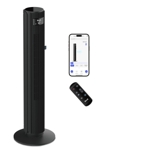
Cooling Gets Smarter: Forget about looking around for the 'missing' remote control. Access your smart fans anytime, anywhere with your smartphone. The built-in free Dreo App brings harmony to all your Dreo WiFi devices.
27ft/s Air Velocity: The powerful motor and the unique air propeller design moves air to incredible speeds of 8.2m/s. This oscillating fan effectively distributes airflow around the room to create a cooling environment like no other fan.
Less Noise, Exceptional Rest: Enjoy a fresh, comfortable, and ultra-quiet breeze overnight with the built-in sleep mode. Enhanced by the unique air propeller design in this floor fan, it minimizes noise while delivering ultimate comfort. The ideal fans for bedroom, home, office, living room, etc.
Upgraded Smart Display: All the vital information you need, track the room temperature, fan speed, mode, oscillation, mute, and timer settings on the bladeless fan's large LED display. 6-speed & 4 modes setting allows customizing the airflow to your needs. Mounting type: Floor mount Voltage AC 220-240V 50Hz Wattage 50 watts, Weight: 9.6562470756 pounds, Manufacturer: Dreo
Brand: Dreo Dreo Smart Tower Fan Wifi Voice Control, 7.3M/S Velocity Quiet Cooling Fan, Works With Alexa, App Control, 6 Speeds Bladeless Fan With Remote, Led
OnBuy.comBrand: Dreo Dreo Smart Tower Fan Wifi Voice Control, 7.3M/S Velocity Quiet Cooling Fan, Works With Alexa, App Control, 6 Speeds Bladeless Fan With Remote, Led
This guide helps users get the most out of their Dreo Smart Tower Fan (Black). Ideal for those seeking smart home integration and powerful cooling, this fan offers features like voice control and app-based operation. While it provides excellent airflow and quiet operation, users should note the reliance on a Wi-Fi connection for smart features.
All features
Colour
Black
Model Part Number
DR-HTF001S
Brand
Dreo
Extended Product Information
FAQs
How do I connect the fan to my Wi-Fi?
Download and open the Dreo App, then follow the in-app instructions to connect your fan to your home Wi-Fi network.
Can I control the fan with voice commands?
Yes, the Dreo Smart Tower Fan is compatible with both Alexa and Google Assistant.
How do I clean the fan?
Use a soft, damp cloth to wipe the exterior. Refer to the user manual for detailed cleaning instructions.
What is the sleep mode?
Sleep mode is a setting that reduces fan speed and noise for quiet overnight operation.
What are the different modes?
The fan offers multiple modes, including normal, natural, sleep, and auto modes. Check the app for specific details.
What is the warranty period?
Please consult the product documentation for warranty details.
Can I control the fan remotely?
Yes, you can control the fan from anywhere using the Dreo App, provided the fan is connected to Wi-Fi.
Troubleshooting
Fan won't turn on.
Check the power connection and ensure the fan is plugged in securely. Verify the power outlet is working.
Smart features not working.
Ensure the fan is connected to your Wi-Fi network and that the Dreo App is functioning correctly. Check your internet connection.
Fan is making unusual noises.
Inspect the fan for any obstructions. Clean the fan blades and air intake.
Pros and Cons
Pros
Smart home integration with voice and app control
Effective and powerful airflow for cooling
Quiet operation suitable for bedrooms and other quiet environments
Customizable settings to suit different needs and preferences
Cons
Smart features require a Wi-Fi connection
May require initial setup and account creation for app usage
Setup, Compatibility & Care
Setup:
Unpack the fan and ensure all parts are present.
Follow the instructions in the manual for assembling the fan.
Connect the fan to a power outlet and turn it on.
Download and install the Dreo App.
Connect the fan to your home Wi-Fi network following the app's instructions.
Compatibility:
The fan is compatible with both iOS and Android devices via the Dreo App.
It is also compatible with Alexa and Google Assistant.
Care:
Clean the fan regularly to maintain optimal performance.
Use a soft, damp cloth to wipe the exterior of the fan.
Consult the user manual for instructions on cleaning the air intake and other components.


 OnBuy.com£330.00Visit shop