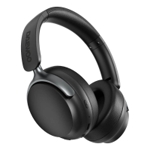
Daewoo Sonic Beat Noise Cancelling Bluetooth Headphones - Black

Experience immersive audio with the Daewoo Sonic Beat Noise Cancelling Bluetooth Headphones. Enjoy...

Best current price£31.99from Frasers

All Offers

12 offers from £31.99 - £39.99

View price history by clicking the chart icon.

FrasersDaewoo Electricals Sonic Beat Noise Cancelling Bluetooth Headphones W - Black - 1
Free delivery in 1–3 days
£31.99
Visit shop
StudioDaewoo Electricals Sonic Beat Noise Cancelling Bluetooth Headphones W Black Size 1
£4.99 delivery
£31.99
Visit shop
CurrysDaewoo Sonic Beat Wireless Bluetooth Noise-Cancelling Headphones - Black, Black
Free delivery in 1–3 days
£35.99
Visit shop
B&QB&Q - Sonic Beat Active Noise Cancelling Bluetooth Headphones With Travel Case
Free delivery in 1–3 days
£39.99
Visit shop
Daewoo ElectricalsDaewoo Sonic Beat Noise Cancelling Bluetooth Headphones With Travel Case
Free delivery in 1–3 days
£39.99
Visit shop

Product Information

Full details

This guide helps users get the most out of their Daewoo Sonic Beat Noise Cancelling Bluetooth Headphones. Designed for those seeking immersive audio experiences, these headphones offer up to 10 hours of playback with active noise cancellation, perfect for focused work or travel. Keep in mind that while they offer excellent sound quality, the battery life may vary based on volume levels and noise cancellation usage.

All features

ColourBlack
SeriesSonic Beat
Model Part Number5024996975895
BrandDaewoo

Extended Product Information

FAQs

How do I turn on the noise cancellation?

Consult the user manual for the specific button or switch to activate the Active Noise Cancelling feature. The location of the button varies.

How long does the battery last?

You can expect up to 10 hours of playback on a single charge. Actual battery life may vary based on usage.

How do I charge the headphones?

Use the included USB charging cable to connect the headphones to a power source.

Can I use these headphones with my gaming console?

Yes, if your console supports Bluetooth or has a 3.5mm audio jack. You will need to connect via Bluetooth or the included AUX cable.

What is the wireless range?

The headphones have a wireless range of up to 10 meters.

What is included in the box?

The box includes the Daewoo Sonic Beat headphones, a USB charging cable, a 3.5mm AUX cable, and a protective travel case.

What is the weight of the headphones?

The headphones weigh 218g.

Troubleshooting

Headphones won't turn on.

Ensure the headphones are charged. If they are charged, try a reset (check the manual for reset instructions).

Bluetooth connection issues.

Make sure Bluetooth is enabled on your device and the headphones are in pairing mode. Try forgetting the device and re-pairing.

Poor sound quality.

Check the audio source and ensure the volume is at an appropriate level. Make sure there is nothing blocking the speakers.

Microphone not working.

Ensure the microphone is enabled on your device. Test the microphone with a phone call or voice recording.

Pros and Cons

Pros

  • Excellent noise cancellation for focused listening.
  • Long battery life for extended use.
  • Fast charging capability.
  • Versatile connectivity options (Bluetooth and AUX).
  • Comfortable on-ear controls.
  • Included travel case for portability.

Cons

  • Battery life may decrease with high volume and ANC usage.
  • On-ear design may not suit all users.
  • Weight of 218g may feel heavy to some users.

Setup, Compatibility & Care

Setup:

  1. Charging: Use the included USB cable to charge the headphones. A full charge takes under 2 hours.
  2. Pairing: Turn on the headphones and enable Bluetooth on your device. Select "Daewoo Sonic Beat" from the list of available devices.
  3. Wired Connection: Connect the 3.5mm AUX cable to the headphones and your device for wired listening.

Compatibility:

The headphones are compatible with most Bluetooth-enabled devices, including smartphones, tablets, and laptops. They also support wired connections via the 3.5mm AUX cable, ensuring compatibility with devices without Bluetooth.

Care:

  • Clean the earcups and headband with a slightly damp cloth. Avoid using excessive moisture.
  • Store the headphones in the included travel case when not in use to protect them from dust and damage.
  • Avoid exposing the headphones to extreme temperatures or direct sunlight.

Similar items

Price History

DatePrice
Visit shop