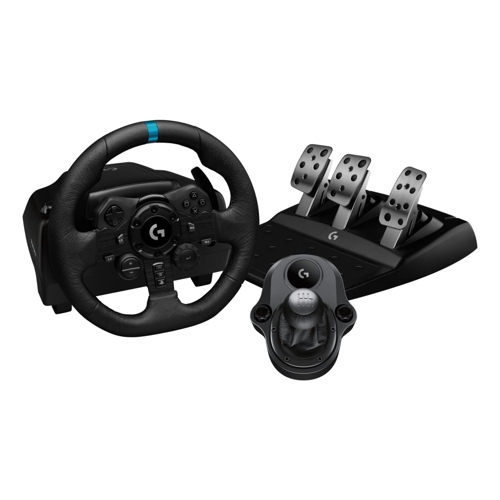
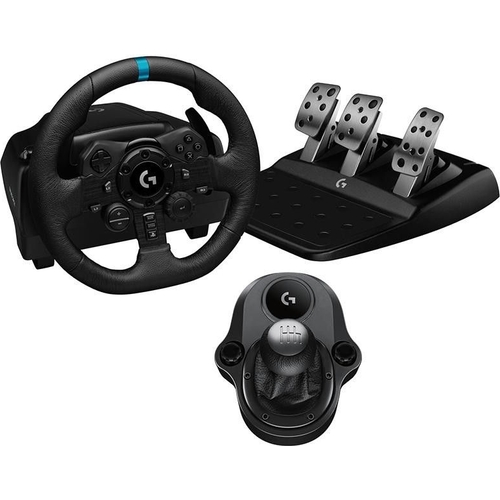
Logitech G923 Racing Wheel, Pedals & Driving Force Shifter - Black

Feel the thrill of the race with the G923 bundle. TRUEFORCE feedback taps directly into the physic...

Best current price£259.00from Currys

All Offers

5 offers from £259.00 - £299.99

View price history by clicking the chart icon.

CurrysLogitech G923 Racing Wheel, Pedals & Driving Force Shifter - Xbox & Pc, Black
Free delivery in 1–3 days
£259.00
Visit shop
eBayLogitech G923 Racing Wheel, Pedals & Driving Force Shifter PS4, PS5 & PC, Black
Free delivery in 1–3 days
£279.95
Visit shop
OnBuy.comLogitech G923 Racing Wheel, Pedals & Driving Force Shifter Ps4, Ps5 & Pc
Free delivery in 1–3 days
£299.99
Visit shop

Product Information

Full details

Designed for serious racing enthusiasts, the Logitech G923 Racing Wheel, Pedals, and Driving Force Shifter delivers an immersive, high-fidelity racing experience. Its core strength lies in TRUEFORCE force feedback, which translates in-game physics directly to your hands, providing unparalleled realism. Be aware that the advanced TRUEFORCE features require compatible games for full functionality.

All features

ColourBlack
SeriesG923
Model Part Number991-000531
BrandLogitech

Extended Product Information

FAQs

What is TRUEFORCE?

TRUEFORCE is Logitech's high-definition force feedback technology that directly connects to in-game physics and audio engines. It provides unprecedented realism, letting you feel everything from engine rumble and tire grip to terrain changes and suspension impacts.

Is the Logitech G923 compatible with Xbox?

No, the Logitech G923 (MPN: 991-000531) is specifically designed for PlayStation 4, PlayStation 5, and PC. There is a separate variant for Xbox compatibility (MPN: 991-000166) with different internal components and branding.

Do I need the G HUB software to use the G923?

For PC users, G HUB software is highly recommended and practically essential. It allows for full customization of settings, creation of game profiles, and firmware updates. On PlayStation, the wheel functions without G HUB, but customization options are more limited.

How do I use the Dual Clutch Launch Assist?

The Dual Clutch Launch Assist feature is programmable via G HUB software (on PC) or specific in-game settings. It allows you to assign the left and right paddle shifters as dual clutch inputs, enabling a perfect launch by releasing the clutch at the optimal RPM.

Can I adjust the brake pedal stiffness?

The G923 features a progressive spring in the brake pedal, designed to simulate pressure-sensitive braking. While the physical spring itself is not easily adjustable by the user, you can often adjust the brake's linearity and dead zones within G HUB software (PC) or in-game settings to fine-tune its response to your preference.

What games support TRUEFORCE?

A growing list of games support TRUEFORCE. Some popular titles include *Gran Turismo 7*, *Assetto Corsa Competizione*, *F1 2021/2022/2023*, *DIRT Rally 2.0*, and *iRacing*. Always check the game's specifications or Logitech's website for an up-to-date list of TRUEFORCE compatible titles.

Troubleshooting

Wheel is not recognized by my PlayStation or PC.

Ensure all cables (USB, power, pedals, shifter) are securely connected. For PC, try a different USB port and ensure G HUB software is installed and updated. For PlayStation, ensure the console recognizes the device in its accessory settings. Restart the console/PC and reconnect the wheel.

TRUEFORCE or force feedback is not working or feels weak.

Verify the game you are playing supports TRUEFORCE technology. Check settings within the game's options for force feedback strength. For PC, open Logitech G HUB and ensure force feedback settings are properly configured and updated. Make sure the wheel's power adapter is connected and functioning.

Pedals are unresponsive or registering incorrectly.

Check the cable connecting the pedals to the wheel base. Ensure no debris is obstructing the pedal mechanisms. If using on PC, calibrate the pedals through G HUB software. Some games also have in-game pedal calibration options.

The 6-speed shifter is not working or gears are not registering.

Confirm the shifter cable is firmly connected to the wheel base. Check in-game control settings to ensure the manual shifter is selected and mapped correctly. Some games may require specific configurations for external shifters.

G HUB software is not detecting the G923 or having issues on PC.

Ensure G HUB is the latest version. Try reinstalling the software. Check for any conflicting drivers or software. Run G HUB as an administrator. Ensure your operating system is up to date.

Pros and Cons

Pros

  • Exceptional Realism: TRUEFORCE technology provides an immersive, high-fidelity force feedback experience.
  • Precise Control: Closed-Loop Motor Control and pressure-sensitive pedals offer accurate steering and braking.
  • Full Immersion: Includes a 6-speed manual shifter and dual clutch for a comprehensive racing setup.
  • Customizable Experience: G HUB software and the 24-point selection dial allow for extensive personalization.
  • Broad Compatibility: Works with PlayStation 4, PlayStation 5, and PC.

Cons

  • TRUEFORCE Game Dependency: Advanced force feedback features require specific game support for full functionality.
  • Initial Setup Time: As a comprehensive racing system, initial setup and calibration may take some time.
  • Space Requirement: The wheel, pedals, and shifter require a dedicated setup area.

Setup, Compatibility & Care

Setup

  1. Mount the Wheel: Securely attach the G923 racing wheel to a desk or racing cockpit using the integrated clamps. Ensure it's stable and won't shift during intense use.
  2. Connect Pedals: Plug the pedal unit cable into the corresponding port on the underside of the steering wheel base.
  3. Connect Shifter (Optional): If using the Driving Force Shifter, plug its cable into the dedicated port on the steering wheel base.
  4. Power Connection: Connect the power adapter to the wheel and then to a wall outlet.
  5. USB Connection: Plug the USB cable from the wheel into your PlayStation console (PS4, PS5) or PC.
  6. PC Software (G HUB): For PC users, download and install the Logitech G HUB software from the official Logitech website. This software is essential for customizing settings, creating profiles, and ensuring optimal performance.

Compatibility

The Logitech G923 is compatible with:

  • PlayStation 4
  • PlayStation 5
  • PC (Requires Windows 10 or later for G HUB software)

*Note*: TRUEFORCE features require games that specifically support the technology for full effect.

Care

  • Cleaning: Use a soft, damp cloth to wipe down the wheel, pedals, and shifter. Avoid harsh chemicals or abrasive cleaners.
  • Storage: When not in use, store the unit in a clean, dry place, ideally covered to prevent dust accumulation.
  • Cable Management: Ensure cables are not kinked or under undue stress to prevent damage.
  • Avoid Extreme Temperatures: Do not expose the unit to extreme heat or cold.

Similar items

Price History

DatePrice
Visit shop