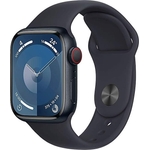
Apple Watch Series 11 GPS + Cellular 46mm Jet Black Aluminium Case

The ultimate way to watch your health.

Best current price£294.99from OnBuy.com

Colour
Dial Size

All Offers

50 offers from £294.99 - £755.11

View price history by clicking the chart icon.

OnBuy.comApple Watch Series 11 Gps 46Mm Jet Aluminium Meuw4 S/M Sport Band Black 195950631753
Free delivery in 1–3 days
£294.99
Visit shop
AmazonApple Watch Series 11 GPS 46mm Smartwatch with Jet Black Aluminium Case with Black Sport Band S/M. Sleep Score, Fitness Tracker, Health Monitoring, Always-On Display, Water Resistant
Free delivery in 1–3 days
£309.00
Visit shop
JoybuyApple Black Watch Series 11 Gps 46Mm Jet Aluminium Case With Sport Band - S/M
Free delivery in 1–3 days
£309.00
Visit shop
Joybuy UKApple Watch Series 11 Gps 46Mm Jet Black Aluminium Case With Black Sport Band - S/M 195950631784
Free delivery in 1–3 days
£309.00
Visit shop
AO.comApple Watch Series 11 - 46mm - GPS - Aluminium - Black - M/L
Free delivery in 1–3 days
£399.00
Visit shop

Used Offers

6 offers from £219.99 - £339.00

View price history by clicking the chart icon.

eBayApple Watch Series 11 Smartwatch GPS + Cellular 46mm Jet Black M/L Sport Band
Free delivery in 1–3 days
£219.99
Visit shop

Product Information

Full details

The Apple Watch Series 11 is designed for health-conscious individuals and fitness enthusiasts seeking a comprehensive wearable to monitor their well-being and optimize their workouts. Its key benefit lies in providing deep health insights and advanced fitness tracking directly from your wrist. A potential caveat is its reliance on an iPhone for full functionality, although cellular models offer increased independence.

All features

ColourBlack
Dial Size46mm
SeriesSeries 11
Model Part NumberMFC44QN/A
BrandApple

Extended Product Information

FAQs

How do I set up a new Apple Watch?

To set up a new Apple Watch, bring it close to your iPhone. Open the Watch app on your iPhone, and follow the on-screen instructions to pair and configure your watch. Ensure both devices have Bluetooth enabled and are running the latest software.

Can I use the Apple Watch Series 11 without an iPhone nearby?

Yes, with the cellular model, you can make calls, send texts, stream music, and use apps that don't require your iPhone once you have set up a cellular plan. However, initial setup and some advanced features require an iPhone.

What is the battery life of the Apple Watch Series 11?

The Apple Watch Series 11 offers up to 24 hours of battery life under normal usage. With Low Power Mode, it can extend up to 38 hours.

Is the Apple Watch Series 11 waterproof?

Yes, the Apple Watch Series 11 is waterproof up to 50 meters and is suitable for shallow-water activities like swimming. It is not recommended for high-velocity water sports or deep diving.

How do I clean my Apple Watch and band?

Wipe the watch case and band with a soft, lint-free cloth. For rubber bands, rinse with fresh water and dry thoroughly. Avoid using soaps or harsh chemicals. Ensure the watch is dry before charging.

What health features does the Apple Watch Series 11 include?

It includes a heart rate monitor, blood oxygen sensor, ECG app, irregular rhythm notifications, sleep tracking with sleep score, temperature sensing, and the Vitals app for overnight health metrics.

Can I track various types of workouts with this watch?

Yes, the Apple Watch Series 11 supports a wide range of workouts including running, cycling, swimming, yoga, HIIT, and more, providing advanced metrics for each.

What safety features are available on the Apple Watch Series 11?

Key safety features include Crash Detection, Fall Detection, and an SOS alert function that can contact emergency services. The Check In feature also allows you to notify a contact when you've reached your destination.

Troubleshooting

Watch won't turn on

Ensure the watch is charged. Press and hold the side button for up to 10 seconds. If it still doesn't turn on, connect it to the charger.

Pairing issues with iPhone

Make sure Bluetooth is enabled on your iPhone. Restart both your watch and iPhone. Ensure they are running the latest software versions. Unpair and re-pair the devices if necessary.

Inaccurate heart rate readings

Ensure the watch is worn snugly but comfortably on your wrist. Clean the sensors on the back of the watch. Avoid excessive movement during readings.

Poor GPS accuracy

Ensure Location Services are enabled for the watch and workout app. Avoid enclosed spaces or areas with poor satellite reception. Use the 'Backtrack' feature if you get lost.

Cellular connection not working

Check if your cellular plan is active and properly set up. Ensure you are within cellular service range. Restart the watch and your iPhone.

Battery draining too quickly

Reduce screen brightness, disable background app refresh for non-essential apps, and check battery usage by app in Settings. Enable Low Power Mode when needed.

Pros and Cons

Pros

  • Provides in-depth health monitoring, including advanced metrics like blood oxygen and ECG.
  • Offers robust fitness tracking with detailed workout data and analysis tools.
  • Cellular connectivity allows for greater independence from your iPhone.
  • Advanced safety features like Crash Detection offer peace of mind.
  • Durable, water-resistant design suitable for various activities.
  • Bright, clear Always-On Retina display.

Cons

  • Full functionality often requires a paired iPhone.
  • Battery life may require daily charging for heavy users.
  • Advanced features may have a learning curve for new users.
  • The 46mm case size might be too large for some wrists.
  • Limited standalone app store compared to a smartphone.

Setup, Compatibility & Care

Setup:

  1. Ensure your Apple Watch and iPhone are updated to the latest compatible operating systems.
  2. Turn on your Apple Watch and bring it close to your iPhone.
  3. Follow the on-screen prompts on your iPhone to pair the devices.
  4. Customize settings, select apps, and configure health and safety features.

Compatibility:

  • Requires an iPhone running iOS 17 or later.
  • Cellular models require a compatible cellular plan.

Care:

  • Cleaning: Wipe the watch case and band with a soft, lint-free cloth. If necessary, dampen the cloth with fresh water. For rubber bands, rinse with fresh water and dry thoroughly. Avoid soaps and harsh chemicals.
  • Water Resistance: The watch is waterproof up to 50 meters. It is suitable for shallow-water activities like swimming in a pool or ocean. It should not be used for scuba diving, waterskiing, or other activities involving high-velocity water or submersion below shallow depth.
  • Charging: Use the included Magnetic Fast Charger to USB‑C cable. Ensure the charger makes contact with the back of the watch.
  • Strap Replacement: Bands are removable. Consult the Apple support website for detailed instructions on changing bands.

Similar items

Price History

DatePrice
Visit shop