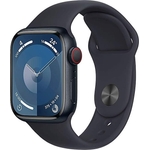
Apple Watch Series 11 GPS Cellular 42mm Space Grey


Release Date of Item: 19/09/2025*PLEASE NOTE STOCK ON LAUNCH WILL BE LIMITED. DELAYS TO DELIVERY T...Release Date of Item: 19/09/2025*PLEASE NOTE STOCK ON LAUNCH WILL BE LIMITED. DELAYS TO DELIVERY TIMES CAN BE EXPECTED*.The ultimate way to watch your health.The more insights you have, the more empowered you are to take action. From the ECG app to the Vitals app and more, Apple Watch Series 11 provides a bigger picture of your health, so you can stay informed. And now Series 11 takes the next big step in heart health with a pioneering feature - hypertension notifications.Get notified of chronic high blood pressure.Hypertension, or high blood pressure, impacts over 1.3 billion adults worldwide and is a leading cause of heart attack, stroke and kidney disease. The condition frequently goes undiagnosed because it often has no symptoms - and even during a doctor's visit, with a single measurement it can be easily missed.Better by every measure.Whether you're training for a marathon or swimming lengths, Apple Watch Series 11 serves up endless ways to work out. And it uses helpful metrics to count every move, so you know how to push harder and train smarter. Let's go - the starting line is on your wrist.To know you is to move you.Now, in addition to detailed insights, Apple Watch Series 11 provides personalised fitness encouragement. With Apple Intelligence from your nearby iPhone, Workout Buddy gives you audible motivation in real time. Together with Workout media, Heart Rate Zones and Custom Workouts, there are even more brains behind the burn.Longer battery life? No problem.Apple Watch Series 11 delivers up to 24 hours of normal use. So even after you've worn your watch all day, the leap in battery life means you can continue to wear it overnight without charging, so you can stay on top of your health data.A real lifeline.Packed with innovative safety firsts, Apple Watch Series 11 has your back. It's designed to summon help when you need it most - even if you can't reach your iPhone.42mm DisplayGPS + Cellular - make calls & send messages with just your Apple watch (a GPS + Cellular model is required to use family setup)5G Connectivity: First Apple Watch with 5G support for faster data speedsHypertension Detection: Tracks blood pressure using a 30-day background algorithm powered by the optical heart rate sensorSleep Score: Evaluates sleep quality based on duration & sleep stagesBattery Life: Up to 24 hours on a single chargeDurable Display: Ion-X glass with a ceramic atomic-level coating, twice as scratch-resistant as before HYPERTENSION NOTIFICATIONS — Apple Watch Series 11 can spot signs of chronic high blood pressure and notify you of possible hypertension. KNOW YOUR SLEEP SCORE — Sleep score provides an easy way to help track and understand the quality of your sleep, so you can make it more restorative. EVEN MORE HEALTH INSIGHTS — Take an ECG anytime. Get notifications for a high and low heart rate, an irregular rhythm and possible sleep apnoea. View overnight health metrics with the Vitals app and take readings of your blood oxygen. STUNNING DESIGN — Thin and lightweight, Series 11 is comfortable to wear round the clock — while exercising and even when you’re sleeping, so it can help track your key metrics. A POWERFUL FITNESS PARTNER — With advanced metrics for all your workouts, plus features like Pacer, Heart Rate Zones, training load, Workout Buddy powered by Apple Intelligence from your nearby iPhone, and more. Apple Watch Series 11 also comes with three months of Apple Fitness+ free. BIG BOOST IN BATTERY LIFE — With up to 24 hours of normal use. And fast charge for up to 8 hours of normal use in just 15 minutes. BUILT TO LAST — With a super-durable glass display that’s 2x more scratch resistant than Series 10. Series 11 also has a water resistance rating of 50m and is IP6X dust resistant. SAFETY FEATURES — Series 11 can detect a hard fall or serious car crash, automatically help connect you with emergency services and notify your emergency contacts. Check In can automatically notify a loved one when you’ve arrived at your destination. STAY CONNECTED ON THE GO — Send a text, make a call, download music and podcasts, and connect to emergency services, all without your iPhone nearby. And now with speedy 5G, you can get fast performance on the go. * LEGAL DISCLAIMERS — This is a summary of the main product features.
Best current price£279.00from Amazon
Best offers
Shopping.co.uk recommended and popular offers
 Amazon£279.00Visit shop ›
Apple Watch Series 11 GPS 42mm Smartwatch with Space Grey Aluminium Case with Black Sport Band S/M. Sleep Score, Fitness Tracker, Health Monitoring, Always-On Display, Water Resistant
Visit shop › OnBuy.com£298.74Visit shop ›
Apple Watch Series 11 42Mm Gps Space Grey Aluminium With Black Sport Band
Visit shop ›