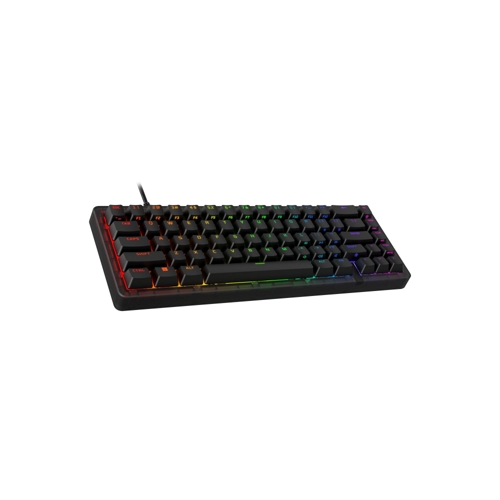
HyperX Origins 2 65 - Red

The HyperX Origins 2 65 is a compact gaming keyboard designed for complete personalization. Featur...

Currently unavailable

Colour

Currently out of stock

This product is not available at the moment. Check back later.

Product Information

Full details

The HyperX Origins 2 65 is a high-performance, compact mechanical keyboard tailored for competitive gamers and enthusiasts who prioritize desk space and deep customization. Featuring a 65% form factor and hot-swappable switches, it allows for a highly personalized tactile experience and efficient workflow; however, users who rely heavily on a dedicated number pad may find the smaller layout requires an adjustment period.

All features

ColourRed
Model Part NumberB4QS3AA#ABU
BrandHyperX

Extended Product Information

FAQs

Can I use any mechanical switch with this keyboard?

The Origins 2 65 is compatible with most 3-pin and 5-pin mechanical switches.

Do I need to solder the switches to replace them?

No, the keyboard features hot-swap sockets, allowing you to pull out and insert switches without soldering.

What is the benefit of the 8k polling rate?

An 8k polling rate reports input to your PC 8000 times per second, which reduces input lag compared to standard 1k polling rate keyboards.

Can I save my macros directly to the keyboard?

Yes, you can create and save up to 3 custom profiles directly to the keyboard's onboard memory using NGENUITY.

Is the USB cable detachable?

Yes, the keyboard features a detachable USB connection, making it easy to pack for travel.

Does this keyboard include a wrist rest?

No, the keyboard does not come with a wrist rest, but it does include flip-down feet for ergonomic angle adjustment.

Troubleshooting

Keyboard keys are not registering in NGENUITY

Ensure the keyboard firmware is updated through the NGENUITY software and verify that the keyboard is plugged into a USB 3.0 port or higher.

Switches are not working after swapping

Ensure the switch pins are perfectly straight before inserting them into the socket. If pins are bent, straighten them carefully with tweezers and re-insert.

RGB lighting is not displaying custom colors

Check that the correct profile is active in NGENUITY and ensure no other conflicting lighting software is running in the background.

Pros and Cons

Pros

  • Extremely compact 65% form factor
  • Hot-swappable switch design for easy customization
  • High-speed 8K polling rate for competitive performance
  • Excellent build quality with vibration-dampening internals
  • Robust software support via HyperX NGENUITY

Cons

  • No dedicated number pad
  • Requires adjustment for users accustomed to full-sized boards
  • High-profile housing may require a wrist rest for some users

Setup, Compatibility & Care

To get started, simply connect the keyboard via USB to your PC, PS5, or Xbox Series console. For full functionality, including macro assignment and RGB lighting profiles, download and install the HyperX NGENUITY software from the official website.

Compatibility: Compatible with PC, PS5, and Xbox Series.

Care Instructions: To maintain performance, keep the keyboard away from liquid spills. Use a keycap puller to remove keycaps periodically for cleaning. Because the board is hot-swappable, you can remove individual switches if you notice debris accumulating in the sockets; use compressed air to clear out dust, but avoid using liquid cleaners directly on the PCB.