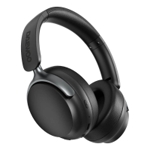
Bose QuietComfort Ultra Wireless Headphones - Blue


Best current price£273.73from PCHUB.UK
Best offers
Shopping.co.uk recommended and popular offers
Bose Blue 880066-1200 Headphones/Headset Wired & Wireless Head-Band Cal
Visit shop


Best current price£273.73from PCHUB.UK
Shopping.co.uk recommended and popular offers
Bose Blue 880066-1200 Headphones/Headset Wired & Wireless Head-Band Cal
Visit shop8 offers from £273.73 - £405.35
View price history by clicking the chart icon.
2 offers from £254.99
View price history by clicking the chart icon.
The Bose QuietComfort Ultra Wireless Headphones in Blue are designed for discerning listeners who seek an unparalleled audio experience free from distractions. Offering Bose's quietest noise cancellation technology, these headphones immerse you in high-fidelity sound and deep bass, making them ideal for travel, commutes, or focused listening. While delivering premium performance, like all wireless devices, they do require periodic charging.
| Colour | Blue |
|---|---|
| Series | QuietComfort Ultra |
| Model Part Number | 880066-1200 |
| Brand | Bose |
Press and hold the power button to enter pairing mode, then select 'Bose QuietComfort Ultra' from your device's Bluetooth settings.
Info needed: Specific battery life details are not provided in the product description.
Info needed: The product description highlights wireless technology. Please consult the user manual for information on wired connectivity options.
Use a soft, slightly damp cloth to wipe the earcups and headband. Avoid harsh cleaning agents.
Yes, they are designed with an over-ear, secure, and lightweight fit specifically for comfort during extended wear.
The primary benefit is immersing you in your audio by eliminating distractions, offering Bose's quietest noise cancellation technology for undisturbed listening.
Ensure the headphones are fully charged. Connect them to a power source and wait a few minutes before attempting to power on again.
Check that the headphones are properly paired and connected to your device. Ensure the volume is turned up on both the headphones and your audio source. Try re-pairing the headphones.
Adjust the fit of the earcups to ensure a tight seal around your ears. Make sure there are no obstructions between the headphones and your audio source.
Verify the charging cable is securely connected to both the headphones and the power source. Try using a different USB port or power adapter.
Setup:
Compatibility:
These headphones utilize standard wireless technology (Bluetooth), making them compatible with most Bluetooth-enabled smartphones, tablets, laptops, and other audio devices.
Care:
QuietComfort Ultra Headphones - Purple - Active noise cancellationFrom £267
Daewoo Sonic Beat Pro Wireless Headphones - BlackFrom £22
JLab JBuds Lux ANC Headphones - Sage, GreenFrom £71
Soundcore Space One Pro - BlackFrom £119
Soundcore Space One Headphones - BlackFrom £60
Bose QuietComfort - Active Noise Cancellation - BlackFrom £300
Bose QuietComfort Headphones (2nd Gen) - Active Noise Cancelling - PurpleFrom £300
beyerdynamic AVENTHO Wireless Over-Ear Headphones with ANC - BlackFrom £359
Sony WH-CH720N Wireless Noise Cancelling Headphones - BlackFrom £59
Sony ULT Wear Wireless Headphones - GreyFrom £119
Bose QuietComfort Wireless Active Noise Canceling Headphones - BlackFrom £161
JLab JBuds Lux ANC Wireless Headphones - GraphiteFrom £71