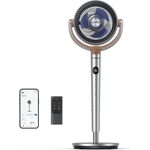
AirFlo™ 43" Smart Hybrid Pedestal Fan - Pro Breeze - White
Powerful, quiet, and effortlessly adaptable – this hybrid fan is built to move air smarter. With a...Powerful, quiet, and effortlessly adaptable – this hybrid fan is built to move air smarter. With a supersized 7-blade fan head and multidirectional vortex airflow, it circulates cool air across your entire room 25–45% faster than an average desk fan.* Switch between pedestal and tabletop height in seconds without tools or screws. Whether at your desk or in the living room, the fan adjusts to your space — not the other way around. Now with Wi-Fi connectivity, you can control every setting — from speed to oscillation — using the Pro Breeze smart app, wherever you are. Laboratory tested, it’s our quietest fan yet. The built-in dust filter also helps trap airborne particles, improving air quality while you cool down. *When compared to an electric desk fan with a 1200- 1400 rpm.
This guide is for anyone looking to maximize comfort and air quality with the Pro Breeze AirFlo™ 43" Smart Hybrid Pedestal Fan. Enjoy powerful, quiet cooling and improved air quality throughout your space. Note that while the fan is designed for quiet operation, it is not entirely silent.
All features
Colour
White
Brand
Pro Breeze
Extended Product Information
FAQs
How do I control the fan without using the app?
The fan has physical control buttons located on the unit itself for power, speed, and oscillation.
What is the warranty period for this fan?
The fan comes with a standard warranty, please refer to your product documentation for the specific duration.
Can I use the fan outdoors?
This fan is designed for indoor use only and should not be exposed to the elements.
How often should I clean the dust filter?
It is recommended to clean the dust filter every 2-4 weeks, depending on usage and environmental conditions.
Does the fan have a timer function?
Yes, the fan includes a timer function that can be set via the Pro Breeze smart app.
What is the maximum height of the fan in pedestal mode?
The maximum height is 43 inches.
What is the decibel level of the fan?
The fan operates quietly; see product specifications for exact decibel (dB) levels at different speeds.
Troubleshooting
Fan does not turn on.
Ensure the fan is plugged into a working outlet. Check the power cord for any damage. Try a different outlet.
Fan is not connecting to Wi-Fi.
Make sure your Wi-Fi network is active and the fan is within range. Restart the fan and your router. Re-enter your Wi-Fi password in the Pro Breeze smart app.
Fan is making unusual noises.
Check if anything is obstructing the fan blades. Clean the blades and surrounding areas. Contact customer support if the issue persists.
Fan is not responding to app commands.
Ensure your mobile device is connected to the same Wi-Fi network as the fan. Close and reopen the Pro Breeze app. Check for app updates.
Pros and Cons
Pros
Efficient air circulation across the entire room
Smart app control for convenient operation
Quiet performance suitable for various environments
Dual functionality for pedestal or tabletop use
Improves air quality with a built-in dust filter
Cons
Requires Wi-Fi for smart features
Fan is not entirely silent at higher speeds
Dust filter requires periodic cleaning
Smart app may require setup and initial configuration
Setup, Compatibility & Care
Assembly: No tools are required for setup. Easily switch between pedestal and tabletop modes without tools or screws.
Wi-Fi Setup: Download the Pro Breeze smart app and follow the in-app instructions to connect to your home Wi-Fi network.
Compatibility: Compatible with iOS and Android devices via the Pro Breeze smart app.
Cleaning the Dust Filter: The dust filter is accessible from the rear of the fan. Remove the filter and clean it with a soft brush or vacuum cleaner every 2-4 weeks, depending on usage and environmental conditions.
General Cleaning: Wipe the fan blades and exterior surfaces with a damp cloth as needed. Do not use harsh chemicals or abrasive cleaners.



 Pro Breeze£134.99Visit shop