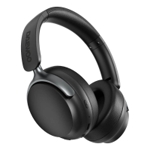
Setup
- Initial Pairing: When first turned on, the WH-CH520 headphones will automatically enter pairing mode. You'll usually hear a voice prompt like 'Bluetooth pairing'.
- Activate Bluetooth: On your device (smartphone, tablet, laptop), go to Bluetooth settings and ensure Bluetooth is turned on.
- Select Headphones: Look for 'WH-CH520' in the list of available devices and select it to pair.
- Multi-Point Connection: To use Multi-Point, pair the headphones with your first device. Then, on the first device, disable its Bluetooth temporarily. Now, pair the headphones with your second device. Once the second device is paired, re-enable Bluetooth on the first device. The headphones should now be connected to both. Audio will play from the active source, and calls will prioritize your phone.
Compatibility
These headphones are compatible with any device that supports Bluetooth audio connectivity, including smartphones, tablets, laptops, and some smart TVs.
Care
- Charging: Use the provided USB-C cable to charge the headphones. Connect it to a standard USB power adapter (not included) or a computer's USB port. Avoid using chargers with excessively high voltage/amperage that could damage the battery.
- Cleaning: Gently wipe the earcups and headband with a soft, dry, or slightly damp cloth. Avoid using harsh chemicals or abrasive cleaners. Ensure no moisture gets into the charging port or microphone openings.
- Storage: When not in use, store the headphones in a clean, dry place away from extreme temperatures and direct sunlight. Avoid placing heavy objects on them to prevent damage.
- Avoid Water: These headphones are not waterproof. Keep them away from rain, splashes, and excessive moisture to prevent damage.



 eBay£24.99Visit shop
  Amazon£29.99Visit shop