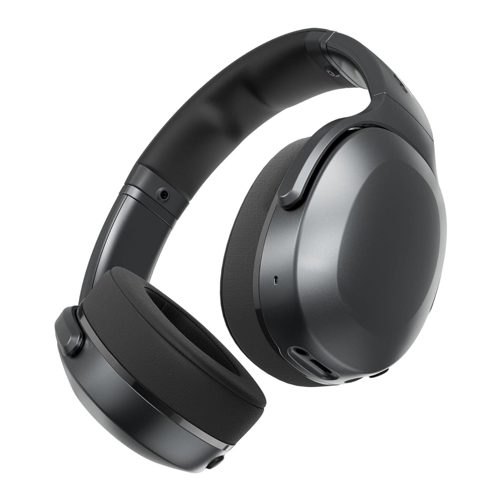
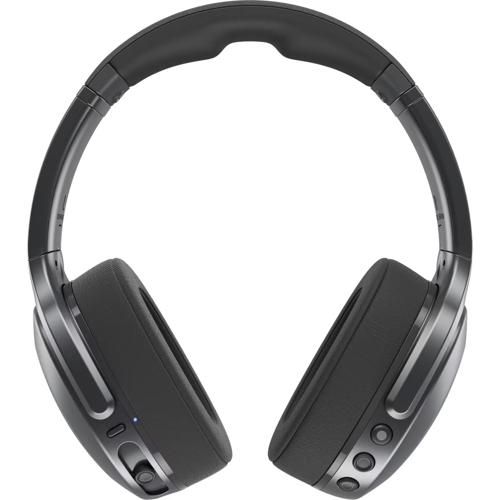
Skullcandy Crusher 540 - Active

Meet Crusher 540 Active, the ultimate active-use headphones designed to help you get in the zone t...

Best current price£169.99from Joybuy

Colour

All Offers

3 offers from £169.99

View price history by clicking the chart icon.

JoybuySkullcandy Coal Crusher Active Wireless Over-Ear Headphones
Free delivery in 1–3 days
£169.99
Visit shop
Joybuy UKSkullcandy Crusher Active Wireless Over-Ear Headphones - Coal 810145323137
Free delivery in 1–3 days
£169.99
Visit shop

Product Information

Full details

The Skullcandy Crusher 540 Active headphones are designed for active individuals seeking an immersive audio experience during workouts. Their key benefit is the powerful, adjustable sensory bass that enhances motivation, combined with a sweat and water-resistant build for durability. A potential caveat is that the intense bass might be overwhelming for users who prefer a more neutral sound profile for activities other than high-energy workouts. Key features include multi-sensory Crusher Bass, a 40-hour battery with Rapid Charge, moisture-fighting nano-coating, breathable ear cushions, and a secure clamp-force fit for active use. The Skullcandy App offers further customization through Personal Sound and button remapping, while built-in Tile finding technology provides peace of mind.

All features

ColourBlack
Headphones Noise CancellationActive
SeriesCrusher 540
Model Part NumberS6EVW-T992
BrandSkullcandy

Extended Product Information

FAQs

How do I adjust the Crusher Bass?

You can adjust the intensity of the Crusher Bass using the dedicated slider located on the left earcup of the headphones. Slide it up to increase the bass level and down to decrease it.

How long does the battery last?

The Skullcandy Crusher 540 Active headphones offer up to 40 hours of listening time on a single charge with standard usage. Battery life may vary depending on volume levels and use of features like Crusher Bass.

How does Rapid Charge work?

Rapid Charge allows you to get approximately 4 hours of playback from just a 10-minute charge when the battery is low. Simply connect the headphones to a power source using the USB charging cable.

What is Personal Sound and how do I set it up?

Personal Sound, powered by Audiodo, creates a custom audio profile based on your unique hearing. Download the Skullcandy App, go to the Personal Sound section, and follow the on-screen prompts to complete a hearing test. The headphones will then adjust playback to optimize sound for your hearing.

Are these headphones truly waterproof?

The headphones feature a moisture-fighting nano-coating that makes them sweat and water-resistant, suitable for intense workouts. However, they are not fully waterproof and should not be submerged in water.

How do I find my lost headphones?

First, ensure your headphones are registered in the Tile app. If they are lost, open the Tile app on your smartphone; it will show you the last known location of your headphones on a map. You can also trigger a sound to play from the headphones if they are within Bluetooth range.

Can I use the headphones while they are charging?

Yes, you can use the headphones while they are charging via the USB cable, but this may impact the effectiveness of the Rapid Charge feature.

Troubleshooting

Headphones won't turn on

Ensure the headphones are charged. Connect them to a power source for at least 10 minutes and try again. Check if the power button is being held down correctly.

No sound or low volume

Check the volume level on both your device and the headphones. Ensure the headphones are correctly paired and connected via Bluetooth. Try re-pairing the headphones with your device.

Bluetooth connection is unstable or dropping

Ensure your device's Bluetooth is enabled and within range. Turn off and on the Bluetooth on your device and headphones. Minimize interference from other wireless devices or physical obstructions. Try forgetting the device in your Bluetooth settings and re-pairing.

Crusher Bass is not working or feels weak

Ensure the Crusher Bass feature is enabled and adjusted correctly using the slider on the headphones. Check the sound settings within the Skullcandy App for any bass-related customizations.

Cannot find headphones using Tile App

Make sure the headphones are powered on and within Bluetooth range. Ensure the Tile app is running and that the headphones are registered in your Tile account. Check the battery level of the headphones.

Pros and Cons

Pros

  • Powerful and adjustable sensory bass enhances workout motivation.
  • Durable construction with sweat and water-resistant nano-coating.
  • Long battery life with a convenient Rapid Charge feature.
  • Secure fit designed to stay in place during intense physical activity.
  • Customizable sound profiles via the Skullcandy App for personalized audio.
  • Integrated Tile technology for easy location of lost headphones.

Cons

  • The intense bass may not suit all listening preferences or genres.
  • Noise isolation is present but not as effective as dedicated active noise-cancelling headphones.
  • App dependency for advanced features like Personal Sound customization.
  • The clamp force, while secure, might feel tight for some users during extended wear.
  • Bulkier design compared to earbuds, making them less pocketable.

Setup, Compatibility & Care

Setup:

  1. Ensure the headphones are fully charged using the provided USB cable.
  2. Turn on the headphones by pressing and holding the power button.
  3. Enable Bluetooth on your device (smartphone, tablet, etc.).
  4. Select 'Crusher 540' from the list of available Bluetooth devices on your device.
  5. Download the Skullcandy App from your device's app store to access features like Personal Sound and button customization. Follow the in-app instructions to pair the headphones for advanced features and register for Tile finding.

Compatibility:

  • The Crusher 540 Active is compatible with any device supporting Bluetooth 5.0 or later, including most smartphones, tablets, and computers.
  • The Skullcandy App is available for iOS and Android devices.
  • For Tile finding functionality, you will need to download and install the Tile app and create an account.

Care:

  • Earpads: Clean the breathable fabric earpads gently with a slightly damp cloth. Avoid soaking them.
  • Exterior: Wipe down the exterior of the headphones, including the nano-coated surfaces, with a soft, dry or slightly damp cloth after each use, especially after sweaty workouts.
  • Storage: Store the headphones in a cool, dry place. Utilize the flat-folding design for compact storage when not in use. Avoid extreme temperatures and direct sunlight for prolonged periods.
  • Charging Port: Ensure the charging port is free of debris before connecting the charging cable.

Price History

DatePrice
Visit shop