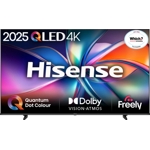
Hisense 65" 4K Ultra HD Grey - E8Q

Experience stunning visuals and immersive audio with the Hisense 65E8QTUK 65-inch 4K Ultra HD Mini...

Best current price£799.00from AO.com

Screen Size

All Offers

5 offers from £799.00 - £817.40

View price history by clicking the chart icon.

AO.comHisense 65" E8QTUK MiniLED 4K Ultra HD TV - 144Hz, Quantum Dot Colour, Smart TV, Black
£10.00 delivery
£799.00
Visit shop
Appliances Direct (BID)Hisense E8qtuk 65 Inch Smart 4K Ultra Hd Mini-Led Tv 65E8QTUK
£14.99 delivery
£799.00
Visit shop
Laptops Direct (BID)Hisense E8qtuk 65 Inch Smart 4K Ultra Hd Mini-Led Tv Grey, Laptops Direct - 65E8QTUK
£14.99 delivery
£799.00
Visit shop
Marks ElectricalHisense 65" ULED Mini LED Smart TV - 4K Ultra HD, VIDAA, 144Hz Refresh Rate, Dolby Vision, HDR10+ 65E8QTUK
Free delivery in 1–3 days
£799.00
Visit shop
PcNova.co.ukHisense Light/Grain 65" E8qtuk Miniled 144Hz Smart Ai Tv With Freely
Free delivery in 1–3 days
£817.40
Visit shop

Refurbished Offer

1 offer from £649.99

View price history by clicking the chart icon.

eBayHisense 65"" 65E8QTUK Smart 4K UHD HDR Mini LED Freely TV
Free delivery in 1–3 days
£649.99
Visit shop

Used Offers

7 offers from £431.25 - £585.00

View price history by clicking the chart icon.

eBayHisense 65E8QTUK 4K ULED MiniLED Smart TV (SRP £799) *MISSING STAND SCREWS*
Free delivery in 1–3 days
£431.25
Visit shop

Product Information

Full details

The Hisense 65" E8Q Series Smart TV is designed for home entertainment enthusiasts who want stunning picture quality and immersive audio. It delivers exceptional visuals with its MiniLED technology, Quantum Dot Colour, and 144Hz refresh rate, while the built-in subwoofer and Dolby Atmos create an engaging audio experience. Keep in mind that while the initial setup is straightforward, optimizing the picture and sound settings may require some adjustments to get the most out of the TV.

All features

ColourGrey
Energy EfficiencyG
Screen Size65
Display Type4K Ultra HD
SeriesE8Q
Model Part Number65E8QTUK
BrandHisense

Extended Product Information

FAQs

How do I update the TV's firmware?

Go to the TV's settings menu, select 'Support' or 'System,' and then 'Software Update.' Follow the on-screen instructions.

Can I connect Bluetooth headphones?

Yes, go to the settings menu, select 'Bluetooth,' and pair your headphones.

How do I access streaming apps?

Press the dedicated app buttons on the remote (e.g., Netflix, Disney+) or navigate through the VIDAA U8.5 Smart OS home screen.

What is the warranty period?

The warranty period is typically two years, but please refer to your product documentation for the specific details.

How do I reset the TV to factory settings?

Go to the settings menu, select 'System' or 'Support,' and then 'Reset' or 'Factory Reset.' Follow the on-screen instructions. Note that this will erase all your settings.

Does the TV support HDR?

Yes, the TV supports various HDR formats, including Dolby Vision, HDR10, and HLG.

How do I use the Game Bar?

The Game Bar is automatically activated when a gaming source is detected. You can access it to adjust settings and optimize your gaming experience.

Troubleshooting

TV won't turn on

Check the power cord connection and outlet. Try a different outlet and ensure the power switch on the TV is turned on.

No picture or distorted picture

Check the HDMI cables and connections. Make sure the input source is selected correctly. Reset the TV to factory settings.

No sound

Check the volume level and mute settings. Ensure the correct audio output is selected. Check external audio device connections.

Wi-Fi connection issues

Check the Wi-Fi network connection and password. Restart the TV and router. Move the TV closer to the router.

Remote control not working

Check the remote control batteries. Make sure there are no obstructions between the remote and the TV's sensor. Pair the remote again in the settings menu.

Pros and Cons

Pros

  • Stunning picture quality with MiniLED and Quantum Dot technologies.
  • Smooth gaming experience with 144Hz refresh rate and AMD FreeSync Premium Pro.
  • Immersive audio with built-in subwoofer and Dolby Atmos.
  • Smart features and easy access to streaming services.
  • Wide viewing angles and anti-reflection screen.
  • Sleek design with Solar Remote.

Cons

  • Requires some initial setup and adjustment of settings for optimal picture and sound.
  • Energy efficiency class G may result in higher energy consumption.
  • May not have all the apps as other major smart TV platforms.
  • Picture settings may need adjusting depending on the viewing environment.
  • Some users may find the VIDAA U8.5 Smart OS interface less familiar.

Setup, Compatibility & Care

Setup

  1. Unpacking: Carefully remove the TV from its packaging, ensuring all components (stand, remote, cables) are present.
  2. Assembly: Attach the stand to the TV using the provided screws. Alternatively, mount the TV on a VESA-compatible wall mount (400 x 400 mm).
  3. Connections: Connect your devices (cable box, game console, Blu-ray player) to the HDMI ports. Connect the power cable and turn on the TV.
  4. Initial Setup: Follow the on-screen instructions to set up the TV, including connecting to your Wi-Fi network and signing in to your accounts.

Compatibility

The Hisense 65" E8Q is compatible with:

  • HDMI 2.1 devices
  • Wi-Fi networks (802.11a/b/g/n/ac)
  • Bluetooth devices (for connecting headphones, soundbars, etc.)
  • Various video formats (AVI, MKV, MP4, etc.)

Care

  • Cleaning: Use a soft, dry cloth to wipe the screen. For stubborn marks, slightly dampen the cloth with water and wipe gently. Avoid using harsh chemicals.
  • Ventilation: Ensure adequate ventilation around the TV to prevent overheating.
  • Power: Unplug the TV during thunderstorms or extended periods of non-use to protect it from power surges.
  • Updates: Keep the TV's firmware updated to ensure optimal performance and access to the latest features. Updates are typically available via the TV's settings menu.

Similar items

Price History

DatePrice
Visit shop