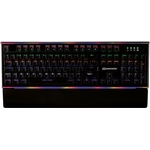
Turtle Beach Command Series KB5 Mechanical Gaming Keyboard - Black

The Turtle Beach Command Series KB5 Gaming Keyboard puts extra control right where you need it. It...

Best current price£74.99from Amazon

All Offers

7 offers from £74.99 - £189.00

View price history by clicking the chart icon.

AmazonTurtle Beach Command Series KP7 Gaming Keypad - Compact Design, Rapid Trigger, Hall-Effect Switches, Programmable Wheel, 8K Polling, Double Shot PBT Keycaps, RGB Lighting for FPS, MOBA Precision
Free delivery in 1–3 days
£74.99
Visit shop
CurrysTurtle Beach Command Series Kb5 Mechanical Gaming Keyboard - Black, Black
Free delivery in 1–3 days
£139.00
Visit shop
eBayTurtle Beach Command Series KB5 Full-Size Wired Full-size (100%), Black
Free delivery in 1–3 days
£178.52
Visit shop

Product Information

Full details

The Turtle Beach Command Series KB5 is designed for competitive gamers and enthusiasts who require high-performance, responsive controls without tabbing out of their games. Its standout feature is the 2.4-inch integrated touch display, which provides real-time system stats and macro management, though users should note it is a full-sized board that requires a dedicated space on the desk.

All features

ColourBlack
Model Part Number711662
BrandTurtle Beach

Extended Product Information

FAQs

Can I change the key switches on the KB5?

The KB5 uses integrated Titan low-profile mechanical switches; they are not intended to be user-swappable like hot-swappable keyboards.

Does the keyboard support custom RGB lighting?

Yes, it features full per-key RGB lighting which can be customized using the Swarm II software.

What is the benefit of the 8K polling rate?

An 8K polling rate reports input to your PC 8,000 times per second, significantly reducing input delay compared to standard keyboards.

Is the wrist rest removable?

Yes, the keyboard includes a detachable palm rest for ergonomic comfort that can be removed for a smaller footprint.

Does the KB5 work with Mac?

The KB5 is optimized for PC gaming. While it may register basic typing on other operating systems, full feature functionality requires the Swarm II software, which is Windows-only.

Troubleshooting

Keyboard not detected by PC

Ensure the USB cable is firmly connected to a USB 3.0 or higher port and try a different port if necessary.

Touch display is unresponsive

Check the Swarm II software to ensure the display driver is updated and the display function is enabled in settings.

Macro keys not triggering

Verify that the macros are properly assigned to the specific keys within the Swarm II profile manager.

Pros and Cons

Pros

  • Integrated touch display adds significant convenience
  • Extremely low actuation distance for rapid response
  • Durable double-shot PBT keycaps resist shine and wear
  • High-speed 8K polling for competitive advantage
  • Comfortable typing experience with detachable wrist rest

Cons

  • Full-size form factor occupies more desk space
  • Requires Swarm II software installation for full customization
  • Wired-only connectivity may not suit all setups

Setup, Compatibility & Care

Connect the KB5 using the provided USB Type-A cable to your PC. For full functionality, download and install the Turtle Beach Swarm II software suite, which serves as the hub for macros, RGB effects, and firmware updates.

Care Instructions:

  • Keep the keyboard away from liquid spills.
  • Use compressed air to blow out dust from under the keycaps periodically.
  • Wipe the chassis and keycaps with a lightly dampened microfiber cloth to remove oils.
  • Ensure the detachable wrist rest is properly snapped into place to maintain ergonomic support during long sessions.

Similar items

Price History

DatePrice
Visit shop