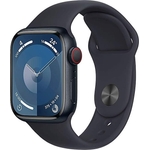
The Apple Watch Series 11 offers invaluable health insights, including high or low heart rate noti...The Apple Watch Series 11 offers invaluable health insights, including high or low heart rate notifications and sleep score tracking to help you improve sleep quality. It acts as a powerful fitness partner with advanced workout metrics and features like Pacer and Heart Rate Zones. The watch boasts up to 24 hours of battery life, fast charging capabilities, and a durable design with a scratch-resistant glass display and 50m water resistance. Key health features include ECG, irregular rhythm notifications, and blood oxygen monitoring. Safety features like fall detection and crash detection can automatically contact emergency services. Stay connected with text, calls, music, and Siri. The Series 11 requires iPhone 11 or later with iOS 26 or later. Specific features have age restrictions and may require a data plan. Battery life varies by use. Apple Fitness+ requires a subscription. Fast charging is compatible with Series 7 and later models. Water resistance and dust resistance are not permanent conditions.
Apple Watch Series 11 Smartwatch GPS + Cellular 46mm Jet Black M/L Sport BandFree delivery in 1–3 days£299.99Visit shop →
Apple Watch Series 11 A3335 Jet Black 42mm 5G boxed Grade A Apple UK WarrantyFree delivery in 1–3 days£319.00Visit shop →
Apple Watch Series 11 Smartwatch GPS + Cellular 46mm Jet Black M/L Sport BandFree delivery in 1–3 days£319.99Visit shop →
Apple Watch Series 11 GPS/Cellular 46mm Smartwatch Jet Black Sport Band BoxedFree delivery in 1–3 days£339.00Visit shop →
Product Information
Full details
The Apple Watch Series 11 is designed for health-conscious individuals seeking a comprehensive wellness companion. It offers invaluable health insights, powerful fitness tracking, and convenient connectivity, all in a stylish and durable design. While offering impressive features, users should be aware that some advanced functionalities require an iPhone 11 or later. This guide provides an in-depth look at the Apple Watch Series 11, covering its features, usage, and troubleshooting tips.
All features
Colour
Black
Dial Size
46mm
Series
Series 11
Model Part Number
MEUX4MP/A
Brand
Apple
Extended Product Information
FAQs
How do I charge my Apple Watch Series 11?
Place the back of your watch on the magnetic charging puck. Make sure the watch is aligned properly and the charging cable is connected to a power source.
Is the Apple Watch Series 11 waterproof?
The watch is water-resistant up to 50 meters. It's suitable for swimming and other shallow water activities. Avoid exposure to high-velocity water or soap.
How do I change the watch band?
Press the band release button and slide the band sideways to remove it. Slide the new band in until it clicks into place.
How do I update the watch software?
Make sure your watch is on the charger and within range of your iPhone. Open the Watch app on your iPhone, go to General > Software Update.
How do I restart my Apple Watch?
Press and hold the side button until the power options appear. Tap the power off icon, then turn it back on. If that doesn't work, force restart by holding the side button and Digital Crown simultaneously until the Apple logo appears.
Can I use the Apple Watch Series 11 without an iPhone?
You can use some features without an iPhone, such as fitness tracking and some apps. However, many features require an iPhone to be nearby and connected.
What is the warranty for the Apple Watch Series 11?
The Apple Watch Series 11 comes with a limited one-year warranty. AppleCare+ is available for extended coverage.
Troubleshooting
Watch not turning on.
Ensure the watch is charged. Try a different power outlet or charging cable.
Poor battery life.
Reduce screen brightness, disable always-on display, and check which apps are using the most battery in the Watch app on your iPhone.
Connectivity issues.
Ensure Bluetooth is enabled on your iPhone, and that your watch and phone are within range. Restart both devices if necessary.
Heart rate monitoring is inaccurate.
Make sure the watch is snug on your wrist. Clean the back of the watch and your wrist to ensure proper skin contact.
Apps not installing.
Ensure your iPhone has a stable internet connection and sufficient storage space. Restart the watch and try again.
Pros and Cons
Pros
Comprehensive health tracking features for detailed insights into your well-being.
Robust fitness tracking with advanced metrics for effective workout analysis.
Seamless connectivity for staying in touch and accessing information on the go.
Durable and water-resistant design suitable for various activities.
Emergency features provide added safety and peace of mind.
Cons
Requires an iPhone 11 or later with iOS 26 or later to use many features.
Battery life can vary significantly based on usage.
Apple Fitness+ requires a subscription.
Some features have age restrictions.
Water resistance and dust resistance are not permanent conditions.
Setup, Compatibility & Care
Setup:
Pair your Apple Watch Series 11 with your iPhone via Bluetooth. Follow the on-screen instructions in the Watch app.
Ensure your iPhone is running iOS 26 or later.
Connect to Wi-Fi to download updates and apps.
Compatibility:
The Apple Watch Series 11 is compatible with iPhone 11 or later models.
Ensure your iPhone has the latest version of iOS.
Some features require a cellular plan.
Care:
Clean your watch regularly with a soft, lint-free cloth. Avoid using harsh chemicals or cleaning agents.
Rinse your watch with fresh water after exposure to saltwater or chlorine.
Avoid extreme temperatures and direct sunlight for prolonged periods.
Use only official Apple watch bands or compatible third-party bands.