
Kenable Flat HDMI Extension Cable - Black
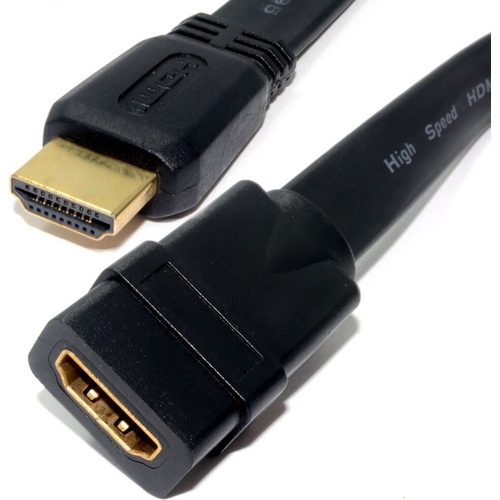
A standard HDMI extension cable that will allow you to extend an existing cable. Ideal if your exi...

Best current price£3.64from OnBuy.com

All Offers

3 offers from £3.64 - £4.94

View price history by clicking the chart icon.

OnBuy.comKenable Flat Hdmi High Speed Extension Cable - Male To Female, 1M, -Plated, V1.4 (Code 7886) Black/Gold 5055383478866
Free delivery in 1–3 days
£3.64
Visit shop
B&QB&Q - Flat Hdmi High Speed Extension Cable Male Plug To Female Socket 1M
Free delivery in 1–3 days
£4.94
Visit shop

Product Information

Full details

This Kenable Flat HDMI Extension Cable in Black is designed for users who need to extend the reach of their existing HDMI cables. Its primary benefit is providing a simple solution for connecting devices when the original cable falls short, offering a low-profile alternative to bulky standard cables. A potential caveat is its support for HDMI High Speed (v1.4), which may not be sufficient for the latest high-bandwidth video standards. Key features include a flat cable design for discreet routing, moulded plugs, and gold-plated connectors for reliable signal transfer.

All features

ColourBlack
Model Part Number007886
Brandkenable

Extended Product Information

FAQs

What is the maximum resolution this cable supports?

This cable supports HDMI High Speed (v1.4), which is capable of resolutions up to 1080p and 3D.

Can I use this cable for 4K content?

While some 4K resolutions might work at very low frame rates with HDMI v1.4, this cable is not officially designed or recommended for reliable 4K content due to bandwidth limitations.

How do I connect it?

Simply plug your existing HDMI cable into the female end of this extension, and then plug the male end of the extension into your display device.

Will this protect my TV's HDMI port?

Yes, by acting as an intermediary, it reduces the number of times you plug and unplug directly into your TV's port, which can help prevent wear and tear.

Is the cable directional?

No, HDMI cables are generally not directional, and this extension cable can be used in either direction for connection.

What does 'flat' mean for the cable?

The 'flat' design refers to the shape of the cable itself, making it thinner and easier to route discreetly, for example, under carpets or along walls, compared to standard round HDMI cables.

Troubleshooting

No picture or intermittent signal

Ensure both ends of the extension cable, as well as the existing HDMI cable, are firmly connected. Try bypassing the extension to see if the original cable works. Check if the connected devices are powered on and set to the correct HDMI input.

Poor video or audio quality (e.g., static, flickering)

Ensure the gold-plated connectors are clean and free from dust. Check the combined length of the cables; very long extensions can sometimes degrade signal quality. If possible, test with a shorter, known-good HDMI cable to rule out issues with other cables in the chain.

Cable does not fit securely

Verify that you are using a standard HDMI connector. The moulded plugs are designed for a firm fit; if it feels too loose or too tight, there might be an obstruction or a non-standard port.

Pros and Cons

Pros

  • Provides a simple solution for extending HDMI cable length.
  • Flat design aids in discreet installation and cable management.
  • Helps protect HDMI ports on devices from physical strain.
  • Gold-plated connectors offer good signal quality and durability.
  • Moulded plugs ensure a secure and reliable connection.

Cons

  • Limited to HDMI v1.4 specifications, may not support the latest 4K/8K resolutions or higher refresh rates.
  • As an extension, it can introduce a slight signal degradation over very long combined cable lengths.
  • The flat design, while beneficial for routing, might be less durable against sharp bends compared to round cables.

Setup, Compatibility & Care

Setup:

  1. Connect the female end of the Kenable Flat HDMI Extension Cable to the male end of your existing HDMI cable.
  2. Connect the male end of the extension cable to the HDMI input port on your display device (e.g., TV, monitor).
  3. Ensure all connections are snug and secure.

Compatibility:

  • This cable is compatible with all devices featuring standard HDMI ports and supporting HDMI High Speed (v1.4).
  • Backward compatible with earlier HDMI versions.
  • Suitable for resolutions up to 1080p and 3D.

Care:

  • To clean the cable and connectors, gently wipe them with a dry, soft cloth. Avoid using liquids or abrasive cleaners.
  • Do not excessively bend or twist the flat cable, especially at the connector points, to prevent internal damage.
  • Store the cable in a cool, dry place when not in use.

Similar items

Price History

DatePrice
Visit shop