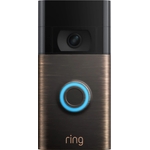
Ring Video Doorbell Pro (3rd gen) - Wired - Silver

Transform your entryway with the Ring Wired Doorbell Pro. Featuring Retinal 4K technology, it capt...

Best current price£219.00from AO.com

All Offers

5 offers from £219.00 - £387.99

View price history by clicking the chart icon.

AO.comRing Wired Doorbell Pro (3rd gen) - Smart Doorbell - 4K Retinal Video - 10x Zoom - Silver
Free delivery in 1–3 days
£219.00
Visit shop
CurrysRing Wired Retinal 4K Video Doorbell Pro (Newest Gen) - Deep Silver, Silver/Grey
Free delivery in 1–3 days
£219.99
Visit shop
OnBuy.comRing Wired Video Doorbell Pro (Newest Gen) Hardwired | Video Doorbell Camera | Retinal 4K, Up To 10X Enhanced Zoom | Wide Field Of View | Radar Detect
Free delivery in 1–3 days
£223.00
Visit shop
B&Q - Ring Wired Video Doorbell Pro (Newest Gen) Hardwired Camera Retinal 4 KUp To 10 X Enhanced Zoom Wide Field Of View Radar
Free delivery in 1–3 days
£387.99
Visit shop

Product Information

Full details

The Ring Video Doorbell Pro (3rd gen) is designed for homeowners seeking advanced security and communication at their entryway. Its key benefit is the Retinal 4K video quality with enhanced zoom, providing unparalleled clarity for visitor identification and package detection. A potential caveat is its wired-only nature, requiring existing doorbell wiring or a plug-in adapter for power.

All features

ColourSilver
Model Part NumberX17UD
BrandRing

Extended Product Information

FAQs

Do I need a subscription to use the Ring Video Doorbell Pro (3rd gen)?

Live view, motion alerts, and two-way talk are available without a subscription. However, to record, review, and share video history, a Ring Protect subscription plan is required.

Can I use this doorbell with my existing chime?

The Ring Video Doorbell Pro (3rd gen) is designed to work with most existing wired doorbell systems. It can also trigger a Ring Chime or Echo device if you have one.

What is the difference between 3D Motion Detection and standard motion detection?

3D Motion Detection uses radar to accurately detect the distance and path of motion, allowing for more precise alerts and reducing false notifications from movement outside your property.

How is the Plug-In Adapter different from hardwiring?

The Plug-In Adapter provides continuous power by connecting to a standard indoor electrical outlet, offering an alternative for homes without existing doorbell wiring. Hardwiring connects directly to your home's doorbell circuit.

What is the field of view for the Ring Video Doorbell Pro (3rd gen)?

The doorbell offers a wide field of view, providing head-to-toe visibility of visitors at your door.

How do I update the firmware on my doorbell?

Firmware updates are typically downloaded and installed automatically by Ring. Ensure your doorbell is connected to Wi-Fi and has sufficient power. You can check the firmware status in the device settings within the Ring app.

Can I zoom in on the video feed?

Yes, the Ring Video Doorbell Pro (3rd gen) features up to 10x enhanced zoom, allowing you to get a closer look at details.

Troubleshooting

Doorbell not powering on

Verify that the wiring is securely connected to the doorbell and the transformer. Check that the transformer is providing adequate voltage (16-24V AC) or ensure the Plug-In Adapter is fully connected to a working outlet.

Wi-Fi connection issues

Ensure your Wi-Fi network is stable and within range. Restart your router and the doorbell. Check that you are using the correct Wi-Fi password and that your network is broadcasting on 2.4GHz or 5GHz bands.

Motion alerts are too frequent or not triggering

Adjust the Motion Zones and Motion Sensitivity settings in the Ring app. Fine-tune the 3D Motion Detection zones to focus on specific areas and reduce false triggers. Ensure the device's firmware is up to date.

Poor video quality (blurry, pixelated)

Check your Wi-Fi signal strength. Ensure the camera lens is clean. Verify that the resolution settings in the app are appropriate for your connection speed.

Two-Way Talk audio is distorted or not working

Ensure both the doorbell and the device you are using to communicate have a strong internet connection. Check microphone and speaker permissions for the Ring app.

Pros and Cons

Pros

  • Exceptional video clarity with 4K resolution and advanced zoom capabilities.
  • Precise motion detection reduces false alerts and focuses on relevant activity.
  • Excellent low-light performance ensures visibility day and night.
  • Clear two-way audio for effective communication with visitors.
  • Sleek, modern design enhances the home's exterior.

Cons

  • Requires existing wired doorbell setup or a plug-in adapter (sold separately).
  • Advanced features may require a Ring Protect subscription for full functionality.
  • Initial setup might be complex for users unfamiliar with electrical wiring.
  • Relies on a stable Wi-Fi connection for optimal performance.
  • The 3D Motion Detection may require careful placement and adjustment.

Setup, Compatibility & Care

Setup:

This wired doorbell requires a compatible doorbell transformer (16-24V AC, 30VA) or can be powered using the Ring Plug-In Adapter (sold separately) connected to an indoor electrical outlet.

  1. Power Source: Ensure you have existing doorbell wiring connected to a suitable transformer or connect the Plug-In Adapter to a power source.
  2. Mounting: Securely mount the doorbell at the recommended height (around 4 feet) using the provided hardware. Ensure it is positioned to capture the desired view.
  3. Wiring: Connect the doorbell wires to the terminals on the back of the device. If using the Plug-In Adapter, connect its cable to the doorbell.
  4. App Configuration: Download the Ring app and follow the on-screen instructions to connect the doorbell to your Wi-Fi network and complete the setup.

Compatibility:

  • Works with existing Ring Chimes or can be paired with a new Ring Chime.
  • Compatible with Alexa-enabled devices for voice control and announcements.
  • Requires a Wi-Fi network (802.11 b/g/n, 2.4GHz or 5GHz).

Care:

  • Clean the lens and exterior with a soft, dry microfiber cloth.
  • Avoid using abrasive cleaners or solvents, which can damage the finish and lens.
  • Ensure the mounting area is free from debris that could obstruct the sensors.

Similar items

Price History

DatePrice
Visit shop