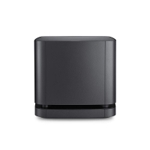
LG Sound Suite M5 Wireless Multi-room Speaker - Black
Experience immersive, multidimensional sound with LG's Sound Suite M5 speaker. Part of LG's multi-...Experience immersive, multidimensional sound with LG's Sound Suite M5 speaker. Part of LG's multi-room system, it seamlessly integrates with Google Cast and Apple AirPlay speakers, allowing you to sync playlists across different rooms. Its Dolby Atmos FlexConnect (DAFC) technology adapts to your setup, detecting speaker placement to balance sound for a wraparound effect. Enjoy wire-free, adaptive surround sound with a front array featuring a silk-diaphragm tweeter and woofer, and an up-firing unit for convincing overhead effects, delivering 3D audio you can feel. The speaker also boasts AI Sound Pro to analyze and optimize audio clarity, balance, and spatial depth, and AI Room Calibration Pro to fine-tune each channel for your specific room. Stream effortlessly via WiFi and Bluetooth. Built with audio expertise from Peerless, it offers refined sound quality and a premium design that complements any home.
Lg Sound Suite Multi Room Speaker M5 M5.Agbrllk£3.99 delivery£249.00Visit shop →
Lg Sound Suite M7 Wireless Bluetooth Wi-Fi Speaker With Dolby Atmos£3.99 delivery£379.00Visit shop →
Lg Sound Suite M7 Wireless Bluetooth Wi-Fi Speaker With Dolby Atmos£3.99 delivery£379.00Visit shop →
Lg Sound Suite Subwoofer W7 W7.Agbrllk£3.99 delivery£579.00Visit shop →
Lg Sound Suite Subwoofer W7 W7.Agbrllk£3.99 delivery£579.00Visit shop →
Lg Sound Suite H7 Soundbar H7.Agbrllk£3.99 delivery£849.00Visit shop →
Lg Sound Suite H7 Soundbar H7.Agbrllk£3.99 delivery£849.00Visit shop →
Product Information
Full details
The LG Sound Suite M5 is for audiophiles seeking immersive, multidimensional sound in a versatile, multi-room setup. Its key benefit is Dolby Atmos FlexConnect (DAFC) technology, which intelligently adapts sound to your room's acoustics for a wraparound effect. A potential caveat is that to experience full Dolby Atmos, pairing two M5 speakers is recommended. This wireless speaker integrates seamlessly with Google Cast and Apple AirPlay, offers AI-driven audio optimization, and boasts a premium design.
All features
Colour
Black
Series
Sound Suite M5
Model Part Number
719613
Brand
LG
Extended Product Information
FAQs
Do I need two M5 speakers for Dolby Atmos?
While the M5 supports Dolby Atmos technology, pairing two M5 speakers is recommended to experience the full, immersive, multidimensional Dolby Atmos sound.
How do I connect the speaker to my home Wi-Fi?
Connect via Wi-Fi using the LG ThinQ app or compatible streaming apps like Google Home or Apple Home. Follow the on-screen instructions for network setup.
Can I use the M5 with other brands of AirPlay or Google Cast speakers?
Yes, the M5 is designed to integrate seamlessly with other speakers supporting Google Cast and Apple AirPlay 2 for multi-room audio synchronization.
What is AI Sound Pro?
AI Sound Pro is a feature that analyzes the content being played (dialogue, music, movies) in real-time and automatically optimizes audio settings like clarity, balance, and spatial depth for the best listening experience.
What is the RMS rated power of the speaker?
The LG Sound Suite M5 has an RMS rated power of 50W.
Is the speaker water-resistant?
The product specifications do not indicate water resistance. It should be kept away from moisture and liquids.
How do I reset the speaker to factory settings?
Refer to the LG ThinQ app or the product manual for specific instructions on performing a factory reset, as this process may vary.
Troubleshooting
Speaker not powering on
Ensure the power cable is securely connected to both the speaker and a working electrical outlet. Try a different outlet.
Cannot connect to Wi-Fi
Verify your Wi-Fi network name and password are correct. Restart your router and the speaker. Ensure the speaker is within range of your Wi-Fi router.
Bluetooth connection issues
Make sure the speaker is in pairing mode and no other devices are actively connected via Bluetooth. Turn Bluetooth off and on again on your source device. Move devices closer together.
No sound or distorted audio
Check the volume level on the speaker and the source device. Ensure the correct audio source is selected. Restart the speaker and the source device. If using AI Room Calibration, ensure it has completed successfully.
Multi-room playback is choppy
Ensure a stable Wi-Fi connection for all speakers. Reduce the number of active devices on your network. Move speakers closer to the Wi-Fi router if possible.
Pros and Cons
Pros
Delivers immersive 3D audio with Dolby Atmos support.
Intelligent AI features optimize sound for any room and content.
Seamless multi-room audio integration via Google Cast and AirPlay 2.
Wireless connectivity (Wi-Fi and Bluetooth) offers great flexibility.
Premium build quality and aesthetic design.
Cons
Full Dolby Atmos experience requires pairing two M5 speakers.
Reliance on wireless connectivity may be a concern for some users.
AI calibration might require some initial setup time.
Setup, Compatibility & Care
Setup:
Connect the speaker to a power source.
Download the LG ThinQ app (or your preferred streaming app like Spotify Connect, Google Home, or Apple Home) to your smartphone or tablet.
Follow the in-app instructions to connect the M5 speaker to your home Wi-Fi network.
For Bluetooth pairing, activate Bluetooth on your device and select the 'LG Sound Suite M5' from the available list.
If pairing two speakers for Dolby Atmos, use the LG ThinQ app or relevant streaming app to link them as a stereo pair.
Compatibility:
Wireless Streaming: Wi-Fi (via Google Cast, Apple AirPlay 2) and Bluetooth.
Multi-room Systems: Compatible with Google Cast and Apple AirPlay 2 enabled devices.
Audio Formats: Supports standard audio codecs for streaming services.
Care:
Clean the exterior with a soft, dry cloth. Avoid using harsh chemicals or abrasive cleaners.
Ensure speaker grilles are free from dust and debris. A gentle vacuum with a brush attachment can be used if necessary.
Keep the speaker away from extreme temperatures and direct moisture.



 Amazon£199.00Visit shop
  AO.com£199.00Visit shop