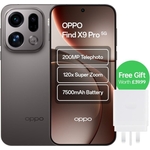
The Oppo Find X9 Pro is a premium smartphone that combines cutting-edge technology with stunning d...The Oppo Find X9 Pro is a premium smartphone that combines cutting-edge technology with stunning design. Equipped with a powerful MediaTek Dimensity 9500 processor and 16GB of RAM, this device delivers exceptional performance for all your multitasking needs. Its impressive 512GB internal storage ensures you have ample space for photos, apps, and media. Additionally, with support for 5G connectivity, you can enjoy ultra-fast internet speeds wherever you go. The phone boasts a stunning 6.7" AMOLED display with a 120 Hz refresh rate and features a triple rear camera setup, including a remarkable 200MP lens, for exceptional photography. It also includes wireless charging, a fingerprint sensor for enhanced security, and dual SIM support. The Oppo Find X9 Pro is ideal for tech enthusiasts and professionals. It is also well-suited for frequent travellers who need to manage multiple networks effortlessly.
This guide is for tech enthusiasts and professionals seeking a high-performance smartphone. The Oppo Find X9 Pro offers exceptional performance with its Snapdragon processor and ample storage, allowing for seamless multitasking and storing large files. However, users should be aware that the device's advanced features may have a learning curve.
All features
Colour
White
WiFi Standard
Wi-Fi 6
Internal Storage Capacity
512 GB
Network Generation
5G
Operating System
Android
Processor
Snapdragon
Display Size
6.7
Series
Find X9 Pro
Model Part Number
CPH2791-White
Mobile Device Battery Capacity
7500 mAh
Brand
OPPO
Extended Product Information
FAQs
How do I take a screenshot?
Press the power button and the volume down button simultaneously.
How do I transfer files from my computer?
Connect the phone to your computer via USB. Select File Transfer mode. You can then copy files to the device.
Does the phone support wireless charging?
Yes, the Oppo Find X9 Pro supports wireless charging.
How do I update the operating system?
Go to Settings > Software Updates. The system will check for updates automatically. Follow the instructions to install the update.
How do I reset my phone?
Back up your data first. Go to Settings > Additional Settings > Backup and reset > Erase all data (factory reset).
What kind of SIM card does this phone use?
The phone uses Nano-SIM cards.
Is the phone water-resistant?
The Oppo Find X9 Pro is designed to be water-resistant, but it is not fully waterproof. Avoid prolonged exposure to water.
Troubleshooting
Device won't turn on
Ensure the device is charged. If the battery is depleted, charge it for at least 30 minutes. If it still doesn't turn on, try a forced restart by holding the power and volume down buttons simultaneously for about 10 seconds.
Poor battery life
Check your battery usage in the settings to identify apps draining the battery. Reduce screen brightness, disable unused features like GPS and Bluetooth, and close background apps.
Wi-Fi connection issues
Restart your Wi-Fi router and the phone. Ensure you have the correct Wi-Fi password. Forget the Wi-Fi network and reconnect.
Camera not focusing
Clean the camera lens. Tap the screen to focus on a specific object. Ensure there is enough light.
Pros and Cons
Pros
Exceptional performance with Snapdragon processor.
Large 512GB storage capacity for all your files.
Stunning 6.7" AMOLED display with a 120 Hz refresh rate.
High-quality photography with a triple rear camera system, including a 200MP lens.
Fast 5G connectivity for quick downloads and streaming.
Cons
Advanced features may require time to learn.
The large size may not suit all users.
Battery charging time may be longer.
May be more expensive than other models.
Setup, Compatibility & Care
Initial Setup: Upon powering on the device, follow the on-screen instructions to set up your language, connect to a Wi-Fi network, and sign in to your Google account.
SIM Card Installation: Insert your SIM card(s) into the designated slots. The device supports dual SIM cards.
Data Transfer: Transfer your data from your old phone using the built-in data transfer tool or via cloud backup services.
Software Updates: Regularly check for software updates in the settings menu to ensure your device runs the latest version.
Compatibility: The Oppo Find X9 Pro is compatible with 5G networks and Wi-Fi 6.
Care: Use a screen protector to prevent scratches. Clean the device with a soft, dry cloth. Avoid exposure to extreme temperatures and moisture.



 OnBuy.com£623.99Visit shop
  Currys£899.00Visit shop