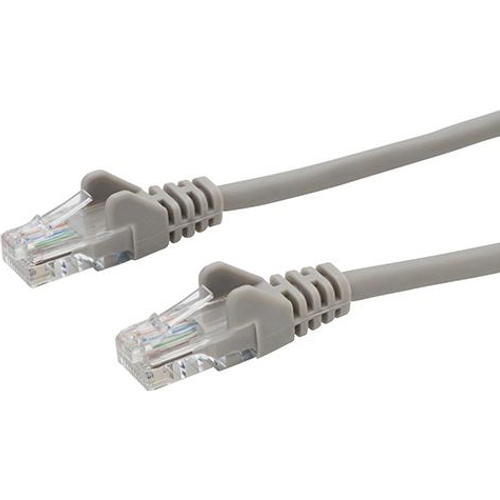
connektgear Network Cable - Cat6

Category 6 cable rated for Gigabit Ethernet at 250 MHz. Standard RJ45 connectors used for Ethernet...

Best current price£1.67from UK Office Direct

All Offers

7 offers from £1.67 - £8.56

View price history by clicking the chart icon.

UK Office DirectConnekt Gear Snagless Network Cable Rj45 Cat6 Grey 5M
£2.99 delivery
£1.67
Visit shop
Office StationeryConnekt Gear connektgear Snagless Network Cable RJ45 Cat6 Grey 5m
£7.19 delivery
£2.23
Visit shop
OnBuy.comDp Building Systems 31-0050G 5M Cat6 U/Utp (Utp) Networking Cable Grey 5035624018778
Free delivery in 1–3 days
£4.59
Visit shop
PCHUB.UKConnektgear Grey 5M Rj45 Cat6 Utp Stranded Flush Moulded Ls0h Network Cable
Free delivery in 1–3 days
£6.49
Visit shop
GamingKitConnektgear Grey 5M Rj45 Cat6 Utp Stranded Flush Moulded Ls0h Network Cable
Free delivery in 1–3 days
£7.79
Visit shop

Product Information

Full details

This connektgear Cat6 network cable is designed for users needing reliable Gigabit Ethernet connectivity. It offers high-speed data transfer up to 1 Gbps at 250 MHz, ideal for home networks, office environments, and gaming. A key benefit is its LSZH (Low Smoke Zero Halogen) jacket, providing increased safety in the event of a fire. One caveat is that this is an unshielded twisted pair (UTP) cable, which may be more susceptible to interference in environments with high electromagnetic activity.

All features

SeriesCat6
Model Part Number31-0050G
Brandconnektgear

Extended Product Information

FAQs

What is the difference between Cat5e and Cat6 cables?

Cat6 cables are designed to support higher frequencies (250 MHz) and faster data transfer rates (up to 1 Gbps) compared to Cat5e (100 MHz and 1 Gbps). Cat6 also generally has tighter twists in its wire pairs, which helps reduce crosstalk and interference.

What does LSZH mean and why is it important?

LSZH stands for Low Smoke Zero Halogen. It means that in the event of a fire, the cable jacket emits very little smoke and no toxic halogen gases, making it a safer option for indoor installations, especially in enclosed spaces or public buildings.

Can I use this Cat6 cable with a Cat5e network?

Yes, Cat6 cables are backward compatible with Cat5e and older standards. However, the connection will only perform at the speed and capability of the slowest component in the network, meaning your speed will be limited to Cat5e speeds (up to 1 Gbps).

What is the '24AWG' rating on this cable?

AWG stands for American Wire Gauge. A 24AWG rating indicates the thickness of the copper conductors inside the cable. A lower AWG number means a thicker wire, which can generally carry more data with less resistance. 24AWG is a standard size for Cat6 cables.

What does UTP mean?

UTP stands for Unshielded Twisted Pair. This means the cable's internal wires are twisted together in pairs but are not surrounded by an additional shielding layer to protect against external electromagnetic interference (EMI).

How do I know if the cable is securely connected?

You should hear a distinct 'click' when the RJ45 connector is fully inserted into the port. Additionally, the link lights on your network device (router, switch, computer) should illuminate, indicating an active connection.

Troubleshooting

No internet connection after plugging in the cable.

Ensure both ends of the cable are securely plugged into the correct ports on your devices. Check if the link lights on your network devices (router, computer) are illuminated. Try a different network cable or a different port on your router.

Slow internet speeds or intermittent connection.

Verify the cable is a Cat6 standard. Check for physical damage to the cable or connectors. Ensure the cable is not too close to sources of electromagnetic interference (e.g., power cables, microwaves). If the cable is longer than 5 meters and experiencing issues, consider a shorter, higher-quality cable. Update network adapter drivers on your computer.

Link lights on the network port are not active.

Confirm that the device at the other end of the cable is powered on and functioning. Test the cable with different devices to rule out a faulty port on one of the devices. Ensure the cable is fully seated in the port.

Pros and Cons

Pros

  • Supports high-speed Gigabit Ethernet (1 Gbps) and 250 MHz frequency.
  • LSZH jacket provides enhanced fire safety.
  • Gold-plated RJ45 connectors ensure reliable contact.
  • Flexible and easy to handle due to stranded conductors.
  • Standardized Cat6 performance for broad compatibility.

Cons

  • Unshielded design (UTP) can be more susceptible to electromagnetic interference (EMI) than shielded cables.
  • Stranded conductors are generally less durable for frequent, high-stress connections compared to solid conductors.
  • Limited to 5 meters, which may not be sufficient for all installations.

Setup, Compatibility & Care

Setup:

This cable is designed for Plug and Play operation. Simply connect one RJ45 connector to your network device (e.g., computer, router, switch, game console) and the other RJ45 connector to your network port. Ensure a secure click as you plug them in.

Compatibility:

  • Backward Compatible: While a Cat6 cable, it is compatible with older Ethernet standards like Cat5e and Cat5, though it will operate at the lower standard's speed.
  • RJ45 Ports: Works with any device featuring a standard RJ45 Ethernet port.
  • Network Devices: Suitable for connecting to routers, switches, modems, network-attached storage (NAS) devices, and computers.

Care:

  • Storage: Store the cable in a dry place, away from direct sunlight and extreme temperatures. Avoid coiling it too tightly to prevent damage to the internal wires.
  • Cleaning: If the connectors or cable jacket require cleaning, use a dry or slightly damp, soft cloth. Do not use harsh chemicals or solvents.
  • Handling: Avoid bending the cable sharply at the connector ends. Use the molded boots for strain relief and to protect the connection point.

Price History

DatePrice
Visit shop