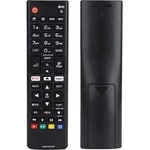
The One For All LG TV Replacement Remote is the ideal replacement for your original LG TV remote c...The One For All LG TV Replacement Remote is the ideal replacement for your original LG TV remote control. No setup is required, simply insert the batteries and it's ready to use on all LG televisions. You can easily use the learning feature to fully customise this remote to your needs. The LG TV Replacement Remote features a handy shortcut key to your favorite streaming services. It works just like your original remote, and for most TVs, no setup is required. Simply put your batteries in and it is ready to use. You can also learn functions from any remote, such as for a Sound Bar volume. The app shortcut key gives you direct access to your favourite streaming service.
The One For All LG TV Replacement Remote (URC1311) is designed for users seeking a reliable and straightforward substitute for their original LG TV remote. Its primary benefit is its plug-and-play functionality, requiring no initial setup for most LG TVs, allowing immediate use upon battery insertion. A potential caveat is that advanced customization or learning functions require manual steps.
All features
Series
URC
Model Part Number
URC1311
Brand
One For All
Extended Product Information
FAQs
Do I need to set up this remote for my LG TV?
No, for most LG televisions, the remote is plug-and-play. Simply insert batteries, and it should work immediately without any setup.
Can this remote control other devices like a soundbar?
Yes, using the learning function, you can program this remote to control functions from other devices, such as volume for a soundbar or playback controls for a Blu-ray player.
What type of batteries does it use?
The remote uses two AAA batteries. These are not included with the remote.
How do I program the learning function?
To program a function, press and hold 'SET' and '1', then press the button you want to program on this remote, followed by the corresponding button on your original remote, holding them towards each other until the LED blinks.
What does the streaming service shortcut key do?
This button is designed to provide quick access to your favorite streaming services on compatible LG TVs.
Is the remote rechargeable?
No, the remote is not rechargeable and requires standard AAA batteries.
What is the warranty period for this remote?
Please refer to the product packaging or the manufacturer's official website for specific warranty information, as it can vary.
Troubleshooting
Remote not working
Ensure batteries are inserted correctly with proper polarity. Replace with fresh AAA batteries. Make sure there are no obstructions between the remote and the TV's IR sensor. Try moving closer to the TV.
Specific buttons not functioning
If using the learning function, re-learn the specific button by following the setup instructions. Ensure the original remote being copied from is functional.
Remote is unresponsive or erratic
Replace the batteries. Clean the IR emitter on the remote and the IR receiver on the TV with a dry cloth.
Shortcut key not launching streaming service
This remote provides a shortcut command. Ensure your LG TV is configured to recognize this shortcut. Some LG TV models may require specific setup within the TV's own menus for this function to work optimally.
Pros and Cons
Pros
No setup required for most LG TVs, offering immediate use.
Learning function allows for extensive customization with other devices.
Dedicated streaming service shortcut enhances convenience.
Reliable IR wireless communication.
Simple button interface, easy to navigate.
Cons
Advanced features like learning require manual configuration.
Not compatible with non-LG devices unless functions are learned.
Does not feature a built-in display for status information.
Requires batteries, which are not included and not rechargeable.
Setup, Compatibility & Care Instructions
Setup
Insert Batteries: Open the battery compartment and insert two AAA batteries (not included), ensuring correct polarity.
Immediate Use: For most LG televisions, the remote will function immediately. Point it at your TV and test basic functions.
Learning Function (Optional): To learn functions from another remote (e.g., soundbar volume):
Press and hold the `SET` and `1` buttons for a few seconds until the LED blinks twice.
Press and hold the button on the URC1311 you wish to program (e.g., `VOL+`).
Hold the original remote, pointing its emitter towards the URC1311's emitter, and press and hold the corresponding button on the original remote.
The LED on the URC1311 will blink twice when the function is learned. Repeat for other buttons as needed.
Compatibility
Primary: Fully compatible with all LG televisions.
Secondary (Learning): Can learn functions from virtually any remote control for added devices like soundbars or Blu-ray players.
Interface: IR Wireless.
Care
Cleaning: Wipe the remote gently with a soft, dry cloth. Avoid using liquids or abrasive cleaners, as they can damage the surfaces.
Battery Replacement: Replace batteries when the remote's response becomes weak or erratic. Always use new, high-quality AAA batteries.


 eBay£9.59Visit shop
  George at ASDA£13.98Visit shop