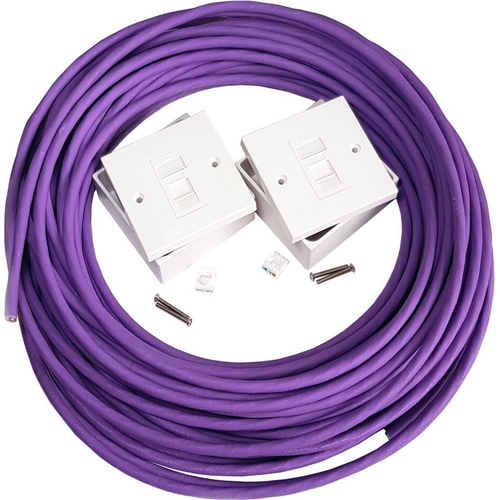
This CAT6a Extension Kit features Low Smoke Pure Copper CAT6a Shielded Cable, ideal for indoor ins...This CAT6a Extension Kit features Low Smoke Pure Copper CAT6a Shielded Cable, ideal for indoor installations where wireless connectivity is not feasible. The cable can be cut to the required length for a professional finish. It is constructed with the highest grade pure copper, low smoke, CAT6a shielded cable, suitable for running from a network switch or router to another location. The kit includes network face plates with a colour-coded wiring diagram (TIA/EIA-568-B) and a tool-less design for easy attachment of CAT6a cores. Standard pre-terminated CAT6a cables can connect to the face plates, creating a high-quality extension capable of 10Gbps. Please note: The supplied cable is not suitable for outdoor use. Both the wall plates and cables are fully shielded to prevent interference from power cables, ensuring a protected installation. A network tester is recommended for post-installation checks. Included in the kit: 4 Pair CAT6a Ethernet Cable (Pure Copper 0.251mm², 23 AWG, Foil & Braid Shielded, Low Smoke Zero Halogen - LSZH), 2 x CAT6a Shielded Face Plates with Back Box Screws & Cable Tie (tool-less design), and 2 x 47mm Surface Mount Back Boxes. Flush mounted wall plates are available upon request.
This Loops CAT6a Extension Kit is designed for users needing reliable indoor wired network connectivity where wireless is not an option. Its primary benefit is providing a high-quality, shielded extension capable of 10Gbps speeds using pure copper CAT6a cable. A key consideration is that the included cable is not suitable for outdoor use.
All features
Series
CAT6a
Brand
Loops
Extended Product Information
FAQs
Is this kit suitable for outdoor use?
No, the included CAT6a Ethernet cable is specifically designed for indoor installations and is not suitable for outdoor use.
What speeds can I expect with this kit?
This CAT6a kit is capable of supporting network speeds up to 10Gbps, provided your connected devices and network infrastructure also support these speeds.
Do I need special tools to install the face plates?
The included face plates feature a tool-less design, which simplifies the termination process and typically does not require specialized tools beyond basic cable preparation.
What is LSZH cable?
LSZH stands for Low Smoke Zero Halogen. Cables with this rating emit less smoke and fewer toxic halogens when exposed to fire, making them safer for indoor environments.
Can I use this with existing CAT5e or CAT6 cables?
Yes, this CAT6a extension kit is backward compatible with CAT6 and CAT5e standards, though you will be limited to the maximum speed supported by the lower category cable.
What is the gauge of the copper wire?
The cable uses 23 AWG pure copper wire, with a diameter of 0.251mm².
Does the kit include everything needed for surface mounting?
Yes, the kit includes two CAT6a shielded face plates and two 47mm surface mount back boxes with screws and cable ties for installation.
Troubleshooting
No network connectivity after installation
Verify that all 8 cores are correctly terminated in the correct order on both face plates according to the TIA/EIA-568-B standard. Ensure standard CAT6a cables are used for connections to devices. Use a network tester to check for continuity and correct pairing.
Slow network speeds or intermittent connection
Check for potential interference from unshielded components or nearby power cables. Ensure the shielding on the cable and face plates is intact and properly connected. Re-terminate the cable ends if connections appear loose or improperly seated.
Difficulty terminating the cable on the face plate
Ensure the cable's outer jacket and shielding are stripped correctly without nicking the internal wires. Refer to the face plate's specific instructions for the tool-less termination mechanism; sometimes, a gentle push or a specific tool (often integrated) is required.
Cable is too long or too short
The included cable can be cut to the precise length needed. If it's too short, you may need to purchase an additional length of compatible CAT6a shielded cable.
Pros and Cons
Pros
High-speed 10Gbps performance.
Robust shielding protects against interference.
Pure copper cable ensures signal integrity.
Tool-less face plates simplify termination.
LSZH cable offers improved safety in indoor environments.
Customizable cable length for neat installations.
Cons
Not suitable for outdoor use.
Requires a network tester for proper verification.
Surface mount boxes may not suit all aesthetic preferences (flush mount available upon request).
Setup, Compatibility & Care
Setup:
Plan Layout: Determine the required cable length and mounting locations for the face plates and back boxes.
Install Back Boxes: Secure the surface mount back boxes to the wall using appropriate fixings.
Prepare Cable: Cut the CAT6a Ethernet cable to the determined length. Ensure the cut is clean and square.
Terminate Cable: Carefully strip the outer jacket and internal shielding. Separate the twisted pairs and untwist them just enough for termination.
Attach to Face Plate: Using the tool-less mechanism on the CAT6a face plate, insert the cores according to the TIA/EIA-568-B color code. The tool-less design often involves pressing the wires into designated slots.
Mount Face Plate: Attach the terminated face plate to the installed back box.
Connect: Use standard pre-terminated CAT6a Ethernet cables to connect your network devices to the newly installed face plates.
Test: Use a network tester to verify all connections are correctly made and the cable is functioning as expected.
Compatibility:
Compatible with all standard networking equipment supporting CAT6a or lower category Ethernet standards (e.g., CAT6, CAT5e).
Works with standard RJ45 connectors and network devices.
Flush mounted wall plates are available upon request if surface mounting is not desired.
Care:
Keep the cable and face plates clean by wiping with a dry or slightly damp cloth. Avoid abrasive cleaners.
Ensure connections are secure to prevent dust ingress.
Regularly check for any physical damage to the cable or connectors.


 OnBuy.com£44.49Visit shop
  B&Q£47.99Visit shop