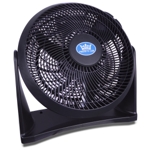
Air Pro 10" Desk Fan - Black

Stay cool with smarter, simpler control using the Air Pro 10" Desk Fan with SmartVoice™ Technology...

Currently unavailable

Currently out of stock

This product is not available at the moment. Check back later or explore other options below.

Product Information

Full details

The Air Pro 10" Desk Fan in Black is designed for users seeking convenient, hands-free cooling with enhanced privacy. Its key benefit is the **SmartVoice™ 100% Offline Voice Control**, allowing effortless operation without Wi-Fi or apps. A potential caveat is that voice commands are limited to a preset library of over 40 commands. This compact yet powerful air circulator offers 6 speed settings, 3D oscillation, a 12-hour timer, and includes a remote control for flexible operation, making it ideal for small to medium spaces.

All features

ColourBlack
Model Part Number5057994240573
BrandAir Pro

Extended Product Information

FAQs

Does the SmartVoice™ technology require an internet connection?

No, the SmartVoice™ technology operates 100% offline. All voice commands are processed directly on the device, requiring no Wi-Fi connection, apps, or cloud services.

How many voice commands can the fan understand?

The fan is pre-programmed to understand over 40 distinct voice commands, covering functions like speed adjustment, oscillation, and timer settings.

Can I use the fan with a smart home system like Alexa or Google Home?

This fan does not support integration with external smart home systems or apps. Its voice control is exclusively handled by its proprietary offline SmartVoice™ technology.

What safety features are included?

The fan includes tip-over protection (shuts off if tipped), overheat protection (shuts off if motor temperature is too high), and a child lock feature to prevent accidental adjustments by children.

How do I clean the fan?

Always unplug the fan before cleaning. Wipe the exterior with a soft, damp cloth. For dust on the grilles, use a soft brush or a vacuum with a brush attachment. Do not use abrasive cleaners or immerse the unit in water.

What is the power consumption of the fan?

The fan is powered by an energy-efficient 45W motor.

Does the fan have different speed settings?

Yes, the fan features 6 adjustable speed settings to cater to various cooling preferences.

Troubleshooting

Fan does not turn on.

Ensure the power cord is securely plugged into a working electrical outlet. Check if the main power switch on the fan is in the 'on' position. Try a different outlet to rule out outlet issues.

Voice commands are not recognized.

Speak clearly and directly towards the fan's microphone. Ensure you are using one of the over 40 preset commands. Check that the fan is powered on and not in a mode where voice control is disabled (if applicable). Reduce background noise if possible.

Fan is making unusual noises.

Check for any obstructions around the blades or grille. Ensure the fan is on a stable surface and not vibrating excessively. If noise persists, contact customer support.

Oscillation is not working.

Verify that the oscillation function has been activated via the control panel, remote, or voice command. Ensure there are no physical obstructions preventing movement.

Remote control is unresponsive.

Ensure the remote control has a clear line of sight to the fan. Check or replace the battery in the remote control. Make sure the fan is powered on and within the remote's effective range.

Pros and Cons

Pros

  • Hands-free operation via offline voice commands enhances accessibility and convenience.
  • Privacy-focused design with no Wi-Fi or data collection.
  • Quiet operation suitable for bedrooms, offices, or living areas.
  • Powerful airflow for its compact size.
  • Multiple control options (voice, remote, manual).

Cons

  • Voice command functionality is limited to a predefined set of commands.
  • Requires being within voice command range for hands-free operation.
  • The 10" size may be insufficient for very large rooms.
  • No smart home integration (e.g., app control, Alexa/Google Assistant compatibility).

Setup, Compatibility & Care

Setup:

  1. Unpack the fan and remove all protective packaging.
  2. Place the fan on a stable, level surface.
  3. Plug the power cord into a suitable electrical outlet.
  4. The fan is now ready for manual control, remote control, or voice command operation.

Voice Control Initialization:

  • No specific setup is required for SmartVoice™. Simply ensure the fan is powered on and speak the available commands clearly within range.

Compatibility:

  • This fan is designed for standard AC power outlets.
  • Voice commands are processed offline on the device; no Wi-Fi, Bluetooth, or smart home hub is required.

Care Instructions:

  • Cleaning: Ensure the fan is unplugged before cleaning. Wipe the exterior surfaces with a soft, damp cloth. Avoid using abrasive cleaners or immersing the fan in water.
  • Grille Cleaning: For the grilles, a soft brush or a vacuum cleaner with a brush attachment can be used to remove dust.
  • Storage: If storing the fan for an extended period, clean it thoroughly and store it in its original packaging or a protective bag in a cool, dry place.