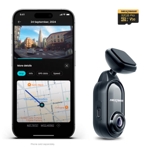
VANTRUE N4 Pro 4K 3 Channel Dash Cam - Vantrue
Not Available
The VANTRUE N4 Pro is designed for drivers who require comprehensive, high-definition evidence of their surroundings and interior cabin. Ideal for rideshare drivers and commuters prioritizing road safety, this 3-channel system excels by capturing crisp 4K front-facing footage along with clear interior and rear views, though users should note the system requires significant storage space and cable management for optimal installation.
| Brand | Vantrue |
|---|
Yes, the N4 Pro has a built-in microphone that records cabin audio, which can be toggled on or off in the settings.
The N4 Pro supports microSD cards up to 512GB. Always use a high-endurance card designed for constant dash cam recording.
Yes, the system is modular, but using all three channels is recommended for full security coverage.
Yes, it supports parking mode, though hardwiring the unit to your vehicle's fuse box is recommended to ensure constant power when the engine is off.
GPS data is saved within the file metadata, which can be viewed when playing back videos in the Vantrue player software.
Ensure you are using a high-endurance microSD card and format it within the dash cam settings menu.
Ensure your phone is within close proximity to the unit and disable cellular data if your phone is struggling to prioritize the dash cam's signal.
Check your power source to ensure the car charger or hardwire kit is providing consistent voltage.
For installation, mount the front unit behind the rearview mirror using the included adhesive mount. Route the interior camera cable discreetly along the headliner to the main unit, and run the rear camera cable to the back windshield. Use a high-endurance Class 10 or higher microSD card to handle the high bitrate of 4K recording. To maintain the device, wipe lenses periodically with a microfiber cloth to prevent smudge buildup. Regularly format your memory card through the device settings menu every few months to maintain peak performance and prevent file fragmentation.