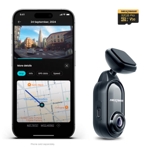
Redtiger F9 Dash Cam - REDTIGER

Drive with absolute confidence with the REDTIGER F9 Dual Dash Camera. This advanced system capture...

Best current price£57.99from Joybuy

All Offers

2 offers from £57.99

View price history by clicking the chart icon.

JoybuyRedtiger Light F9 Dash Cam 4K Front And Rear 1080P, Wifi Gps Car Camera With 32Gb Card, Dual Dash Camera For Cars, Loop Recording, Night Vision, Parking Mode, Smart App Control, Support 256Gb Max
Free delivery in 1–3 days
£57.99
Visit shop
Joybuy UKRedtiger F9 Dash Cam 4K Front And Rear 1080P, Wifi Gps Car Camera With 32Gb Card, Dual Dash Camera For Cars, Loop Recording, Night Vision, Parking Mode, Smart App Control, Support 256Gb Max 6975394267145
Free delivery in 1–3 days
£57.99
Visit shop

Product Information

Full details

The REDTIGER F9 Dual Dash Camera is an essential safety tool for daily commuters and road-trip enthusiasts who require high-fidelity video evidence of their driving environment. Providing 4K Ultra HD front-facing clarity and 1080P rear coverage, it offers robust protection against accidents and disputes, though users should note that initial setup of the mobile app connectivity requires a stable local WiFi connection to the device's internal signal.

All features

BrandREDTIGER

Extended Product Information

FAQs

Does the camera overwrite old footage?

Yes, the F9 features seamless loop recording that automatically overwrites the oldest, unlocked video files when the memory card reaches capacity.

Can I use the parking mode without a hardwire kit?

While the internal battery provides short-term power, a hardwire kit is recommended for consistent, long-term parking surveillance.

What is the maximum capacity SD card supported?

The REDTIGER F9 supports microSD cards with a capacity of up to 256GB.

How do I access the GPS data?

The GPS information is embedded within the video files and can be viewed using the dedicated smartphone app or supported desktop video players.

Is the rear camera waterproof?

The rear camera is designed for internal mounting within the cabin, typically on the rear windshield, and is not rated for external weather exposure.

Troubleshooting

Camera does not start recording automatically

Ensure the power cable is firmly seated and check that the SD card is properly inserted and formatted.

WiFi signal is not appearing in phone settings

Verify that the WiFi feature is enabled on the camera menu and keep your phone close to the unit during pairing.

Recorded video appears blurry or foggy

Clean the exterior camera lens with a microfiber cloth and ensure the front windshield area in front of the lens is free of dirt or grease.

Pros and Cons

Pros

  • Superior 4K video quality for the front camera
  • Comprehensive dual-channel coverage
  • Integrated GPS for location and speed logging
  • Reliable automated parking surveillance
  • Support for high-capacity microSD cards up to 256GB

Cons

  • Requires professional installation for the cleanest look
  • Smartphone app can be finicky during initial pairing
  • Requires high-endurance SD card for optimal performance

Setup, Compatibility & Care

For installation, mount the front unit behind the rearview mirror to ensure the lens has a clear view of the road. Route the rear camera cable carefully along the interior headliner of your vehicle to avoid obstruction. Ensure the device is connected to a constant power source if you intend to use the parking mode effectively. The system supports microSD cards; while a 32GB card is included, upgrading to a 128GB or 256GB 'High Endurance' card is recommended for frequent daily drivers. To care for the unit, avoid exposing the camera to extreme, prolonged direct sunlight when the vehicle is stationary in high-temperature environments, and occasionally format the memory card via the camera settings menu to maintain file structure integrity.

Similar items

Price History

DatePrice
Visit shop