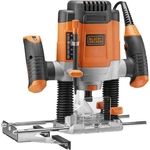
Trend T33A Wet & Dry Vacuum and T12EK Router

The Trend T33A M Class Wet Dry Vacuum features an auto-start power take-off (1,500W for 240V and 1...

Currently unavailable

Currently out of stock

This product is not available at the moment. Check back later or explore other options below.

Similar alternatives

Product Information

Full details

This guide is for trade professionals and serious DIYers seeking a robust dust extraction solution and a versatile router for demanding woodworking tasks. The Trend T33A Wet & Dry Vacuum offers powerful auto-start functionality for tool extraction and excellent dust capture, while the T12EK Router provides high performance and precise control for intricate work. A potential caveat is the combined size and weight when transporting both units, requiring adequate space. Key features include the T33A's M Class rating with H13 HEPA filtration for hazardous dust, auto-start power take-off, and easy-empty tank, alongside the T12EK's powerful motor, variable speed control, and soft-start feature.

All features

Model Part NumberT33A
BrandTrend

Extended Product Information

FAQs

What is the main benefit of the T33A's auto-start feature?

The auto-start power take-off allows the vacuum to automatically turn on when you start a connected power tool and run for a short period after, ensuring efficient dust extraction with minimal user intervention.

Can the T33A vacuum be used for fine dust like MDF or silica?

Yes, the T33A is M Class rated and features a High-Performance H13 Pleated HEPA Filter System, capable of capturing 99.95% of microscopic harmful dust particles, including silica and MDF dust.

How do I empty the T33A vacuum when dealing with liquids?

The vacuum has a liquid drain-off port located at the bottom of the tank, allowing for easy emptying without needing to lift the heavy tank.

What is the purpose of the push-button filter shake on the T33A?

The push-button shakes the filter, clearing fine dust build-up. This helps maintain efficient suction power and prolongs filter life, reducing the need for frequent manual cleaning.

How does the T12EK router handle different materials?

The T12EK features 7-level variable speed control, allowing you to adjust the router's speed to match the requirements of various cutters and materials, from softwoods to hardwoods and plastics.

What safety features are included with the T12EK router?

The T12EK includes a soft-start feature to prevent kick-back and an automatic power shut-off mechanism that prevents accidental start-up if the trigger is loosened.

What is the capacity of the T33A vacuum for wet and dry use?

The T33A has a capacity of 17 litres for wet use and 25 litres for dry use.

Are all necessary cleaning tools included with the T33A vacuum?

Yes, the Trend T33A vacuum is supplied with a full set of cleaning tools for various applications.

Troubleshooting

Vacuum not starting with power tool

Ensure the power tool is securely plugged into the auto-start socket and that the tool itself is switched on. Check that the vacuum is powered on and plugged into a live outlet.

Reduced suction power on vacuum

Check if the dust bag is full or if the filter is clogged. Use the push-button filter shake to clear dust. Ensure the hose and any intake points are not blocked.

Router motor not starting or cutting out

Verify the power connection is secure. Ensure the trigger is fully depressed. Check if the soft-start mechanism is engaging correctly. If the issue persists, the motor may require professional inspection.

Router speed seems inconsistent

Ensure the correct speed setting is selected for the material. Overloading the router can also cause speed reduction; try taking shallower passes.

Vacuum stops unexpectedly during wet pickup

This is likely the auto-stop function engaging because the liquid capacity has been reached. Empty the tank via the drain-off port.

Pros and Cons

Pros

  • Excellent dust capture for hazardous materials (M Class, H13 HEPA)
  • Convenient auto-start feature synchronizes vacuum with power tools
  • Variable speed control on router offers precision for diverse tasks
  • Durable construction for demanding work environments
  • Easy maintenance and emptying of the vacuum
  • Enhanced safety features on the router

Cons

  • Combined weight and size may require significant transport space
  • 5m hose and cable length might be limiting for very large job sites
  • Requires separate power sources for optimal use of auto-start
  • Tool power take-off wattage limits the type/size of tool that can be connected efficiently

Setup, Compatibility & Care

Vacuum (T33A) Setup:

  1. Connect the 5m hose to the vacuum inlet.
  2. For dry use, fit a dust bag into the tank for efficient collection and disposal.
  3. For wet use, ensure no dust bag is fitted. A filter cover may be needed to protect the motor from water splash.
  4. Connect the power tool to the auto-start power take-off socket using an appropriate extension cable.
  5. Plug the vacuum's power cable into a suitable power outlet.

Router (T12EK) Setup:

  1. Insert the desired router bit securely into the collet.
  2. Connect the router's power cable to a suitable power outlet.
  3. Adjust the desired cutting depth using the depth adjustment mechanism.
  4. Select the appropriate speed using the 7-level variable speed control dial based on the material and cutter type.

Compatibility:

  • The T33A vacuum's auto-start socket is designed for power tools with a suitable power draw (up to 1,500W for 240V, 1,100W for 110V via PTO).
  • Both units are supplied with 5m cables, offering a combined 10m working radius from their power sources.

Care & Maintenance:

  • Vacuum: Periodically check and clean the H13 HEPA filter. Use the push-button filter shake to clear dust. For liquid emptying, use the drain-off port. Wipe down the tank and exterior with a damp cloth.
  • Router: Keep ventilation slots clear of dust. Clean the motor housing and base plate regularly. Ensure the collet is clean before inserting bits. Store in a dry place, ideally in its original case.