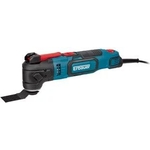
Erbauer 18V Ext Keep Cool Cordless Multi Tool - Eri1080Mlt
Introducing the All-New Erbauer EXT 18V Multitool. Experience the next generation of performance w...Introducing the All-New Erbauer EXT 18V Multitool. Experience the next generation of performance with our V2 Brushless Motor delivering 35% more power for effortless cutting, sanding, scraping, and demolition than the previous model.
This guide is for users of the Erbauer 18V EXT Cordless Multi Tool (Eri1080Mlt). It offers increased power for cutting, sanding, scraping, and demolition tasks, making it ideal for various DIY projects. However, users should be aware of battery life limitations depending on the task's intensity.
All features
Model Part Number
Eri1080Mlt
Brand
Erbauer
Extended Product Information
FAQs
What batteries are compatible with the Erbauer 18V EXT Multi Tool?
The tool is compatible with Erbauer EXT 18V batteries.
What types of accessories can I use with this multi-tool?
The multi-tool is compatible with a variety of accessories, including blades for cutting, sanding pads, and scraper blades. Refer to the accessory guide for more details.
How do I change the accessory?
Follow the instructions in the user manual to change the accessories. Generally, this involves unlocking a lever or using a provided tool to remove and install the new accessory.
How do I clean and maintain the tool?
Use a dry cloth to clean the tool. Avoid using solvents or abrasive cleaners. Store the tool in a dry place.
What is the warranty period for this tool?
Please refer to your purchase documentation for warranty details. Warranty information may vary.
Where can I find replacement accessories?
Replacement accessories are available at your local retailer or online.
What does the Keep Cool technology do?
Keep Cool technology helps to regulate the tool's temperature, ensuring it remains at optimal performance levels during extended use.
Troubleshooting
Tool not starting.
Ensure the battery is properly inserted and charged. Check the battery contacts for any debris. If the tool still doesn't start, try a different battery.
Reduced power or performance.
Check the accessory for wear or damage and replace if necessary. Make sure the battery is fully charged. Clean the tool of any dust or debris that might be affecting performance.
Vibration is excessive.
Ensure the accessory is securely attached. If the vibration persists, inspect the accessory for damage or imbalances.
Pros and Cons
Pros
Increased power compared to previous models.
Versatile for various applications.
Cordless design for enhanced mobility.
Keep Cool technology for sustained performance.
Compatible with Erbauer EXT 18V batteries.
Cons
Battery life can be a limiting factor depending on usage.
Performance may vary based on the type of material.
Requires compatible 18V battery and charger (sold separately).
May require accessory changes for different tasks.
Setup, Compatibility & Care
Setup: Attach the appropriate accessory for the task at hand (blade, sanding pad, etc.).
Compatibility: This tool is designed to work with Erbauer EXT 18V batteries and chargers.
Care: After use, clean the tool with a dry cloth. Do not use solvents or abrasive cleaners. Store the tool in a dry, safe place. Check accessories for wear and replace as needed.


 B&Q£72.25Visit shop