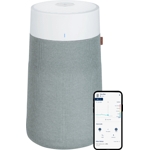
Freshen up your home with this Blueair air purifier. It's designed for rooms up to 103 square metr...Freshen up your home with this Blueair air purifier. It's designed for rooms up to 103 square metres, so it'll do a great job in most spaces around your home. When you switch on Auto mode, it'll get to work purifying the air straight away, and you can see how it's getting on with a quick glance at the display. It's easy to use, too. Either grab the remote control, or your smartphone if you're out and about using the Blueair App. Blueair Blue Max 3450i purifies up to 103m2 living space in 30 minutes or 43m2 in 12.5 minutes on high and is quieter than a whisper at only 23 dB on low fan speed. Connect to the Blueair app to monitor your air quality, set schedules, use geofencing technology and more; RealTrack provides accurate filter tracking in the app. Enjoy cleaner air at home with this BlueAir purifier. Its HEPASilent filter will clean up the air in your room in less than an hour and runs as quietly as a mouse. That's not all, it also traps 99.97% of airborne particles all the way down to a teeny tiny 0.1 micron. That means you're safer from seasonal viruses or allergies caused by dust and pets. And it's smart enough to take commands from the Blueair app - just connect it to your phone and breathe easy. Control it using just your voice with Alexa and Google Assistant. Switch between Auto and Night modes when you need to get a good night's sleep. Its 5 colour air quality indicator lets you check if you're breathing fresh air. No more forgetting to replace air filters - its RealTrack algorithm sets reminders before they expire. There are 4 fan speeds, and night mode is perfect for dozing off in peace and quiet. Its 38 W power can refresh a room up to 103 m² in just 30 minutes.
The Blueair Blue Max 3450i Air Purifier is designed for anyone wanting to improve their indoor air quality in rooms up to 103 square meters. It offers efficient air purification through its HEPASilent filter, capturing 99.97% of airborne particles. However, keep in mind that filter replacements are necessary every 6 months to maintain optimal performance. This guide provides detailed instructions and tips for getting the most out of your Blueair purifier.
All features
Colour
Blue
Model Part Number
110088
Brand
EGLO
Extended Product Information
FAQs
How often do I need to replace the filter?
The main filter should be replaced every 6 months. The RealTrack feature in the Blueair app will help you keep track.
Can I wash the main filter?
No, the main filter is not washable and should be replaced. However, the pre-filter cover is washable.
What is the noise level of the air purifier?
The noise level is 23 dB on low speed and 50 dB on high speed.
Does the air purifier have an automatic mode?
Yes, the Blueair Blue Max 3450i has an Auto mode that adjusts the fan speed based on air quality.
Can I control the air purifier remotely?
Yes, you can control the air purifier remotely using the Blueair app on your smartphone or tablet.
Does the air purifier work with voice assistants?
Yes, the air purifier is compatible with Amazon Alexa and Google Assistant for voice control.
What is the coverage area of the air purifier?
The Blueair Blue Max 3450i is suitable for rooms up to 103 m².
What kind of particles does the filter remove?
The HEPASilent filter removes 99.97% of airborne particles down to 0.1 microns, including dust, pollen, pet dander, viruses, and bacteria.
Troubleshooting
The air purifier isn't turning on.
Check the power cord and outlet. Ensure the device is properly plugged in and that the outlet is working. Try a different outlet.
The air purifier is not connecting to Wi-Fi.
Ensure your Wi-Fi network is functioning correctly and that the purifier is within range. Restart the purifier and your router. Re-enter your Wi-Fi credentials in the app.
The air purifier is producing unpleasant odors.
Check the filter for saturation and replace it if necessary. Clean the pre-filter to remove trapped particles that may be causing odors.
The air quality indicator is not changing.
Make sure the air quality sensor is not blocked. The air quality indicator should adjust automatically as the air is purified, so wait a few minutes after turning it on to see if it changes.
The app is not responding.
Close and reopen the Blueair app. Ensure that the app is updated to the latest version. Try restarting your phone or tablet.
Pros and Cons
Pros
Highly efficient air purification with HEPASilent technology.
Quiet operation, ideal for bedrooms and living spaces.
Smart features, including app control, scheduling, and voice commands.
Effective at removing a wide range of airborne particles, including allergens and viruses.
Large room coverage suitable for various home sizes.
User-friendly with a built-in display and intuitive controls.
Cons
Requires filter replacements every 6 months, adding to the cost of ownership.
The initial cost might be higher compared to some other air purifiers.
App features depend on a stable Wi-Fi connection.
The pre-filter cover requires machine washing.
May not be suitable for extremely large spaces beyond the specified coverage area.
Setup, Compatibility & Care
Initial Setup:
Unpack the air purifier and remove all packaging materials.
Insert the filter and close the filter door securely.
Plug in the power cord and turn on the device using the power button.
Download the Blueair app and connect the purifier to your Wi-Fi network for smart features.
Compatibility:
The Blueair Blue Max 3450i is compatible with both iOS and Android devices via the Blueair app.
It also works with Amazon Alexa and Google Assistant for voice control.
Care Instructions:
Filter Replacement: Replace the main filter every 6 months. The RealTrack feature in the app will notify you when it's time.
Pre-Filter Cleaning: Wash the pre-filter cover every few weeks, or as needed, to remove larger particles.
Exterior Cleaning: Wipe the exterior with a soft, damp cloth. Avoid using harsh chemicals or abrasive cleaners.


 Boots.com£299.00Visit shop
  Currys£299.00Visit shop
  B&Q£299.00Visit shop