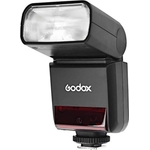
The Godox V860III-C Speedlite for Canon cameras is a portable TTL flashgun with a built-in LED mod...The Godox V860III-C Speedlite for Canon cameras is a portable TTL flashgun with a built-in LED modeling light. It is powered by a high-capacity lithium-ion battery to give you 450 full-powered shots per charge and a fast recycling time of up to 1.5 seconds. It includes a variety of different modes from High-Speed Sync (HSS) and Stroboscopic Multi-Burst. The upgraded version of V860III continues all the features of V860II but is added with functions that will take your shooting efficiency to the next level. A modeling light was added to help you preview the light effect, ensuring every fire had a perfect result. With 10-level dimmable brightness, V860III also gives you a better sense of lighting techniques through pre-visualization and free adjustment. A quick switch was added at your fingertips, allowing you to switch between manual and TTL mode in a blink. V860III provides you with an incredibly smooth shooting process. Upgraded Li-ion battery with a large capacity escorts your shooting journey by its 1.5s recycling time and 450 full-power flashes. The battery of V860III is interchangeable with V1, making your potential pack lighter. A quick-release lock was updated to a quick lever, ensuring the speedlight is locked safely in place while using on camera. When the off-camera, this design helps you unlock it easily and quickly. V860III continues in TTL, Manual, and Multi flash modes. All the functions as HSS (up to 1/8000s), FEC, FEB, rear-curtain sync, and so on help you to capture every splendid moment quickly, precisely, and creatively. This V860III/C model is for Canon Cameras. Flash head can be zoomed from 20mm to 200mm automatically or manually, allowing for a convenient adjustment of the light range. Whether shooting in a broad setting or a focused space, V860III will light the objects naturally. With the swivel angle from 0° to 330°horizontally, and form -7° to 120°vertically, V860III lets you easily complete direct flash, bounce flash, and any other shooting techniques. Built-in with Godox 2.4G wireless X system, V860III ensures a reliable shooting process with seamless connectivity. When using it off-camera, V860III is also compatible with Godox X system triggers like X1, X2 and, so on. Integrating transmitter and receiver in one flash, V860III gives you the maximum flexibility and convenience to co-work with other flashes.
Godox V860III TTL Flashgun With Li-Ion Battery kit For SonyFree delivery in 1–3 days£209.00Visit shop →
Godox V860III TTL Flashgun With Li-Ion Battery kit For CanonFree delivery in 1–3 days£209.00Visit shop →
Product Information
Full details
The Godox V860III-C Speedlite is designed for Canon camera users seeking a versatile and portable flash solution. It offers a built-in LED modeling light and a fast recycling time, enabling photographers to capture stunning images with greater ease and efficiency. Be aware that while the flash is compatible with many Canon cameras, ensure compatibility with your specific model. This guide will help you understand and effectively utilize the Godox V860III-C Speedlite's features, including its TTL capabilities, high-speed sync, and wireless system.
All features
Brand
Godox
Extended Product Information
FAQs
How do I switch between TTL and Manual modes?
There is a quick switch on the speedlight allowing you to easily switch between TTL and Manual modes.
What is the recycling time of the Godox V860III-C?
The recycling time is approximately 1.5 seconds at full power.
Does the V860III-C support high-speed sync (HSS)?
Yes, the Godox V860III-C supports high-speed sync up to 1/8000s.
What kind of battery does the V860III-C use?
It uses a rechargeable lithium-ion battery that is included in the package.
Can I use the Godox V860III-C off-camera?
Yes, it has a built-in 2.4G wireless X System and is compatible with Godox X System triggers.
What is the flash head zoom range?
The flash head can zoom from 20mm to 200mm.
What is the guide number of the Godox V860III-C?
The guide number is 60m at ISO 100 and 200mm zoom.
Troubleshooting
Flash not firing.
Check that the flash is securely mounted on the camera, the battery is charged, and the camera's flash settings are enabled. Ensure the flash is set to the correct mode (TTL or Manual).
Flash overexposing images.
Reduce the flash output power (if in Manual mode) or adjust the flash exposure compensation (FEC) in TTL mode. Ensure you are at an appropriate distance from your subject.
Flash not syncing with the camera.
Make sure that the flash and camera are compatible and the sync speed is within the camera's limits. Update the firmware of the flash and/or camera if necessary.
The flash head won't zoom.
Check that you're in the right mode and that the zoom function is enabled. Clean the zoom mechanism.
Pros and Cons
Pros
Fast recycling time allows for capturing consecutive shots without significant delays.
Integrated LED modeling light helps preview lighting effects before taking the shot.
The quick switch between manual and TTL modes offers efficient workflow.
Compatible with Godox X system triggers for off-camera flash use.
The zoom feature allows for versatile lighting adjustments.
High-speed sync enables creative shots in bright environments.
Cons
Some users might find the initial setup a little complex.
The external battery charger is required for charging.
The flash might be too powerful for close-up photography in some situations.
Requires some learning to master all the advanced features.
May require additional accessories for optimal off-camera use.
Setup, Compatibility & Care
Mounting: Attach the speedlight to your Canon camera's hot shoe and secure it using the locking mechanism.
Battery: Insert the rechargeable lithium-ion battery into the speedlight's battery compartment.
Power On: Turn on the flash and camera.
Mode Selection: Choose between TTL, Manual, or Multi modes, based on your shooting needs.
Zoom Adjustment: Adjust the flash head zoom to match your lens's focal length.
Compatibility: Ensure compatibility with your specific Canon camera model.
Care: Store the flash in its protective case when not in use. Clean the flash head with a soft, damp cloth. Avoid exposing the flash to extreme temperatures or humidity.



 Park Cameras£159.00Visit shop
  Wex Photo Video£159.00Visit shop