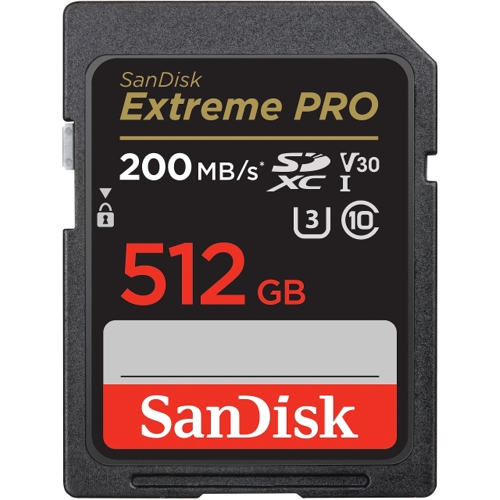
SanDisk Extreme PRO SDXC Memory Card - 512GB

The SanDisk Extreme PRO SDXC 512GB UHS-I Memory Card is SanDisk's most powerful SD UHS-I memory ca...

Best current price£27.76from PCHUB.UK

All Offers

107 offers from £27.76 - £422.99

View price history by clicking the chart icon.

PCHUB.UKSandisk Extreme Pro 32 Gb Sdhc Uhs-I Class 10
Free delivery in 1–3 days
£27.76
Visit shop
eBaySanDisk 64GB Extreme PRO SDXC SD Card, V30, 4K UHD 200 MB/s, UHS-I Class 10 U3
Free delivery in 1–3 days
£27.99
Visit shop
OnBuy.comSandisk Micro Sd Extreme Pro 200Mb/S Flash Memory Card 64Gb
Free delivery in 1–3 days
£28.48
Visit shop
PcNova.co.ukSandisk Extreme Pro 32 Gb Sdhc Uhs-I Class 10
Free delivery in 1–3 days
£32.71
Visit shop
GamingKitSandisk Extreme Pro 32 Gb Sdhc Uhs-I Class 10
Free delivery in 1–3 days
£33.31
Visit shop

Refurbished Offers

12 offers from £14.99 - £199.00

View price history by clicking the chart icon.

OnBuy.comSandisk Micro Sd Extreme Pro 200Mb/S Flash Memory Card 64Gb
Free delivery in 1–3 days
£14.99
Visit shop
eBaySanDisk Extreme Pro 128GB SDXC Memory Card, Up to 200 MB/s, Class 10, U3, V30
Free delivery in 1–3 days
£36.50
Visit shop

Used Offers

3 offers from £39.00 - £399.00

View price history by clicking the chart icon.

eBaySanDisk 128GB Extreme PRO SDXC card, SD Card, V30 Memory Card, 4K UHD, 200 MB/s
Free delivery in 1–3 days
£39.00
Visit shop

Product Information

Full details

This guide is for photographers and videographers who need a fast and reliable storage solution. The SanDisk Extreme PRO SDXC 512GB UHS-I Memory Card offers impressive read speeds up to 200MB/s, enabling quick media transfers. However, achieving maximum speeds requires a compatible card reader. This guide covers key features, performance, usage, and troubleshooting to help you get the most out of your SanDisk Extreme PRO SDXC card.

All features

SeriesExtreme PRO
Model Part NumberSDSDXXD-512G-GN4IN
BrandSanDisk

Extended Product Information

FAQs

What is the warranty period?

The SanDisk Extreme PRO SDXC card comes with a limited lifetime warranty.

What does the U3 rating mean?

U3 (UHS Speed Class 3) guarantees a minimum sustained write speed of 30MB/s, making it suitable for 4K video recording.

What is the V30 rating?

V30 (Video Speed Class 30) ensures a minimum sustained write speed of 30MB/s for high-quality video recording.

How do I format the SD card?

You can format the SD card within your camera, camcorder, or computer. Refer to your device's manual for instructions. It is recommended to format the card within the device before its first use.

What if my data gets corrupted?

The card includes an offer for RescuePRO Deluxe data recovery software, which can help you recover deleted or corrupted files. Always back up your data regularly.

Can I use this card in any device?

The card is compatible with devices that support SDXC cards. Check your device's specifications to ensure compatibility.

How do I achieve the advertised read speeds?

To achieve read speeds up to 200MB/s, you need a compatible card reader that supports UHS-I.

Troubleshooting

Card not recognized by the device.

Ensure the card is properly inserted. Try inserting it into a different device to check if the card itself is faulty. Make sure the device supports SDXC cards. If the device doesn't recognize the card, try reformatting it in the device.

Slow transfer speeds.

Ensure you are using a compatible card reader that supports UHS-I. The speed may also be limited by the host device. Transferring large files over USB 2.0 will be slower than using USB 3.0 or a faster card reader.

Files are corrupted or missing.

Stop using the card immediately. Use the included RescuePRO Deluxe software offer to attempt data recovery. If data recovery fails, the card may be faulty. Back up the card regularly.

Device displays a 'card error'.

Try reformatting the card in the device. If the error persists, the card may be corrupted. Test the card in another device to check if the issue is with the card or the original device.

Pros and Cons

Pros

  • High capacity for storing large amounts of data.
  • Fast read and write speeds improve workflow efficiency.
  • Durable design ensures reliability in various environments.
  • U3 and V30 ratings are ideal for 4K UHD video recording.
  • Includes data recovery software offer.
  • SanDisk QuickFlow Technology for timesaving media offloads

Cons

  • Requires a compatible card reader to achieve maximum speeds.
  • Performance may vary depending on the host device.
  • Not the fastest card available for professional use, but good value.
  • Data recovery software is only offered, not included.
  • Price is higher compared to standard SD cards.

Setup, Compatibility & Care

Setup:

  1. Insert the SD card into your camera or device's SD card slot.
  2. Format the card in your device before first use. This ensures optimal performance and compatibility. Format options are usually available within the device's settings menu.

Compatibility:

The SanDisk Extreme PRO SDXC card is compatible with any device that supports SDXC cards. This includes:

  • Digital cameras
  • Camcorders
  • Laptops with SD card slots
  • Card readers

Care:

  • Avoid exposing the card to extreme temperatures or humidity.
  • Keep the card clean and free from dust and debris.
  • Do not bend or drop the card.
  • Eject the card properly from your device before removing it.
  • Back up your data regularly.

Similar items

Price History

DatePrice
Visit shop