
Jabra Evolve 40 - Black

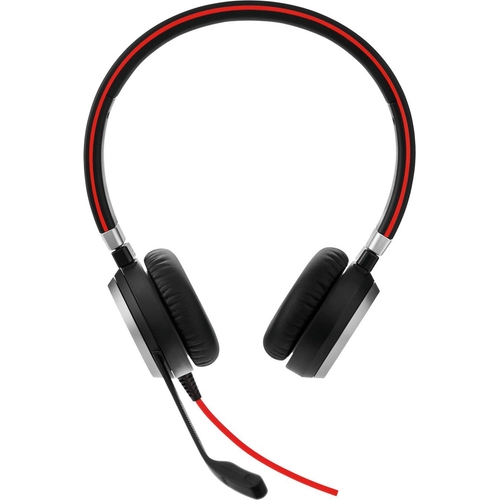
Best current price£79.99from eBay
Best offers
Shopping.co.uk recommended and popular offers
 eBay£79.99Visit shop
 Jabra Evolve 40 Stereo Black Headband Corded Headset
Visit shopBest current price£79.99from eBay
Shopping.co.uk recommended and popular offers
eBay£79.99Visit shop Jabra Evolve 40 Stereo Black Headband Corded Headset
Visit shop24 offers from £79.99 - £358.00
View price history by clicking the chart icon.

5 offers from £13.50 - £39.99
View price history by clicking the chart icon.
The Jabra Evolve 40 UC Stereo headset is designed for professionals seeking to improve focus and enhance communication in noisy environments. Its key benefit is superior sound quality for both calls and music, thanks to its noise-canceling microphone and wideband audio. However, it's a wired headset, so mobility is limited compared to wireless options. The Evolve 40 features a comfortable design, in-line call controls, and is compatible with various platforms, making it an excellent choice for office and call center use.
| Colour | Black |
|---|---|
| Series | Evolve |
| Model Part Number | 6399-829-209 |
| Brand | Jabra |
Use the in-line control unit to mute the microphone.
Yes, it works with smartphones via the 3.5mm jack.
Yes, it features soft leatherette ear cushions and an adjustable headband for all-day comfort.
Use the in-line control unit to answer or end calls.
Please refer to the product documentation for warranty details. Generally, Jabra products have a two-year warranty.
Yes, the headset is designed for both calls and music, providing high-quality audio.
You can connect via USB or 3.5mm jack.
Ensure the microphone is not muted and that the correct audio input is selected in your device settings. Check the cable connection and ensure it's properly plugged in.
Check the volume levels on the headset and your device. Make sure the headset is selected as the default audio output in your device settings.
Ensure the headset is properly connected and that there are no obstructions on the microphone. Clean the earcups and check for any damage to the cable.
Ensure the light is enabled in your device settings. The light should turn on automatically when you are on a call.
The Jabra Evolve 40 is compatible with:

