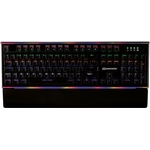
The Razer Huntsman V3 Pro TKL keyboard is made for pro gamers. It's kitted out with the ultra-prec...The Razer Huntsman V3 Pro TKL keyboard is made for pro gamers. It's kitted out with the ultra-precise and accurate Gen-2 Analog Optical Switches. You can adjust their actuation range between 0.1 and 4.0 mm, so the sensitivity will be just right. Rapid trigger mode can keep up with the quickest movements, so the keyboard is just as fast as you are. And there's a handy LED Array Indicator, that makes it easy to see your settings and adjust them on the fly. Plus, on this tenkeyless form factor, there's no num pad to get in the way of your mouse. Customize your gaming keyboard to suit your mood and style with Chroma RGB lighting. Media controls, volume, brightness are more are easy to adjust with the dedicated dial and media buttons. The aluminium top plate means that the keyboard won't budge even during frantic battles. The textured PBT keycaps will stay matte and crisp for years of gaming to come. Stay comfortable while you game thanks to the magnetic leatherette wrist rest.
The Razer Huntsman V3 Pro Tenkeyless is designed for competitive gamers seeking ultimate precision and speed. Its key benefit is the customizable Gen-2 Analog Optical Switches offering adjustable actuation and Rapid Trigger mode. A potential caveat for some users might be the tenkeyless form factor, which omits the numpad, prioritizing mouse space.
All features
Colour
Gold
Model Part Number
RZ03-04982100-R3M1
Brand
Razer
Extended Product Information
FAQs
What is the main advantage of the Gen-2 Analog Optical Switches?
The Gen-2 Analog Optical Switches allow for adjustable actuation points (0.1mm to 4.0mm) and feature Rapid Trigger mode, offering highly customizable sensitivity and response times for gaming.
What does 'Tenkeyless' mean?
Tenkeyless (TKL) means the keyboard does not include a dedicated numeric keypad. This results in a more compact size, freeing up desk space for mouse movement.
How do I adjust the switch sensitivity?
Switch sensitivity and actuation points can be adjusted through the Razer Synapse software. You can set specific profiles for different games or applications.
Is the wrist rest included?
Yes, the Razer Huntsman V3 Pro Tenkeyless comes with a magnetic leatherette wrist rest for added comfort during long gaming sessions.
What type of keycaps does this keyboard use?
The keyboard features durable PBT (Polybutylene terephthalate) keycaps, known for their longevity, resistance to shine, and textured feel.
Can I use this keyboard on a Mac?
Yes, the Razer Huntsman V3 Pro Tenkeyless is compatible with macOS, although advanced features and customization may require Razer Synapse software, which is primarily Windows-based.
Does the keyboard have dedicated media controls?
Yes, it includes dedicated media buttons and a dial for easy control of volume, playback, and brightness.
Troubleshooting
Keyboard not recognized by computer
Ensure the USB-C cable is securely connected to both the keyboard and the computer. Try a different USB port. If using Razer Synapse, ensure the software is up to date.
RGB lighting not working or displaying incorrectly
Check if the lighting is enabled and configured within Razer Synapse. Restart the Synapse software or your computer. Ensure the keyboard is properly detected.
Keys are not responding or are registering incorrectly
Check the key switch actuation settings in Razer Synapse. Ensure Rapid Trigger mode is configured as desired. Clean the keycaps and switches with compressed air. If the issue persists, contact Razer support.
Wrist rest not attaching securely
Ensure the magnetic surface on both the keyboard and the wrist rest is clean and free of debris. Align the magnets carefully to ensure a firm connection.
Pros and Cons
Pros
Highly customizable optical switches for precise control.
Rapid Trigger mode offers superior speed and responsiveness.
Compact tenkeyless design frees up desk space.
Durable build with aluminium top plate and PBT keycaps.
Comfortable magnetic wrist rest included.
Cons
Absence of a numeric keypad may be inconvenient for non-gaming tasks.
Requires software for full customization of RGB lighting and switch settings.
Wired connection limits portability compared to wireless options.
Setup, Compatibility & Care
Setup:
Connect the keyboard to your computer using the provided USB Type-C cable.
If prompted, install the Razer Synapse software to unlock full customization features, including RGB lighting, switch settings, and macro programming.
Attach the magnetic wrist rest for enhanced comfort.
Compatibility:
Operating Systems: Windows, macOS.
Connectivity: USB Type-A port via USB-C connection.
Software: Razer Synapse 3 (recommended for full functionality).
Care:
Wipe the keyboard and wrist rest with a soft, slightly damp cloth. Avoid harsh chemicals or abrasive cleaners.
Keep the keyboard free from dust and debris by using compressed air to clean between the keycaps.



 Amazon£199.99Visit shop
  eBay£245.55Visit shop