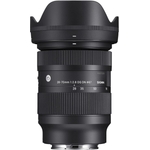
Setup, Compatibility & Care
Setup:
- Ensure your Sony E-mount APS-C camera body is powered off.
- Align the red dot on the lens mount with the red dot on the camera's lens mount.
- Insert the lens and rotate it clockwise until it clicks into place.
- Attach the lens cap when not in use.
Compatibility:
This lens is designed specifically for Sony E-mount APS-C format cameras. It is not compatible with full-frame Sony E-mount cameras without crop mode, nor is it compatible with other camera mounts (e.g., Canon EF, Nikon F).
Care:
- Cleaning: Use a soft, lint-free microfiber cloth to clean the lens elements. For stubborn smudges, use a lens cleaning solution sparingly on the cloth, never directly on the lens.
- Storage: Store the lens in a cool, dry place, preferably in its original pouch or a padded camera bag, to protect it from dust, moisture, and impact.
- Handling: Avoid touching the lens elements with your fingers. Use the lens cap when not shooting.
- Filters: Use a 58mm filter for added protection or creative effects. Always ensure filters are clean before attaching.


 Coast UK & IE£449.00Visit shop
  Wex Photo Video£449.00Visit shop