
VTech CS2000 Cordless Phone - Black
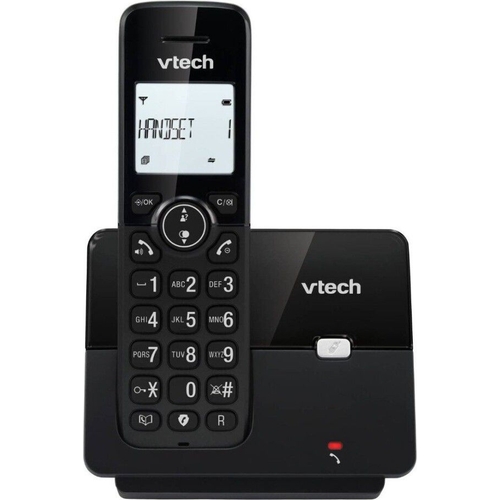

Best current price£16.99from Currys
Best offers
Shopping.co.uk recommended and popular offers
 Currys£16.99Visit shop
 Vtech Cs2000 Cordless Phone, Black
Visit shopBest current price£16.99from Currys
Shopping.co.uk recommended and popular offers
Currys£16.99Visit shop Vtech Cs2000 Cordless Phone, Black
Visit shop2 offers from £16.99 - £20.39
View price history by clicking the chart icon.
2 offers from £15.99
View price history by clicking the chart icon.


This guide is for users of the VTech CS2000 Cordless Phone, offering clear communication and call management. The key benefit is its ability to block unwanted calls and maintain a long battery life. Note that the range is limited indoors. This guide covers setup, features, troubleshooting, and FAQs to help you get the most out of your phone.
| Model Part Number | CS2000 |
|---|---|
| Brand | VTech |
Go to the phone's menu, select 'Call Block,' and then choose the option to add a number. Enter the phone number you wish to block.
Press the menu button, select 'Phonebook,' and then 'Add New Contact'. Enter the name and number, and save.
The phone offers up to 13 hours of talk time and 200 hours of standby time.
The phone has a range of up to 50 meters indoors and 300 meters outdoors.
While the phone is idle, use the up and down arrow keys to adjust the ringer volume.
This model may support additional handsets. Check the product specifications or manual for details on the number of handsets supported.
Press the redial button.
The phone uses rechargeable batteries.
Ensure the handset is charged and within range of the base station. Try resetting the base station by unplugging it for a few minutes and then plugging it back in.
Make sure you are following the correct steps in the phone's menu to add the number to the block list. Check the manual for detailed instructions.
Check the handset and base for any obstructions. Move closer to the base station to improve signal strength. Make sure the volume is turned up on both the handset and base.
Ensure the handset is fully charged before use. Avoid leaving the handset off the base for extended periods. Consider replacing the batteries if they are old.
Make sure you have a Caller ID service enabled with your phone provider. Ensure the phone is properly connected to the phone line.
 VTech Cordless Phone - CS2050From £25
 VTech Cordless Phone - Twin HandsetsFrom £35
 Panasonic Cordless Phone - KX-TGC260EBFrom £30
 Panasonic Single Cordless DECT Telephone - Black - KX-TGC410EBFrom £23
 Panasonic Twin Digital Cordless Telephone with Call Block - KX-TGB612EBFrom £38
 Doro Leva E30 - 128 GB - 4G - BlackFrom £72
 Alcatel F860 - BlackFrom £23
 VTech Cordless Phone - Triple Handsets, BlackFrom £40
 Yealink W73P IP Phone - GreyFrom £80
 Panasonic Digital Cordless Phone - KX-TGD623EBFrom £95
 AGM M9 - 128 GB - Black - 4GFrom £34
 Energizer E130S - 128 GB - 4GFrom £20