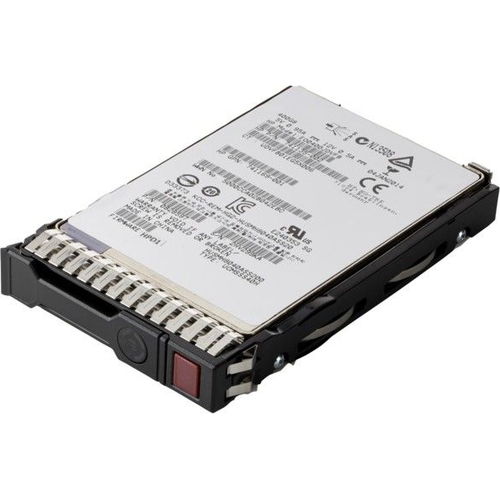
HPE Internal Solid State Drive - 1.92 TB Value SAS
HPE P05938-B21 internal solid state drive 2.5 1.92 TB Serial ATA III MLC. Do you need to accelerat...HPE P05938-B21 internal solid state drive 2.5 1.92 TB Serial ATA III MLC. Do you need to accelerate the performance of your data-intensive applications? HPE Servers Mixed Use (MU) Solid State Drives (SSDs) deliver high performance and endurance for applications requiring high random read and write IOPS performance. HPE (MU) SSDs are backed by over 3.35 million hours of testing and qualification ensuring reliable. high-performing drives. HPE Value SAS SSDs offer a significant performance boost over SATA SSDs with roughly twice the IOPS of SATA SSDs. enabling you to improve transactional database workloads with affordable Value SAS SSDs. HPE Digitally Signed Firmware prevents unauthorized access to your data by providing the assurance that firmware comes from a trusted source. Icons on the HPE Smart Carrier take the guesswork out of a drive's status. and a "do not remove" button prevents data loss from human error. You can also monitor the lifespan of your SSD with HPE SmartSSD Wear Gauge. allowing you to determine if any drives are at risk of failure. HPE SSDs offer High Performance. Exceptional Reliability. and Efficiency for Faster Business Results. Ideal for big data analytics. cloud computing. active archiving. database applications. and data warehousing. Achieve higher IOPS to enhance the performance of your data center. Maintain data accuracy with full data-path error detection. Choose from a broad portfolio of enhanced solutions in a wide variety of capacities. 12Gbs SAS. 6Gbs SATA. and NVMe. HPE Value SAS SSDs Offer Twice the IOPS of SATA SSDs. Significantly Improving Workload Performance. HPE Value SAS SSDs support 12Gbs. versus SATA SSDs at 6Gbs. Optimized for enterprise application workloads. HPE Value SAS SSDs allow you to do more work with fewer servers by improving and consolidating transactional database workloads. HPE Value SAS SSDs allow you to reduce operating costs for storing. powering and maintaining servers. as well as reducing your data center footprint. Available in a variety of storage capacities. HPE Value SAS SSDs are the perfect choice for supporting read-intensive and mixed-use applications.
HP P09094-B21-NL 3.2TB 12Gbps 2.5inch SAS SSD- 1yr WtyFree delivery in 1–3 days£964.00Visit shop →
HP P09094-B21 3.2TB 12Gbps 2.5inch SAS MU SSD - 1yr WarrantyFree delivery in 1–3 days£984.00Visit shop →
HP P09094-B21 3.2TB 12Gbps 2.5inch SAS MU SSD - 1yr WarrantyFree delivery in 1–3 days£988.00Visit shop →
Product Information
Full details
This HPE P05938-B21 1.92TB Value SAS Solid State Drive is designed for server and workstation environments requiring accelerated performance for data-intensive applications. It offers a significant IOPS boost over SATA drives, enhancing transactional database workloads and improving overall data center efficiency. A key caveat is its reliance on a SAS interface, which may require specific host controller compatibility.
All features
Series
Value SAS
Model Part Number
P05938-B21
Brand
HPE
Extended Product Information
FAQs
What is the difference between Value SAS and SATA SSDs?
Value SAS SSDs, like the HPE P05938-B21, offer approximately twice the IOPS (Input/Output Operations Per Second) compared to standard SATA SSDs at a similar capacity. This translates to significantly better performance for transactional database workloads and other IOPS-intensive applications. Value SAS also typically supports higher interface speeds (12Gbs vs 6Gbs for SATA).
Is this SSD compatible with my non-HPE server?
While designed for HPE servers, compatibility with other systems depends on the presence of a compatible SAS controller interface (Serial Attached SCSI). Ensure your server has a SAS controller that supports 2.5" drives and the 6 Gbit/s SATA III interface.
How do I check the health and lifespan of the SSD?
You can monitor the drive's health and remaining lifespan using the HPE SmartSSD Wear Gauge utility, which is often accessible through HPE's server management tools (like iLO) or the operating system's storage management utilities.
What does 'Mixed Use' (MU) mean for an SSD?
'Mixed Use' indicates that the SSD is designed to handle a balanced mix of read and write operations effectively. It offers better endurance and performance for workloads that aren't purely read-intensive or write-intensive, making it suitable for a wide range of enterprise applications.
What is the sequential read/write speed of this SSD?
The HPE P05938-B21 has a sequential read speed of up to 530 MB/s and a sequential write speed of up to 480 MB/s.
What is the random IOPS performance?
This SSD delivers 69,000 Random Read (4KB) IOPS and 33,000 Random Write (4KB) IOPS.
Does this drive support 12Gbs SAS?
This specific Value SAS drive utilizes the 6 Gbit/s SATA III interface. While it offers performance benefits over SATA, it does not support the higher 12Gbs SAS interface found on some other SAS drives.
Troubleshooting
Drive not detected by the system
Verify SAS data and power connections are secure. Ensure the SAS controller is enabled in the BIOS/UEFI. Check if the drive is properly seated in the bay. Test with a different SAS port or cable if possible.
Poor performance or slow speeds
Confirm the drive is connected to a SAS 6 Gbit/s port. Check for any firmware updates. Ensure the workload is compatible with the drive's specifications. Monitor system resources to rule out bottlenecks elsewhere.
System instability or errors during operation
Check the drive's health using HPE management tools. Ensure the drive's firmware is up-to-date. Verify power delivery to the drive is stable. Test the drive in another compatible system if possible.
Smart Carrier icons not functioning
Ensure the drive is properly seated and receiving power/data. Check system management software for any drive-related alerts. If issues persist, the drive may require replacement.
Pros and Cons
Pros
Significantly higher IOPS performance compared to SATA SSDs.
Enhanced reliability with full data-path error detection.
Secure with HPE Digitally Signed Firmware.
User-friendly status indicators and data protection features via Smart Carrier.
Reduces operating costs by consolidating workloads and improving server efficiency.
Cons
Requires a SAS controller, which may not be present in all systems.
Value SAS performance may not be necessary for lighter workloads.
Potential for higher cost compared to standard SATA SSDs.
Only 6 Gbit/s transfer rate, whereas newer SAS drives offer 12Gbs.
Setup, Compatibility & Care
Setup:
Ensure your server or workstation has a compatible SAS controller.
Physically install the 2.5" SSD into an available drive bay.
Connect the SAS data and power cables.
Power on the system and configure the drive in the system's BIOS/UEFI or RAID controller utility.
Install or initialize the operating system and necessary drivers.
Compatibility:
Interface: Requires a SAS interface (6 Gbit/s or higher).
Form Factor: Compatible with 2.5" drive bays. Ensure sufficient physical space and mounting points.
Host System: Primarily designed for HPE servers, but may be compatible with other systems equipped with appropriate SAS controllers.
Care:
Firmware Updates: Periodically check for firmware updates from HPE to ensure optimal performance and security.
Monitoring: Utilize the HPE SmartSSD Wear Gauge and Smart Carrier icons to monitor drive health and lifespan. Replace drives proactively if wear levels are high.
Environment: Operate within the specified temperature and humidity ranges for optimal longevity.

 PCHUB.UK£511.05Visit shop